
Building Custom Skills for Claude
Learn how to create, deploy, and manage custom skills to extend Claude's capabilities with your organization's specialized knowledge and workflows.
Table of Contents
- Introduction & Setup
- Understanding Custom Skills Architecture
- Example 1: Financial Ratio Calculator
- Example 2: Company Brand Guidelines
- Example 3: Financial Modeling Suite
- Skill Management & Versioning
- Best Practices & Production Tips
- Troubleshooting
1. Introduction & Setup
What are Custom Skills?
Custom skills are specialized expertise packages you create to teach Claude your organization's unique workflows, domain knowledge, and best practices. Unlike Anthropic's pre-built skills (Excel, PowerPoint, PDF), custom skills allow you to:
- Codify organizational knowledge - Capture your team's specific methodologies
- Ensure consistency - Apply the same standards across all interactions
- Automate complex workflows - Chain together multi-step processes
- Maintain intellectual property - Keep proprietary methods secure
Key Benefits
| Benefit | Description |
|---|---|
| Expertise at Scale | Deploy specialized knowledge to every Claude interaction |
| Version Control | Track changes and roll back if needed |
| Composability | Combine multiple skills for complex tasks |
| Privacy | Your skills remain private to your organization |
Prerequisites
Before starting, ensure you have:
- Completed Notebook 1: Introduction to Skills(opens in new tab)
- An Anthropic API key with Skills beta access
- Python environment with the local SDK installed
Environment Setup
Let's set up our environment and import necessary libraries:
2. Understanding Custom Skills Architecture
Skill Structure
Every custom skill follows this directory structure:
Important:
- SKILL.md is the ONLY required file - everything else is optional
- Multiple .md files allowed - You can have any number of markdown files in the top-level folder
- All .md files are loaded - Not just SKILL.md and REFERENCE.md, but any .md file you include
- Organize as needed - Use multiple .md files to structure complex documentation
📖 Read our engineering blog post on Equipping agents for the real world with Skills(opens in new tab)
Skills Are Not Just Markdown
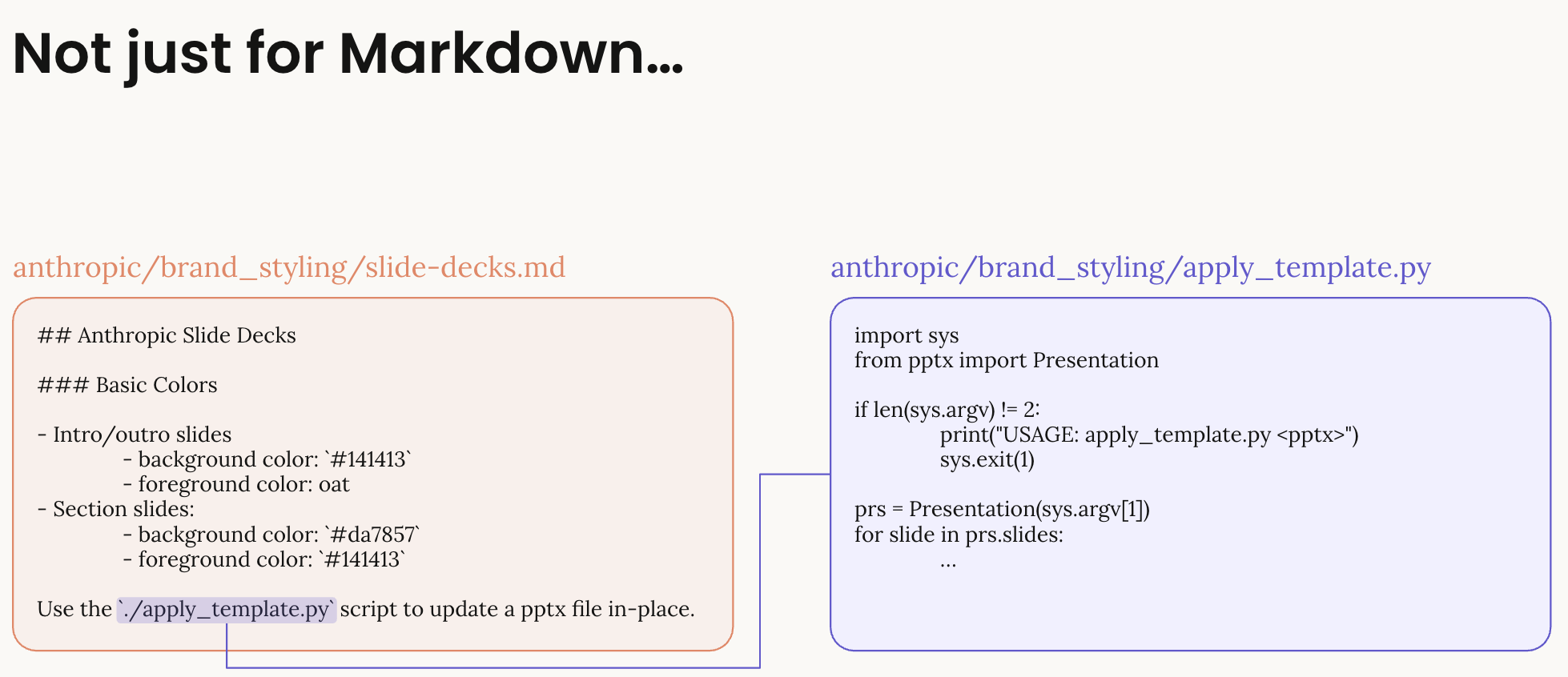
Skills can bundle various file types:
- Markdown files: Instructions and documentation (SKILL.md, REFERENCE.md, etc.)
- Scripts: Python, JavaScript, or other executable code for complex operations
- Templates: Pre-built files that can be customized (Excel templates, document templates)
- Resources: Supporting data files, configuration, or assets
SKILL.md Requirements
The SKILL.md file must include:
-
YAML Frontmatter (name: 64 chars, description: 1024 chars)
name: Lowercase alphanumeric with hyphens (required)description: Brief description of what the skill does (required)
-
Instructions (markdown format)
- Clear guidance for Claude
- Examples of usage
- Any constraints or rules
- Recommended: Keep under 5,000 tokens
Additional Documentation Files
You can include multiple markdown files for better organization:
All .md files in the root directory will be available to Claude when the skill is loaded.
Bundled Files Example
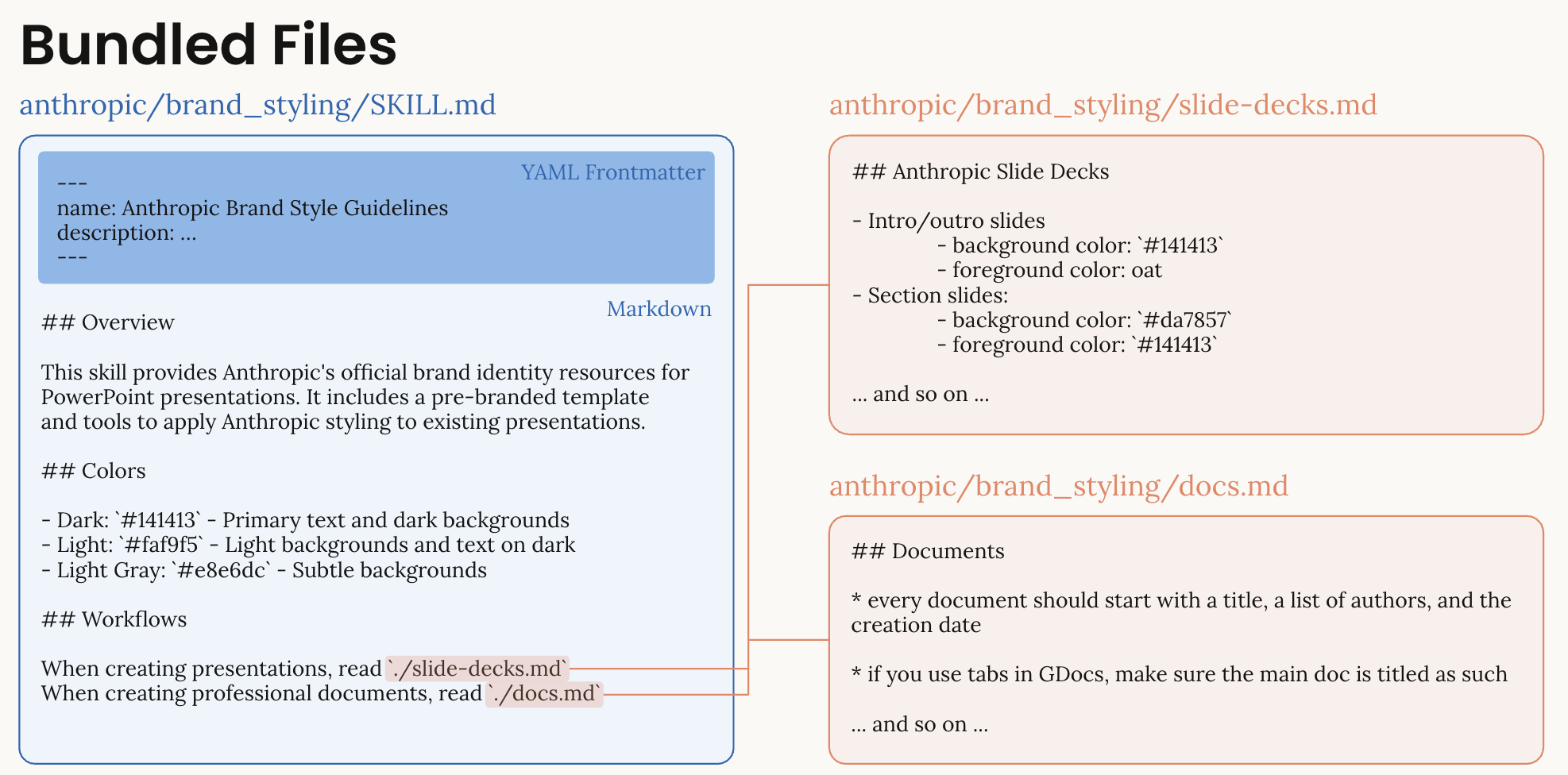
This example shows how Skills can bundle multiple files:
- SKILL.md: Contains the main instructions with colors, typography, and sections
- slide-decks.md: Additional documentation for specific use cases
- Scripts and resources: Can be referenced and used during skill execution
Progressive Disclosure
Skills load in three stages to optimize token usage:
| Stage | Content | Token Cost | When Loaded |
|---|---|---|---|
| 1. Metadata | Name & description | name: 64 chars, description: 1024 chars | Always visible |
| 2. Instructions | All .md files | <5,000 tokens recommended | When relevant |
| 3. Resources | Scripts & files | As needed | During execution |
API Workflow
Best Practices
For detailed guidance on skill creation and best practices, see:
Create Skill Utility Functions
Let's create helper functions for skill management:
Check Existing Custom Skills
Let's see if any custom skills already exist in your workspace:
⚠️ Important: Clean Up Existing Skills Before Starting
If you're re-running this notebook, you may have skills from a previous session. Skills cannot have duplicate display titles, so you have three options:
- Delete existing skills (recommended for testing) - Clean slate approach
- Use different display titles - Add timestamps or version numbers to names
- Update existing skills with new versions - See Skill Management & Versioning section
Let's check for and optionally clean up existing skills:
3. Example 1: Financial Ratio Calculator
Let's create our first custom skill - a financial ratio calculator that can analyze company financial health.
Skill Overview
The Financial Ratio Calculator skill will:
- Calculate key financial ratios (ROE, P/E, Current Ratio, etc.)
- Interpret ratios with industry context
- Generate formatted reports
- Work with various data formats (CSV, JSON, text)
Upload the Financial Analyzer Skill
Now let's upload our financial analyzer skill to Claude:
Test the Financial Analyzer Skill
Let's test the skill with sample financial data:
4. Example 2: Company Brand Guidelines
Now let's create a skill that ensures all documents follow corporate brand standards.
Skill Overview
The Brand Guidelines skill will:
- Apply consistent colors, fonts, and layouts
- Ensure logo placement and usage
- Maintain professional tone and messaging
- Work across all document types (Excel, PowerPoint, PDF)
Test Brand Guidelines with Document Creation
Let's test the brand skill by creating a branded PowerPoint presentation:
5. Example 3: Financial Modeling Suite
Let's create our most advanced skill - a comprehensive financial modeling suite for valuation and risk analysis.
Skill Overview
The Financial Modeling Suite skill provides:
- DCF Valuation: Complete discounted cash flow models
- Sensitivity Analysis: Test impact of variables on valuation
- Monte Carlo Simulation: Risk modeling with probability distributions
- Scenario Planning: Best/base/worst case analysis
This demonstrates a multi-file skill with complex calculations and professional-grade financial modeling.
Upload the Financial Modeling Suite
First, upload the financial modeling skill:
Test the Financial Modeling Suite
Let's test the advanced modeling capabilities with a DCF valuation request:
6. Skill Management & Versioning
Managing skills over time requires understanding versioning, updates, and lifecycle management.
Listing Your Skills
Get an overview of all custom skills in your workspace:
Creating New Versions
Skills support versioning to maintain history and enable rollback. Let's make an enhancement to our Financial Analyzer skill and create a new version.
Step 1: Enhance the Financial Analyzer
We'll add healthcare industry benchmarks to make our skill more versatile. This is a real-world scenario where you'd expand a skill's capabilities based on user needs.
Step 2: Create a New Version
Now that we've enhanced our skill, let's create a new version to track this change:
Step 3: Test the New Version
Let's verify our enhancement works by analyzing a healthcare company:
Cleanup: Managing Your Skills
When you're done testing or need to clean up your workspace, you can selectively remove skills. Let's review what we've created and provide options for cleanup:
7. Best Practices & Production Tips
Skill Design Principles
- Single Responsibility: Each skill should focus on one area of expertise
- Clear Documentation: SKILL.md should be comprehensive yet concise
- Error Handling: Scripts should handle edge cases gracefully
- Version Control: Use Git to track skill changes
- Testing: Always test skills before production deployment
Directory Structure Best Practices
Performance Optimization
| Strategy | Impact | Implementation |
|---|---|---|
| Minimal Frontmatter | Faster skill discovery | name: 64 chars, description: 1024 chars |
| Lazy Loading | Reduced token usage | Reference files only when needed |
| Skill Composition | Avoid duplication | Combine skills vs. mega-skill |
| Caching | Faster responses | Reuse skill containers |
Security Considerations
- API Keys: Never hardcode credentials in skills
- Data Privacy: Don't include sensitive data in skill files
- Access Control: Skills are workspace-specific
- Validation: Sanitize inputs in scripts
- Audit Trail: Log skill usage for compliance
Next Steps
🎉 Congratulations! You've learned how to create, deploy, and manage custom skills for Claude.
What You've Learned
- ✅ Custom skill architecture and requirements
- ✅ Creating skills with SKILL.md and Python scripts
- ✅ Uploading skills via the API
- ✅ Combining custom and Anthropic skills
- ✅ Best practices for production deployment
- ✅ Troubleshooting common issues
Continue Your Journey
- Experiment: Modify the example skills for your use cases
- Build: Create skills for your organization's workflows
- Optimize: Monitor token usage and performance
- Share: Document your skills for team collaboration
Resources
- Claude API Documentation(opens in new tab)
- Skills Documentation(opens in new tab)
- Best Practices(opens in new tab)
- Files API Documentation(opens in new tab)
- Example Skills Repository (coming soon)
Skill Ideas to Try
- 📊 Data Pipeline: ETL workflows with validation
- 📝 Document Templates: Contracts, proposals, reports
- 🔍 Code Review: Style guides and best practices
- 📈 Analytics Dashboard: KPI tracking and visualization
- 🤖 Automation Suite: Repetitive task workflows
Happy skill building! 🚀