
Using Vision with Tools
Using Vision with Tools
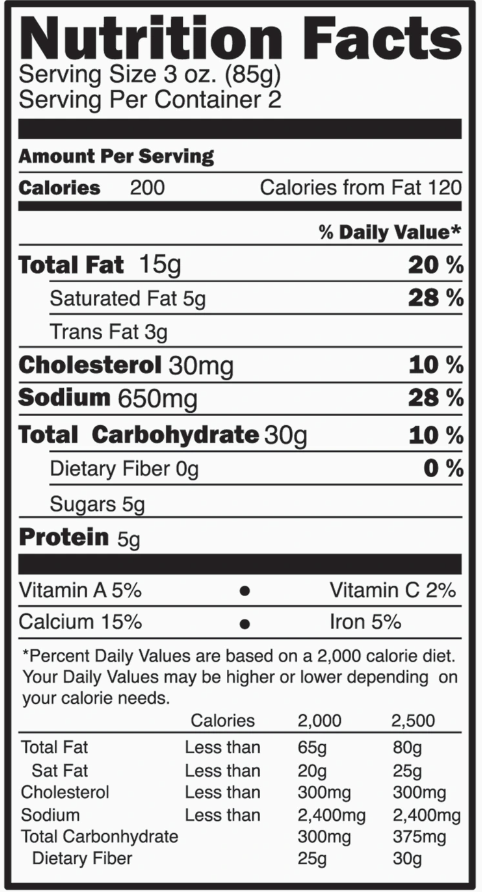
In this recipe, we'll demonstrate how to combine Vision with tool use to analyze an image of a nutrition label and extract structured nutrition information using a custom tool.
Setup
Setup
First, let's install the necessary libraries and set up the Claude API client:
%pip install anthropic IPython
import base64
from anthropic import Anthropic
from IPython.display import Image
client = Anthropic()
MODEL_NAME = "claude-opus-4-8"
Defining the Nutrition Label Extraction Tool
Defining the Nutrition Label Extraction Tool
Next, we'll define a custom tool called "print_nutrition_info" that extracts structured nutrition information from an image. The tool has properties for calories, total fat, cholesterol, total carbs, and protein:
nutrition_tool = {
"name": "print_nutrition_info",
"description": "Extracts nutrition information from an image of a nutrition label",
"input_schema": {
"type": "object",
"properties": {
"calories": {"type": "integer", "description": "The number of calories per serving"},
"total_fat": {
"type": "integer",
"description": "The amount of total fat in grams per serving",
},
"cholesterol": {
"type": "integer",
"description": "The amount of cholesterol in milligrams per serving",
},
"total_carbs": {
"type": "integer",
"description": "The amount of total carbohydrates in grams per serving",
},
"protein": {
"type": "integer",
"description": "The amount of protein in grams per serving",
},
},
"required": ["calories", "total_fat", "cholesterol", "total_carbs", "protein"],
},
}
Analyzing the Nutrition Label Image
Analyzing the Nutrition Label Image
Now, let's put it all together. We'll load a nutrition label image, pass it to Claude along with a prompt, and have Claude call the "print_nutrition_info" tool to extract the structured nutrition information into a nicely formatted JSON object:
Image(filename="../images/tool_use/nutrition_label.png")
def get_base64_encoded_image(image_path):
with open(image_path, "rb") as image_file:
binary_data = image_file.read()
base_64_encoded_data = base64.b64encode(binary_data)
base64_string = base_64_encoded_data.decode("utf-8")
return base64_string
message_list = [
{
"role": "user",
"content": [
{
"type": "image",
"source": {
"type": "base64",
"media_type": "image/png",
"data": get_base64_encoded_image("../images/tool_use/nutrition_label.png"),
},
},
{
"type": "text",
"text": "Please print the nutrition information from this nutrition label image.",
},
],
}
]
response = client.messages.create(
model=MODEL_NAME, max_tokens=4096, messages=message_list, tools=[nutrition_tool]
)
if response.stop_reason == "tool_use":
last_content_block = response.content[-1]
if last_content_block.type == "tool_use":
tool_name = last_content_block.name
tool_inputs = last_content_block.input
print(f"=======Claude Wants To Call The {tool_name} Tool=======")
print(tool_inputs)
else:
print("No tool was called. This shouldn't happen!")
=======Claude Wants To Call The print_nutrition_info Tool=======
{'calories': 200, 'total_fat': 15, 'cholesterol': 30, 'total_carbs': 30, 'protein': 5}