---
title: 提示缓存
url: https://platform.claude.com/docs/zh-CN/build-with-claude/prompt-caching
description: 使用 `cache_control` 缓存提示前缀以降低成本和延迟,可采用自动缓存,也可使用显式断点,并支持 5 分钟或 1 小时的 TTL。
---
"Prompt caching"(提示缓存)允许从提示中的特定前缀处继续处理,从而优化您的 API 使用。对于重复性任务或包含固定元素的提示,这可以显著减少处理时间和成本。
要了解"zero data retention"(零数据保留),即 ZDR 如何适用于此功能,请参阅 [API 与数据保留](https://platform.claude.com/docs/zh-CN/manage-claude/api-and-data-retention)。
启用提示缓存有两种方式:
* **[自动缓存](https://platform.claude.com/docs/zh-CN/build-with-claude/prompt-caching#automatic-caching)**:在请求的顶层添加一个 `cache_control` 字段。系统会自动将 "cache breakpoint"(缓存断点)应用到最后一个可缓存的块上,并随着对话增长向前移动。最适合多轮对话,可自动缓存不断增长的消息历史。
* **[显式缓存断点](https://platform.claude.com/docs/zh-CN/build-with-claude/prompt-caching#explicit-cache-breakpoints)**:直接在各个内容块上放置 `cache_control`,以精细控制具体缓存哪些内容。
最简单的入门方式是使用自动缓存:
```bash cURL
curl https://api.anthropic.com/v1/messages \
-H "content-type: application/json" \
-H "x-api-key: $ANTHROPIC_API_KEY" \
-H "anthropic-version: 2023-06-01" \
-d '{
"model": "claude-opus-5-5",
"max_tokens": 1024,
"cache_control": {"type": "ephemeral"},
"system": "You are an AI assistant tasked with analyzing literary works. Your goal is to provide insightful commentary on themes, characters, and writing style.",
"messages": [
{
"role": "user",
"content": "Analyze the major themes in Pride and Prejudice."
}
]
}'
```
```bash CLI
ant messages create --transform usage <<'YAML'
model: claude-opus-5-5
max_tokens: 1024
cache_control:
type: ephemeral
system: >-
You are an AI assistant tasked with analyzing literary works. Your goal is
to provide insightful commentary on themes, characters, and writing style.
messages:
- role: user
content: Analyze the major themes in Pride and Prejudice.
YAML
```
```python Python
client = anthropic.Anthropic()
response = client.messages.create(
model="claude-opus-5-5",
max_tokens=1024,
cache_control={"type": "ephemeral"},
system="You are an AI assistant tasked with analyzing literary works. Your goal is to provide insightful commentary on themes, characters, and writing style.",
messages=[
{
"role": "user",
"content": "Analyze the major themes in 'Pride and Prejudice'.",
}
],
)
print(response.usage.model_dump_json())
```
```typescript TypeScript
const client = new Anthropic();
const response = await client.messages.create({
model: "claude-opus-5-5",
max_tokens: 1024,
cache_control: { type: "ephemeral" },
system:
"You are an AI assistant tasked with analyzing literary works. Your goal is to provide insightful commentary on themes, characters, and writing style.",
messages: [
{
role: "user",
content: "Analyze the major themes in 'Pride and Prejudice'."
}
]
});
console.log(response.usage);
```
```csharp C#
AnthropicClient client = new();
var parameters = new MessageCreateParams
{
Model = Model.ClaudeOpus5_5,
MaxTokens = 1024,
CacheControl = new CacheControlEphemeral(),
System = "You are an AI assistant tasked with analyzing literary works. Your goal is to provide insightful commentary on themes, characters, and writing style.",
Messages =
[
new()
{
Role = Role.User,
Content = "Analyze the major themes in 'Pride and Prejudice'."
}
]
};
var message = await client.Messages.Create(parameters);
Console.WriteLine(message.Usage);
```
```go Go
client := anthropic.NewClient()
response, err := client.Messages.New(context.TODO(), anthropic.MessageNewParams{
Model: anthropic.ModelClaudeOpus5_5,
MaxTokens: 1024,
CacheControl: anthropic.NewCacheControlEphemeralParam(),
System: []anthropic.TextBlockParam{
{Text: "You are an AI assistant tasked with analyzing literary works. Your goal is to provide insightful commentary on themes, characters, and writing style."},
},
Messages: []anthropic.MessageParam{
anthropic.NewUserMessage(anthropic.NewTextBlock("Analyze the major themes in 'Pride and Prejudice'.")),
},
})
if err != nil {
log.Fatal(err)
}
fmt.Println(response.Usage.RawJSON())
```
```java Java
import com.anthropic.models.messages.CacheControlEphemeral;
// ...
public class PromptCachingExample {
public static void main(String[] args) {
AnthropicClient client = AnthropicOkHttpClient.fromEnv();
MessageCreateParams params = MessageCreateParams.builder()
.model(Model.CLAUDE_OPUS_5_5)
.maxTokens(1024)
.cacheControl(CacheControlEphemeral.builder().build())
.system("You are an AI assistant tasked with analyzing literary works. Your goal is to provide insightful commentary on themes, characters, and writing style.")
.addUserMessage("Analyze the major themes in 'Pride and Prejudice'.")
.build();
Message message = client.messages().create(params);
System.out.println(message.usage());
}
}
```
```php PHP
use Anthropic\Messages\CacheControlEphemeral;
// ...
$client = new Client();
$response = $client->messages->create(
maxTokens: 1024,
messages: [
['role' => 'user', 'content' => "Analyze the major themes in 'Pride and Prejudice'."]
],
model: 'claude-opus-5-5',
cacheControl: CacheControlEphemeral::with(),
system: "You are an AI assistant tasked with analyzing literary works. Your goal is to provide insightful commentary on themes, characters, and writing style.",
);
echo json_encode($response->usage);
```
```ruby Ruby
client = Anthropic::Client.new
response = client.messages.create(
model: "claude-opus-5-5",
max_tokens: 1024,
cache_control: {type: "ephemeral"},
system: "You are an AI assistant tasked with analyzing literary works. Your goal is to provide insightful commentary on themes, characters, and writing style.",
messages: [
{
role: "user",
content: "Analyze the major themes in 'Pride and Prejudice'."
}
]
)
puts response.usage
```
使用自动缓存时,系统会缓存直到最后一个可缓存块(含该块)的所有内容。在后续具有相同前缀的请求中,缓存的内容会被自动复用。
***
## 提示缓存的工作原理
当您发送启用了提示缓存的请求时:
1. 系统会检查直到指定缓存断点的提示前缀是否已在最近的查询中被缓存。
2. 如果找到,则使用缓存版本,从而减少处理时间和成本。
3. 否则,系统会处理完整的提示,并在响应开始后缓存该前缀。
这在以下场景中尤其有用:
* 包含大量示例的提示
* 大量上下文或背景信息
* 具有固定指令的重复性任务
* 较长的多轮对话
默认情况下,缓存的生命周期为 5 分钟。每次使用缓存内容时,缓存都会免费刷新。
生命周期从写入或读取缓存条目的请求开始时计算,而不是从其响应结束时计算。生成响应所花费的时间会计入生命周期:如果一个响应需要 4 分钟完成流式传输,那么复用相同缓存前缀的后续请求必须在该响应完成后约 1 分钟内开始。
如果您觉得 5 分钟太短,Anthropic 还提供 1 小时的缓存时长,[需额外付费](https://platform.claude.com/docs/zh-CN/build-with-claude/prompt-caching#pricing)。
有关更多信息,请参阅 [1 小时缓存时长](https://platform.claude.com/docs/zh-CN/build-with-claude/prompt-caching#1-hour-cache-duration)。
**提示缓存会缓存完整前缀**
提示缓存引用整个提示:`tools`、`system` 和 `messages`(按此顺序),直到并包括标记了 `cache_control` 的块。
***
## 定价
提示缓存引入了新的定价结构。下表显示了每个受支持模型每百万令牌的价格:
| Model | Base input tokens | 5m cache writes | 1h cache writes | Cache hits and refreshes | Output tokens |
| :-------------------------------------------------------------------------------------------------------------------------------------- | :---------------- | :-------------- | :-------------- | :----------------------- | :------------ |
| Claude Fable 5.1 | $10 / MTok | $12.50 / MTok | $20 / MTok | $0.25 / MTok1 | $50 / MTok |
| Claude Mythos 5.1 ([limited availability](https://support.claude.com/en/articles/14604842)) | $10 / MTok | $12.50 / MTok | $20 / MTok | $0.25 / MTok1 | $50 / MTok |
| Claude Fable 5 | $10 / MTok | $12.50 / MTok | $20 / MTok | $1 / MTok | $50 / MTok |
| Claude Mythos 5 ([limited availability](https://support.claude.com/en/articles/14604842)) | $10 / MTok | $12.50 / MTok | $20 / MTok | $1 / MTok | $50 / MTok |
| Claude Opus 5.5 | $4 / MTok | $5 / MTok | $8 / MTok | $0.20 / MTok2 | $20 / MTok |
| Claude Opus 5 | $5 / MTok | $6.25 / MTok | $10 / MTok | $0.50 / MTok | $25 / MTok |
| Claude Opus 4.8 | $5 / MTok | $6.25 / MTok | $10 / MTok | $0.50 / MTok | $25 / MTok |
| Claude Opus 4.7 | $5 / MTok | $6.25 / MTok | $10 / MTok | $0.50 / MTok | $25 / MTok |
| Claude Opus 4.6 | $5 / MTok | $6.25 / MTok | $10 / MTok | $0.50 / MTok | $25 / MTok |
| Claude Opus 4.5 | $5 / MTok | $6.25 / MTok | $10 / MTok | $0.50 / MTok | $25 / MTok |
| Claude Opus 4.1 ([retired, except on Bedrock and Google Cloud](https://platform.claude.com/docs/zh-CN/about-claude/model-deprecations)) | $15 / MTok | $18.75 / MTok | $30 / MTok | $1.50 / MTok | $75 / MTok |
| Claude Opus 4 ([retired, except on Google Cloud](https://platform.claude.com/docs/zh-CN/about-claude/model-deprecations)) | $15 / MTok | $18.75 / MTok | $30 / MTok | $1.50 / MTok | $75 / MTok |
| Claude Sonnet 5.5 | $2 / MTok | $2.50 / MTok | $4 / MTok | $0.10 / MTok2 | $10 / MTok |
| Claude Sonnet 5 | $2 / MTok | $2.50 / MTok | $4 / MTok | $0.20 / MTok | $10 / MTok |
| Claude Sonnet 4.6 | $3 / MTok | $3.75 / MTok | $6 / MTok | $0.30 / MTok | $15 / MTok |
| Claude Sonnet 4.5 | $3 / MTok | $3.75 / MTok | $6 / MTok | $0.30 / MTok | $15 / MTok |
| Claude Sonnet 4 ([retired, except on Bedrock and Google Cloud](https://platform.claude.com/docs/zh-CN/about-claude/model-deprecations)) | $3 / MTok | $3.75 / MTok | $6 / MTok | $0.30 / MTok | $15 / MTok |
| Claude Haiku 5.5 (for prompts up to 100,000 tokens) | $0.10 / MTok | $0.125 / MTok | $0.20 / MTok | $0.01 / MTok | $0.50 / MTok |
| Claude Haiku 5.5 (for prompts over 100,000 tokens) | $0.50 / MTok | $0.625 / MTok | $1 / MTok | $0.05 / MTok | $2.50 / MTok |
| Claude Haiku 4.5 | $1 / MTok | $1.25 / MTok | $2 / MTok | $0.10 / MTok | $5 / MTok |
| Claude Haiku 3.5 ([retired, except on Google Cloud](https://platform.claude.com/docs/zh-CN/about-claude/model-deprecations)) | $0.80 / MTok | $1 / MTok | $1.60 / MTok | $0.08 / MTok | $4 / MTok |
*1 Cache hits and refreshes on Claude Fable 5.1 and Claude Mythos 5.1 are priced at 0.025x the base input price.*
*2 Cache hits and refreshes on Claude Opus 5.5 and Claude Sonnet 5.5 are priced at 0.05x the base input price.*
*All other models use the standard 0.1x multiplier.*
上表反映了提示缓存的以下定价倍数:
* 5 分钟缓存写入令牌的价格是基础输入令牌价格的 1.25 倍
* 1 小时缓存写入令牌的价格是基础输入令牌价格的 2 倍
* 缓存读取令牌的价格是基础输入令牌价格的 0.1 倍(各模型的例外情况请参阅表格脚注)
这些倍数会与其他定价调整因素叠加,例如 Batch API 折扣、[长上下文定价](https://platform.claude.com/docs/zh-CN/about-claude/pricing#long-context-pricing)和数据驻留。对于按提示长度定价的模型,缓存读取和缓存写入都会计入请求的提示长度。有关完整详情,请参阅[定价](https://platform.claude.com/docs/zh-CN/about-claude/pricing)。
***
## 支持的模型
所有[当前可用的 Claude 模型](https://platform.claude.com/docs/zh-CN/models/overview)均支持提示缓存(包括自动缓存和显式缓存)。
***
## 自动缓存
自动缓存是启用提示缓存最简单的方式。您无需在各个内容块上放置 `cache_control`,只需在请求体的顶层添加一个 `cache_control` 字段。系统会自动将缓存断点应用到最后一个可缓存的块上。
```bash cURL
curl https://api.anthropic.com/v1/messages \
-H "content-type: application/json" \
-H "x-api-key: $ANTHROPIC_API_KEY" \
-H "anthropic-version: 2023-06-01" \
-d '{
"model": "claude-opus-5-5",
"max_tokens": 1024,
"cache_control": {"type": "ephemeral"},
"system": "You are a helpful assistant that remembers our conversation.",
"messages": [
{"role": "user", "content": "My name is Alex. I work on machine learning."},
{"role": "assistant", "content": "Nice to meet you, Alex! How can I help with your ML work today?"},
{"role": "user", "content": "What did I say I work on?"}
]
}'
```
```bash CLI
ant messages create --transform usage <<'YAML'
model: claude-opus-5-5
max_tokens: 1024
cache_control:
type: ephemeral
system: You are a helpful assistant that remembers our conversation.
messages:
- role: user
content: My name is Alex. I work on machine learning.
- role: assistant
content: Nice to meet you, Alex! How can I help with your ML work today?
- role: user
content: What did I say I work on?
YAML
```
```python Python
client = anthropic.Anthropic()
response = client.messages.create(
model="claude-opus-5-5",
max_tokens=1024,
cache_control={"type": "ephemeral"},
system="You are a helpful assistant that remembers our conversation.",
messages=[
{"role": "user", "content": "My name is Alex. I work on machine learning."},
{
"role": "assistant",
"content": "Nice to meet you, Alex! How can I help with your ML work today?",
},
{"role": "user", "content": "What did I say I work on?"},
],
)
print(response.usage.model_dump_json())
```
```typescript TypeScript
const client = new Anthropic();
const response = await client.messages.create({
model: "claude-opus-5-5",
max_tokens: 1024,
cache_control: { type: "ephemeral" },
system: "You are a helpful assistant that remembers our conversation.",
messages: [
{ role: "user", content: "My name is Alex. I work on machine learning." },
{
role: "assistant",
content: "Nice to meet you, Alex! How can I help with your ML work today?"
},
{ role: "user", content: "What did I say I work on?" }
]
});
console.log(response.usage);
```
```csharp C#
AnthropicClient client = new();
var parameters = new MessageCreateParams
{
Model = Model.ClaudeOpus5_5,
MaxTokens = 1024,
CacheControl = new CacheControlEphemeral(),
System = "You are a helpful assistant that remembers our conversation.",
Messages =
[
new()
{
Role = Role.User,
Content = "My name is Alex. I work on machine learning."
},
new()
{
Role = Role.Assistant,
Content = "Nice to meet you, Alex! How can I help with your ML work today?"
},
new()
{
Role = Role.User,
Content = "What did I say I work on?"
}
]
};
var message = await client.Messages.Create(parameters);
Console.WriteLine(message.Usage);
```
```go Go
client := anthropic.NewClient()
response, err := client.Messages.New(context.TODO(), anthropic.MessageNewParams{
Model: anthropic.ModelClaudeOpus5_5,
MaxTokens: 1024,
CacheControl: anthropic.NewCacheControlEphemeralParam(),
System: []anthropic.TextBlockParam{
{Text: "You are a helpful assistant that remembers our conversation."},
},
Messages: []anthropic.MessageParam{
anthropic.NewUserMessage(anthropic.NewTextBlock("My name is Alex. I work on machine learning.")),
anthropic.NewAssistantMessage(anthropic.NewTextBlock("Nice to meet you, Alex! How can I help with your ML work today?")),
anthropic.NewUserMessage(anthropic.NewTextBlock("What did I say I work on?")),
},
})
if err != nil {
log.Fatal(err)
}
fmt.Println(response.Usage.RawJSON())
```
```java Java
import com.anthropic.models.messages.CacheControlEphemeral;
// ...
public class AutomaticCachingExample {
public static void main(String[] args) {
AnthropicClient client = AnthropicOkHttpClient.fromEnv();
MessageCreateParams params = MessageCreateParams.builder()
.model(Model.CLAUDE_OPUS_5_5)
.maxTokens(1024)
.cacheControl(CacheControlEphemeral.builder().build())
.system("You are a helpful assistant that remembers our conversation.")
.addUserMessage("My name is Alex. I work on machine learning.")
.addAssistantMessage("Nice to meet you, Alex! How can I help with your ML work today?")
.addUserMessage("What did I say I work on?")
.build();
Message message = client.messages().create(params);
System.out.println(message.usage());
}
}
```
```php PHP
use Anthropic\Messages\CacheControlEphemeral;
// ...
$client = new Client();
$response = $client->messages->create(
maxTokens: 1024,
messages: [
['role' => 'user', 'content' => 'My name is Alex. I work on machine learning.'],
['role' => 'assistant', 'content' => 'Nice to meet you, Alex! How can I help with your ML work today?'],
['role' => 'user', 'content' => 'What did I say I work on?'],
],
model: 'claude-opus-5-5',
cacheControl: CacheControlEphemeral::with(),
system: 'You are a helpful assistant that remembers our conversation.',
);
echo json_encode($response->usage);
```
```ruby Ruby
client = Anthropic::Client.new
response = client.messages.create(
model: "claude-opus-5-5",
max_tokens: 1024,
cache_control: {type: "ephemeral"},
system: "You are a helpful assistant that remembers our conversation.",
messages: [
{role: "user", content: "My name is Alex. I work on machine learning."},
{role: "assistant", content: "Nice to meet you, Alex! How can I help with your ML work today?"},
{role: "user", content: "What did I say I work on?"}
]
)
puts response.usage
```
### 自动缓存在多轮对话中的工作方式
使用自动缓存时,缓存点会随着对话增长自动向前移动。每个新请求都会缓存直到最后一个可缓存块的所有内容,而之前的内容则从缓存中读取。
| 请求 | 内容 | 缓存行为 |
| ---- | --------------------------------------------------------------------------------------------------------- | --------------------------------------------------- |
| 请求 1 | System
+ User(1) + Asst(1)
+ **User(2)** ◀ 缓存 | 所有内容写入缓存 |
| 请求 2 | System
+ User(1) + Asst(1)
+ User(2) + Asst(2)
+ **User(3)** ◀ 缓存 | System 到 User(2) 从缓存读取;
Asst(2) + User(3) 写入缓存 |
| 请求 3 | System
+ User(1) + Asst(1)
+ User(2) + Asst(2)
+ User(3) + Asst(3)
+ **User(4)** ◀ 缓存 | System 到 User(3) 从缓存读取;
Asst(3) + User(4) 写入缓存 |
缓存断点会自动移动到每个请求中的最后一个可缓存块,因此随着对话增长,您无需更新任何 `cache_control` 标记。
### TTL 支持
默认情况下,自动缓存使用 5 分钟的 "TTL"(生存时间)。您可以指定 1 小时的 TTL,价格为基础输入令牌价格的 2 倍:
```json
{ "cache_control": { "type": "ephemeral", "ttl": "1h" } }
```
### 与块级缓存结合使用
自动缓存与[显式缓存断点](https://platform.claude.com/docs/zh-CN/build-with-claude/prompt-caching#explicit-cache-breakpoints)兼容。两者一起使用时,自动缓存断点会占用 4 个可用断点槽位中的一个。
这使您可以结合两种方法。例如,使用显式断点缓存系统提示,同时由自动缓存处理对话:
```json
{
"model": "claude-opus-5-5",
"max_tokens": 1024,
"cache_control": { "type": "ephemeral" },
"system": [
{
"type": "text",
"text": "You are a helpful assistant.",
"cache_control": { "type": "ephemeral" }
}
],
"messages": [{ "role": "user", "content": "What are the key terms?" }]
}
```
### 保持不变的内容
自动缓存使用相同的底层缓存基础设施。定价、最低令牌阈值、上下文顺序要求以及 20 个块的回溯窗口,均与显式断点的规则相同。
### 边缘情况
* 如果最后一个块已经有相同 TTL 的显式 `cache_control`,则自动缓存不执行任何操作。
* 如果最后一个块有不同 TTL 的显式 `cache_control`,API 会返回 400 错误。
* 如果已存在 4 个显式块级断点,API 会返回 400 错误(没有剩余槽位供自动缓存使用)。
* 如果最后一个块不符合作为自动缓存断点目标的条件,系统会静默地向后查找最近的符合条件的块。如果找不到,则跳过缓存。
除旧版 [Amazon Bedrock(Opus 4.6 及更早版本)](https://platform.claude.com/docs/zh-CN/build-with-claude/claude-on-amazon-bedrock-legacy)集成外,自动缓存在所有平台上均可用。在该集成上,API 会对顶层 `cache_control` 字段返回 400 错误,因此请改用[显式缓存断点](https://platform.claude.com/docs/zh-CN/build-with-claude/prompt-caching#explicit-cache-breakpoints)。
***
## 显式缓存断点
如需对缓存进行更多控制,您可以直接在各个内容块上放置 `cache_control`。当您需要缓存以不同频率变化的不同部分,或需要精细控制具体缓存哪些内容时,这种方式非常有用。
### 构建您的提示
将静态内容(工具定义、系统指令、上下文、示例)放在提示的开头。使用 `cache_control` 参数标记可复用内容的结尾以进行缓存。
缓存前缀按以下顺序创建:`tools`、`system`,然后是 `messages`。此顺序形成一个层级结构,每一级都建立在前面各级的基础之上。
#### 自动前缀检查的工作原理
您只需在静态内容的末尾使用一个缓存断点,系统就会自动找到先前请求已写入缓存的最长前缀。了解其工作原理有助于您优化缓存策略。
**三个核心原则:**
1. **缓存写入仅发生在您的断点处。** 用 `cache_control` 标记一个块会恰好写入一个缓存条目:即以该块结尾的前缀的哈希值。系统不会为任何更早的位置写入条目。由于哈希是累积的,涵盖直到并包括断点的所有内容,因此更改断点处或断点之前的任何块,都会在下一个请求中产生不同的哈希值。
2. **缓存读取会向后查找先前请求写入的条目。** 在每个请求中,系统会计算断点处的前缀哈希,并检查是否存在匹配的缓存条目。如果不存在,系统会一次向后移动一个块,检查每个更早位置的前缀哈希是否与缓存中已有的内容匹配。它查找的是先前的写入,而不是稳定的内容。
3. **回溯窗口为 20 个块。** 系统每个断点最多检查 20 个位置,断点本身算作第一个。如果系统在该窗口内未找到匹配的条目,检查就会停止(如果存在下一个显式断点,则从该断点处继续)。在 Claude API 上,一串连续的 `tool_use` 块算作一个位置,一串连续的 `tool_result` 块也算作一个位置,因此包含大量并行工具调用的轮次本身不会将上一个请求的条目挤出窗口。
**示例:不断增长的对话中的回溯**
您在每一轮追加新块,并在每个请求的最后一个块上设置 `cache_control`:
* **第 1 轮:** 10 个块,断点位于第 10 个块。不存在先前的缓存条目。系统在第 10 个块处写入一个条目。
* **第 2 轮:** 15 个块,断点位于第 15 个块。第 15 个块没有条目,因此系统回溯到第 10 个块,并找到第 1 轮的条目。在第 10 个块处命中缓存;系统仅重新处理第 11 到第 15 个块,并在第 15 个块处写入一个新条目。
* **第 3 轮:** 35 个块,断点位于第 35 个块。系统检查 20 个位置(第 35 到第 16 个块),但什么也没找到。第 2 轮在第 15 个块处的条目恰好位于窗口外一个位置,因此没有命中缓存。在第 15 个块处添加第二个断点会在那里开启第二个回溯窗口,从而找到第 2 轮的条目。
**常见错误:将断点放在每次请求都会变化的内容上**
您的提示包含一个大型静态系统上下文(第 1 到第 5 个块),后面跟着一个包含时间戳和用户消息的每请求块(第 6 个块)。您在第 6 个块上设置了 `cache_control`:
* **请求 1:** 在第 6 个块处写入缓存。哈希包含时间戳。
* **请求 2:** 时间戳不同,因此第 6 个块处的前缀哈希也不同。回溯会依次检查第 5、4、3、2 和 1 个块,但系统从未在这些位置写入过条目。没有命中缓存。您每次请求都要为新的缓存写入付费,却从未获得读取。
回溯不会找到断点之后的稳定内容并将其缓存。它查找的是先前请求已写入的条目,而写入只发生在断点处。将 `cache_control` 移到第 5 个块(即在各请求间保持不变的最后一个块),之后的每个请求都会读取缓存的前缀。[自动缓存](https://platform.claude.com/docs/zh-CN/build-with-claude/prompt-caching#automatic-caching)也会陷入同样的陷阱:它将断点放在最后一个可缓存块上,而在这种结构中,该块恰恰是每次请求都会变化的块,因此请改为在第 5 个块上使用显式断点。
**关键要点:** 将 `cache_control` 放在这样一个块上:在您希望共享缓存的各个请求中,以该块结尾的前缀完全相同,且它是满足此条件的最后一个块。在不断增长的对话中,只要每轮添加的块少于 20 个,最后一个块就可以作为断点:较早的内容永远不会改变,因此下一个请求的回溯能够找到先前的写入。对于带有可变后缀(时间戳、每请求上下文、传入消息)的提示,请将断点放在静态前缀的末尾,而不是可变块上。
#### 何时使用多个断点
如果您希望实现以下目标,可以定义最多 4 个缓存断点:
* 缓存以不同频率变化的不同部分(例如,工具很少变化,但上下文每天更新)
* 更精确地控制具体缓存哪些内容
* 当不断增长的对话将您的断点推到距上次缓存写入 20 个或更多块之后时,确保仍能命中缓存
**重要限制:** 回溯只能找到先前请求已写入的条目。如果不断增长的对话将您的断点推到距上次写入 20 个或更多块之后,回溯窗口就会错过它。请从一开始就在更靠近该位置的地方添加第二个断点,以便在需要之前就在那里积累写入。
### 了解缓存断点成本
**缓存断点本身不会增加任何成本。** 您只需为以下内容付费:
* **缓存写入:** 当新内容写入缓存时(对于 5 分钟 TTL,比基础输入令牌价格高 25%)
* **缓存读取:** 当使用缓存内容时(基础输入令牌价格的 10%,在 Claude Fable 5.1 和 Claude Mythos 5.1 上为 2.5%,在 Claude Opus 5.5 和 Claude Sonnet 5.5 上为 5%)
* **常规输入令牌:** 任何未缓存的内容
添加更多 `cache_control` 断点不会增加您的成本;您仍然根据实际缓存和读取的内容支付相同的费用。断点让您可以控制哪些部分可以独立缓存。
***
## 缓存策略与注意事项
### 缓存限制
在 Claude API、[Claude Platform on AWS](https://platform.claude.com/docs/zh-CN/build-with-claude/claude-platform-on-aws)、[Google Cloud](https://platform.claude.com/docs/zh-CN/build-with-claude/claude-on-vertex-ai) 和 [Microsoft Foundry](https://platform.claude.com/docs/zh-CN/build-with-claude/claude-in-microsoft-foundry) 上,最小可缓存提示长度为:
* 512 个令牌:Claude Fable 5.1、[Claude Mythos 5.1](https://platform.claude.com/docs/zh-CN/models/mythos-5-1/overview)、Claude Opus 5.5、Claude Opus 5、Claude Sonnet 5.5、Claude Fable 5、[Claude Mythos 5](https://platform.claude.com/docs/zh-CN/models/mythos-5/overview) 和 Claude Haiku 5.5
* 2,048 个令牌:[Claude Mythos Preview](https://anthropic.com/glasswing) 和 Claude Opus 4.7
* 4,096 个令牌:Claude Opus 4.6 和 Claude Opus 4.5
* 1,024 个令牌:Claude Opus 4.8、Claude Sonnet 5、Claude Sonnet 4.6、Claude Sonnet 4.5([已弃用](https://platform.claude.com/docs/zh-CN/about-claude/model-deprecations))、Claude Opus 4.1([已停用,Bedrock 和 Google Cloud 除外](https://platform.claude.com/docs/zh-CN/about-claude/model-deprecations))、Claude Opus 4([已停用,Google Cloud 除外](https://platform.claude.com/docs/zh-CN/about-claude/model-deprecations))以及 Claude Sonnet 4([已停用,Bedrock 和 Google Cloud 除外](https://platform.claude.com/docs/zh-CN/about-claude/model-deprecations))
* 4,096 个令牌:Claude Haiku 4.5
* 2,048 个令牌:Claude Haiku 3.5([已停用,Google Cloud 除外](https://platform.claude.com/docs/zh-CN/about-claude/model-deprecations))
这些最小值适用于每个模型可用的所有平台。
较短的提示无法被缓存,即使标记了 `cache_control` 也是如此。任何缓存少于此令牌数的请求都将在不缓存的情况下处理,并且不会返回错误。要验证提示是否已被缓存,请检查[响应 usage 字段](https://platform.claude.com/docs/zh-CN/build-with-claude/prompt-caching#tracking-cache-performance):如果 `cache_creation_input_tokens` 和 `cache_read_input_tokens` 都为 0,则说明提示未被缓存(很可能是因为未达到最小长度要求)。
如果您的提示略低于您的模型和平台的最小值,扩展缓存内容以达到阈值通常是值得的。缓存读取的成本远低于未缓存的输入令牌,因此对于频繁重用的提示,达到最小值可以降低成本。
[Bedrock](https://platform.claude.com/docs/zh-CN/build-with-claude/claude-in-amazon-bedrock) 是由 AWS 运营的平台。在 Bedrock 上,请参阅 [Bedrock 提示缓存文档](https://docs.aws.amazon.com/bedrock/latest/userguide/prompt-caching.html),了解适用的各模型最小值、失败行为和 usage 字段名称。
对于并发请求,请注意缓存条目只有在第一个响应开始后才可用。如果您需要并行请求的缓存命中,请等待第一个响应后再发送后续请求。
目前,"ephemeral" 是唯一支持的缓存类型,默认生命周期为 5 分钟。
### 可以缓存的内容
请求中的大多数块都可以被缓存。包括:
* 工具:`tools` 数组中的工具定义
* 系统消息:`system` 数组中的内容块
* 文本消息:`messages.content` 数组中的内容块,适用于用户轮次和助手轮次
* 图像和文档:`messages.content` 数组中的内容块,位于用户轮次中
* 工具使用和工具结果:`messages.content` 数组中的内容块,适用于用户轮次和助手轮次
这些元素都可以被缓存,既可以自动缓存,也可以通过 `cache_control` 标记来缓存。
### 无法缓存的内容
虽然大多数请求块都可以被缓存,但也有一些例外:
* 思考块无法直接使用 `cache_control` 进行缓存。但是,当思考块出现在之前的助手轮次中时,它们可以与其他内容一起被缓存。以这种方式缓存时,从缓存读取的思考块确实会计为输入令牌。
* 子内容块(如[引用](https://platform.claude.com/docs/zh-CN/build-with-claude/citations))本身无法直接缓存。请改为缓存顶层块。
对于引用,可以缓存作为引用来源材料的顶层文档内容块。这样,您就可以通过缓存引用所指向的文档,有效地将提示缓存与引用结合使用。
* 空文本块无法被缓存。
### 导致缓存失效的因素
对缓存内容的修改可能会使部分或全部缓存失效。
如[构建您的提示](https://platform.claude.com/docs/zh-CN/build-with-claude/prompt-caching#structuring-your-prompt)中所述,缓存遵循以下层级结构:`tools` → `system` → `messages`。每一级的更改都会使该级及其后所有级别失效。
下表显示了不同类型的更改会使缓存的哪些部分失效。✘ 表示缓存失效,✓ 表示缓存仍然有效。
| 更改内容 | 工具缓存 | 系统缓存 | 消息缓存 | 影响 |
| -------------------- | ----- | ----- | ----- | ----------------------------------------------------------------------------------------------------------------------------------------------------------------------------------------------------------------------------------------------------------------------------------------------------------------------------------------------------------- |
| **工具定义** | ✘ | ✘ | ✘ | 修改工具定义(名称、描述、参数)会使整个缓存失效 |
| **网络搜索开关** | ✓ | ✘ | ✘ | 启用/禁用网络搜索会修改系统提示 |
| **引用开关** | ✓ | ✘ | ✘ | 启用/禁用引用会修改系统提示 |
| **速度设置** | ✓ | ✘ | ✘ | 在 [`speed: "fast"` 和标准速度](https://platform.claude.com/docs/zh-CN/build-with-claude/fast-mode)之间切换会使系统缓存和消息缓存失效 |
| **工具选择** | ✓ | ✓ | ✘ | 对 `tool_choice` 参数的更改仅影响消息块 |
| **图像** | ✓ | ✓ | ✘ | 在提示中的任何位置添加/删除图像都会影响消息块 |
| **思考参数** | 因模型而异 | 因模型而异 | ✘ | 思考配置(模式,以及扩展模式下的 `budget_tokens`)会被渲染到提示中,因此更改它总是会使消息块失效;在将该配置渲染在工具和系统之前的模型上,工具缓存和系统缓存也会失效。请参阅[思考与提示缓存](https://platform.claude.com/docs/zh-CN/build-with-claude/thinking#thinking-and-prompt-caching)。 |
| **Effort 设置** | 因模型而异 | 因模型而异 | ✘ | 更改 [`output_config.effort`](https://platform.claude.com/docs/zh-CN/build-with-claude/effort) 值总是会使消息块失效,对工具缓存和系统缓存的影响与思考参数一样因模型而异。将 effort 显式设置为模型的默认值等同于省略它,不会导致失效。在支持[按消息设置 effort](https://platform.claude.com/docs/zh-CN/build-with-claude/effort#change-effort-mid-conversation-beta) 的模型上,通过 `messages` 中的 `role: "system"` 消息进行的 effort 更改会保持缓存前缀不变。 |
| **传递给带有思考的请求的非工具结果** | ✓ | ✓ | 因模型而异 | 在 Opus 4.5+、Sonnet 4.6+ 和 Haiku 5.5 上,思考块默认会被保留,因此缓存仍然有效(✓)。在较早的 Opus/Sonnet 模型以及 Claude Haiku 4.5 及之前的 Haiku 模型上,所有先前缓存的思考块都会从上下文中剥离,并且这些思考块之后的所有消息都会从缓存中移除(✘)。有关更多详情,请参阅[使用思考块进行缓存](https://platform.claude.com/docs/zh-CN/build-with-claude/prompt-caching#caching-with-thinking-blocks)。 |
| **被丢弃的思考块** | ✓ | ✓ | ✘ | 当 API 丢弃在该请求中未被[保留](https://platform.claude.com/docs/zh-CN/build-with-claude/thinking#preserved-thinking)的 Claude Fable 5.1、Claude Mythos 5.1、Claude Opus 5.5、Claude Sonnet 5.5 或 Claude Haiku 5.5 思考块时(例如,您将其重放给无法读取它的模型),该请求中从该块位置开始的缓存前缀会发生变化。接收模型可以读取且原样传回的块会保持缓存完整。 |
在支持[对话中途的工具变更](https://platform.claude.com/docs/zh-CN/build-with-claude/mid-conversation-system-messages#mid-conversation-tool-changes)的模型上,`inline-tools-2026-09-15` beta 标头允许您在对话中途添加工具或更改工具定义,而无需编辑 `tools`。在对话中途的系统消息中通过 `tool_addition` 块发送定义,并保持 `tools` 与您最初发送时完全相同。缓存前缀仍然匹配,因此只有追加的消息会作为新输入进行处理。唯一的例外是 `tools` 数组中没有非延迟工具的情况,此时以这种方式定义的第一个工具会在该请求上造成一次完整的缓存未命中。请参阅[在消息中定义工具](https://platform.claude.com/docs/zh-CN/build-with-claude/mid-conversation-system-messages#define-tools-in-a-message-beta)。
在 Claude Fable 5.1、[Claude Mythos 5.1](https://platform.claude.com/docs/zh-CN/models/mythos-5-1/overview)、Claude Fable 5、[Claude Mythos 5](https://platform.claude.com/docs/zh-CN/models/mythos-5/overview)、Claude Opus 5.5、Claude Opus 4.8、Claude Opus 5、Claude Sonnet 5.5 和 Claude Haiku 5.5 上,您可以在对话中途添加新的系统指令,而不会使系统缓存或消息缓存失效。请将 `{"role": "system"}` 消息追加到 `messages`,而不是编辑顶层 `system` 字段,这样缓存前缀就会保持不变。此功能在 Claude Sonnet 5 上不可用。请改用顶层 `system` 字段。请参阅[对话中途的系统消息](https://platform.claude.com/docs/zh-CN/build-with-claude/mid-conversation-system-messages)。
### 跟踪缓存性能
使用以下 API 响应字段监控缓存性能,这些字段位于响应的 `usage` 中(如果使用[流式传输](https://platform.claude.com/docs/zh-CN/build-with-claude/streaming),则位于 `message_start` 事件中):
* `cache_creation_input_tokens`:创建新条目时写入缓存的令牌数。
* `cache_read_input_tokens`:本次请求从缓存中检索的令牌数。
* `input_tokens`:既未从缓存读取、也未用于创建缓存的输入令牌数(即最后一个缓存断点之后的令牌)。
**了解令牌明细**
`input_tokens` 字段仅表示请求中**最后一个缓存断点之后**的令牌,而不是您发送的所有输入令牌。
要计算总输入令牌数:
```text wrap
total_input_tokens = cache_read_input_tokens + cache_creation_input_tokens + input_tokens
```
**位置说明:**
* `cache_read_input_tokens` = 断点之前已缓存的令牌(读取)
* `cache_creation_input_tokens` = 断点之前正在缓存的令牌(写入)
* `input_tokens` = 最后一个断点之后的令牌(不符合缓存条件)
**示例:** 如果您的请求包含 100,000 个令牌的缓存内容(从缓存读取)、0 个令牌的新缓存内容,以及用户消息中的 50 个令牌(位于缓存断点之后):
* `cache_read_input_tokens`:100,000
* `cache_creation_input_tokens`:0
* `input_tokens`:50
* **处理的总输入令牌数:** 100,050 个令牌
这对于理解成本和速率限制都很重要,因为在有效使用缓存时,`input_tokens` 通常会远小于您的总输入。
### 使用思考块进行缓存
将[思考](https://platform.claude.com/docs/zh-CN/build-with-claude/thinking)与提示缓存一起使用时,思考块具有特殊行为:
**与其他内容一起自动缓存:** 虽然思考块无法显式标记 `cache_control`,但当您使用工具结果进行后续 API 调用时,它们会作为请求内容的一部分被缓存。这通常发生在工具使用过程中,即您将思考块传回以继续对话时。
**输入令牌计数:** 当从缓存读取思考块时,它们会在您的使用指标中计为输入令牌。这对于成本计算和令牌预算非常重要。
**缓存失效模式:**
* 当仅提供工具结果作为用户消息时,缓存保持有效
* 在 Opus 4.5+、Sonnet 4.6+ 和 Haiku 5.5 上,即使添加了非工具结果的用户内容,思考块默认也会被保留,因此缓存保持有效
* 在较早的 Opus/Sonnet 模型以及 Claude Haiku 4.5 及之前的 Haiku 模型上,添加非工具结果的用户内容时缓存会失效,导致所有先前的思考块从上下文中剥离
* 即使没有显式的 `cache_control` 标记,也会发生这种缓存行为
有关缓存失效的更多详情,请参阅[导致缓存失效的因素](https://platform.claude.com/docs/zh-CN/build-with-claude/prompt-caching#what-invalidates-the-cache)。
**工具使用示例:**
```text wrap
Request 1: User: "What's the weather in Paris?"
Response: [thinking_block_1] + [tool_use block 1]
Request 2:
User: ["What's the weather in Paris?"],
Assistant: [thinking_block_1] + [tool_use block 1],
User: [tool_result_1, cache=True]
Response: [thinking_block_2] + [text block 2]
# Request 2 caches its request content (not the response)
# The cache includes: user message, thinking_block_1, tool_use block 1, and tool_result_1
Request 3:
User: ["What's the weather in Paris?"],
Assistant: [thinking_block_1] + [tool_use block 1],
User: [tool_result_1, cache=True],
Assistant: [thinking_block_2] + [text block 2],
User: [Text response, cache=True]
# Depending on the model, this non-tool-result user block either keeps prior thinking blocks or strips them (see the next paragraph)
```
在较早的 Opus/Sonnet 模型以及 Claude Haiku 4.5 及之前的 Haiku 模型上,此时所有先前的思考块都会从上下文中移除。在 Opus 4.5+、Sonnet 4.6+ 和 Haiku 5.5 上,先前的思考块默认会被保留,并仍然是缓存前缀的一部分。
有关更多详细信息,请参阅[思考与提示缓存](https://platform.claude.com/docs/zh-CN/build-with-claude/thinking#thinking-and-prompt-caching)。
### 缓存存储与共享
提示缓存采用[工作区](https://platform.claude.com/docs/zh-CN/manage-claude/workspaces)级隔离。缓存按工作区隔离,确保同一组织内不同工作区之间的数据分离。这适用于 Claude API、Claude Platform on AWS 和 Microsoft Foundry;Bedrock 和 Google Cloud 保持组织级缓存隔离。如果您使用多个工作区,请检查您的缓存策略以考虑这一差异。
* **组织和工作区隔离:** 缓存在组织之间相互隔离。不同组织之间永远不会共享缓存,即使它们使用完全相同的提示。在 Claude API、Claude Platform on AWS 和 Microsoft Foundry 上,缓存还会在组织内按工作区隔离;Bedrock 和 Google Cloud 仅使用组织级隔离。
* **精确匹配:** 命中缓存要求提示片段 100% 相同,包括直到并包括标记了 cache control 的块在内的所有文本和图像。
* **输出令牌生成:** 提示缓存对输出令牌的生成没有影响。您收到的响应与不使用提示缓存时得到的响应完全相同。
### 有效缓存的最佳实践
要优化提示缓存性能:
* 对于多轮对话,从[自动缓存](https://platform.claude.com/docs/zh-CN/build-with-claude/prompt-caching#automatic-caching)开始。它会自动处理断点管理。
* 当您需要缓存变化频率不同的不同部分时,使用[显式块级断点](https://platform.claude.com/docs/zh-CN/build-with-claude/prompt-caching#explicit-cache-breakpoints)。
* 缓存稳定、可复用的内容,例如系统指令、背景信息、大型上下文或常用的工具定义。
* 将缓存内容放在提示的开头以获得最佳性能。
* 有策略地使用缓存断点来分隔不同的可缓存前缀部分。
* 将断点放在各请求间保持相同的最后一个块上。对于具有静态前缀和可变后缀(时间戳、每请求上下文、传入消息)的提示,断点应位于前缀的末尾,而不是可变块上。
* 定期分析缓存命中率,并根据需要调整策略。
### 针对不同用例进行优化
根据您的场景定制提示缓存策略:
* 对话代理:降低长对话的成本和延迟,尤其是包含长指令或上传文档的对话。
* 编程助手:通过在提示中保留相关部分或代码库的摘要版本,改进自动补全和代码库问答。
* 大型文档处理:在提示中纳入完整的长篇材料(包括图像),而不会增加响应延迟。
* 详细的指令集:共享大量的指令、流程和示例,以精细调整 Claude 的响应。开发者通常会在提示中包含一两个示例,但借助提示缓存,您可以通过包含 20 个以上多样化的高质量回答示例来获得更好的性能。
* 代理式工具使用:提升涉及多次工具调用和迭代代码更改的场景的性能,这类场景中每一步通常都需要一次新的 API 调用。
* 与书籍、论文、文档、播客文字稿及其他长篇内容对话:将整个文档嵌入提示中,让用户向其提问,从而让任何知识库"活"起来。
### 常见问题排查
如果遇到意外行为:
[缓存诊断](https://platform.claude.com/docs/zh-CN/build-with-claude/cache-diagnostics)可让 API 比较连续的请求并报告提示前缀在何处出现分歧,从而自动完成此列表中的许多步骤。
* 确保缓存部分在各次调用中完全相同。对于显式断点,请验证 `cache_control` 标记位于相同的位置
* 检查调用是否在缓存生命周期内进行(默认为 5 分钟)
* 验证 `tool_choice`、图像使用情况、思考配置以及 `output_config.effort` 在各次调用之间保持一致
* 确认您缓存的令牌数至少达到您所用模型和平台的最小值(请参阅[缓存限制](https://platform.claude.com/docs/zh-CN/build-with-claude/prompt-caching#cache-limitations))
* 确认您的断点位于各请求间保持相同的块上。缓存写入仅发生在断点处,如果该块发生变化(时间戳、每请求上下文、传入消息),前缀哈希将永远无法匹配。回溯不会找到断点之后的稳定内容;它只会找到先前请求在其各自断点处写入的条目
* 验证 `tool_use` 内容块中的键具有稳定的顺序,因为某些语言(例如 Swift、Go)在 JSON 转换过程中会随机化键的顺序,从而破坏缓存
* 使用[缓存诊断](https://platform.claude.com/docs/zh-CN/build-with-claude/cache-diagnostics)让 API 比较连续的请求,并报告提示的哪个部分出现了分歧
对 `tool_choice` 的更改,或提示中任意位置图像的有无变化,都会使缓存失效,需要创建新的缓存条目。有关缓存失效的更多详情,请参阅[导致缓存失效的因素](https://platform.claude.com/docs/zh-CN/build-with-claude/prompt-caching#what-invalidates-the-cache)。
***
## 1 小时缓存时长
如果您觉得 5 分钟太短,Anthropic 还提供 1 小时的缓存时长,[需额外付费](https://platform.claude.com/docs/zh-CN/build-with-claude/prompt-caching#pricing)。
1 小时缓存时长可在 Claude API、[Amazon Bedrock](https://platform.claude.com/docs/zh-CN/build-with-claude/claude-in-amazon-bedrock)、[Amazon Bedrock(Opus 4.6 及更早版本)](https://platform.claude.com/docs/zh-CN/build-with-claude/claude-on-amazon-bedrock-legacy)、[Claude Platform on AWS](https://platform.claude.com/docs/zh-CN/build-with-claude/claude-platform-on-aws)、[Google Cloud](https://platform.claude.com/docs/zh-CN/build-with-claude/claude-on-vertex-ai) 和 [Microsoft Foundry](https://platform.claude.com/docs/zh-CN/build-with-claude/claude-in-microsoft-foundry) 上使用。
要使用延长的缓存,请在 `cache_control` 定义中包含 `ttl`,如下所示:
```json
"cache_control": {
"type": "ephemeral",
"ttl": "1h"
}
```
响应中会包含如下所示的详细缓存信息:
```json Output
{
"usage": {
"input_tokens": 2048,
"cache_read_input_tokens": 1800,
"cache_creation_input_tokens": 248,
"output_tokens": 503,
"cache_creation": {
"ephemeral_5m_input_tokens": 148,
"ephemeral_1h_input_tokens": 100
}
}
}
```
请注意,当前的 `cache_creation_input_tokens` 字段等于 `cache_creation` 对象中各值的总和。
如果您在使用网络搜索等服务器工具时看到了并未请求的 `ephemeral_5m_input_tokens` 写入,请参阅[工具使用与提示缓存](https://platform.claude.com/docs/zh-CN/agents-and-tools/tool-use/tool-use-with-prompt-caching#server-tool-results-are-cached-automatically)。
### 何时使用 1 小时缓存
如果您的提示以固定节奏使用(即系统提示的使用频率高于每 5 分钟一次),请继续使用 5 分钟缓存,因为它会继续免费刷新。
1 小时缓存最适合以下场景:
* 当您的提示的使用频率可能低于每 5 分钟一次,但高于每小时一次时。例如,当代理式辅助代理的运行时间超过 5 分钟时,或者当您存储与用户的长聊天对话,并且通常预计该用户可能不会在接下来的 5 分钟内回复时。
* 当延迟很重要,且您的后续提示可能在 5 分钟之后才发送时。
* 当您希望提高速率限制的利用率时,因为缓存命中不会计入您的速率限制。
5 分钟缓存和 1 小时缓存在延迟方面的表现相同。对于长文档,您通常会看到首个令牌生成时间有所改善。
### 混合使用不同的 TTL
您可以在同一请求中同时使用 1 小时和 5 分钟的缓存控制,但有一个重要的约束:TTL 较长的缓存条目必须出现在 TTL 较短的条目之前(即 1 小时缓存条目必须出现在任何 5 分钟缓存条目之前)。
混合使用 TTL 时,API 会在您的提示中确定三个计费位置:
1. 位置 `A`:最高缓存命中处的令牌数(如果没有命中则为 0)。
2. 位置 `B`:`A` 之后最高的 1 小时 `cache_control` 块处的令牌数(如果不存在则等于 `A`)。
3. 位置 `C`:最后一个 `cache_control` 块处的令牌数。
如果 `B` 或 `C` 大于 `A`,则它必然是缓存未命中,因为 `A` 是最高的缓存命中。
您将被收取以下费用:
1. `A` 的缓存读取令牌。
2. `(B - A)` 的 1 小时缓存写入令牌。
3. `(C - B)` 的 5 分钟缓存写入令牌。
以下是三个示例。图中描绘了 3 个请求的输入令牌,每个请求都有不同的缓存命中和缓存未命中。因此,每个请求都有不同的计算价格,显示在彩色框中。
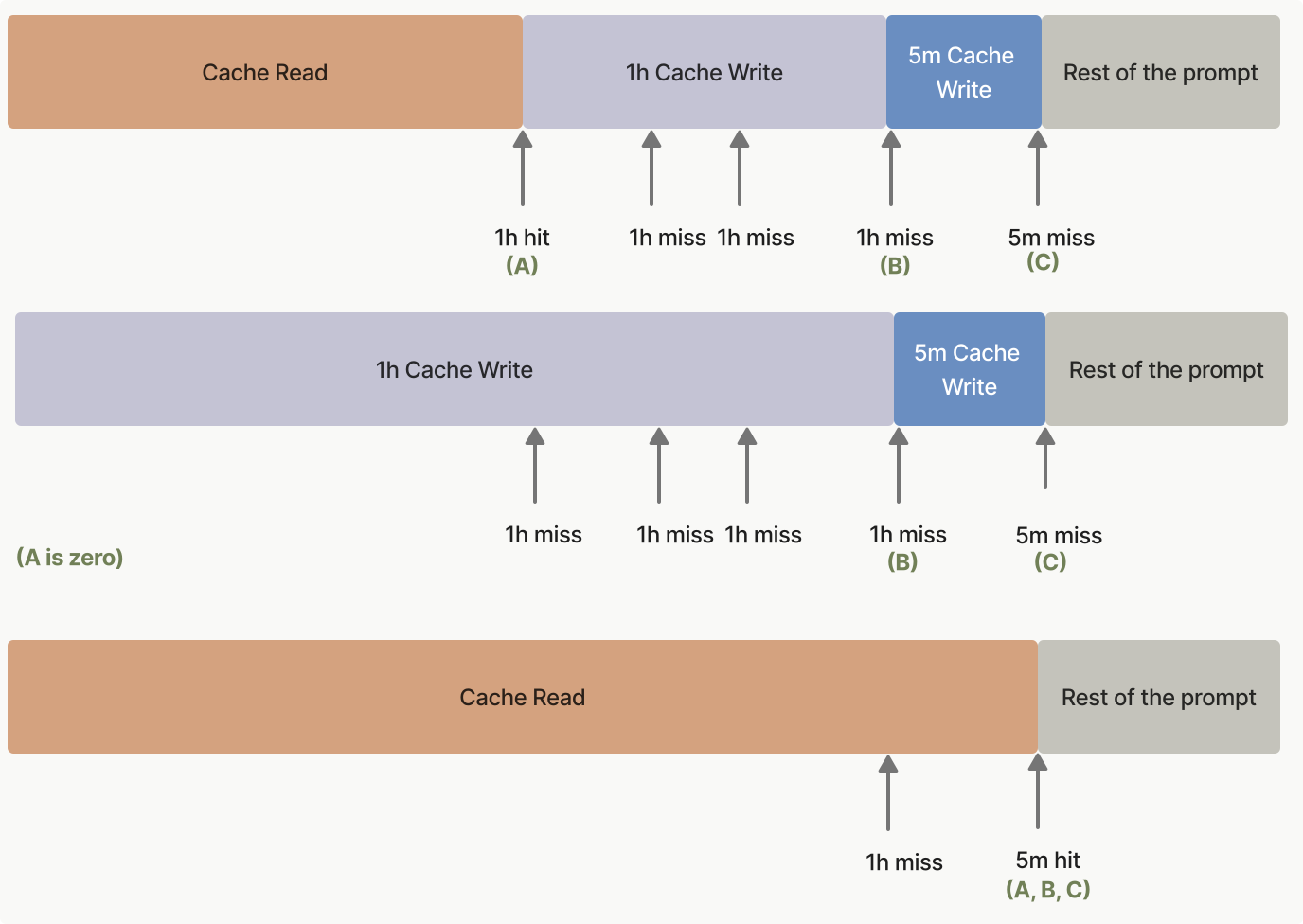
***
## 预热缓存
"Cache pre-warming"(缓存预热)允许您在用户触发真实请求之前,将系统提示或工具定义加载到提示缓存中。这消除了首次用户交互时因缓存未命中而产生的 "latency"(延迟)损失,从而为对延迟敏感的应用缩短 "time-to-first-token"(首令牌时间),即 TTFT。
### 工作原理
在请求中设置 `max_tokens: 0`。API 会将您的提示读入模型,并在任何 `cache_control` "breakpoint"(断点)处写入缓存,然后立即返回,不生成任何输出。响应包含一个空的 `content` 数组、`stop_reason: "max_tokens"`,以及一个完整填充的 `usage` 块。
请将 `cache_control` 断点放在与后续请求共享的最后一个块上(通常是您的系统提示或工具定义),而不是放在占位用户消息上。否则,缓存条目将以占位消息为键,后续请求将无法命中它。同时,请使用与后续请求相同的思考配置和 `output_config.effort`:这些值会被渲染到提示中(请参阅[什么会使缓存失效](https://platform.claude.com/docs/zh-CN/build-with-claude/prompt-caching#what-invalidates-the-cache)),因此使用不同配置进行的预热可能会写入一个您的真实流量永远不会命中的条目。这意味着需要使用[显式缓存断点](https://platform.claude.com/docs/zh-CN/build-with-claude/prompt-caching#explicit-cache-breakpoints)而不是[自动缓存](https://platform.claude.com/docs/zh-CN/build-with-claude/prompt-caching#automatic-caching),因为自动缓存会将断点放在最后一个块上,而这里的最后一个块是占位消息。占位用户消息可以是任何包含非空白内容的字符串(此处的示例使用 `"warmup"`);其内容会被读入模型,但永远不会得到回答。
与任何其他请求一样,如果前缀尚未被缓存,预热请求会产生**缓存写入**费用。请检查响应中的 `usage.cache_creation_input_tokens` 以确认是否发生了写入。输出令牌按零计费。
```bash cURL
curl https://api.anthropic.com/v1/messages \
-H "content-type: application/json" \
-H "x-api-key: $ANTHROPIC_API_KEY" \
-H "anthropic-version: 2023-06-01" \
-d '{
"model": "claude-opus-5-5",
"max_tokens": 0,
"system": [
{
"type": "text",
"text": "You are an expert software engineer with deep knowledge of distributed systems...",
"cache_control": {"type": "ephemeral"}
}
],
"messages": [{"role": "user", "content": "warmup"}]
}'
```
```bash CLI
ant messages create \
--transform '{stop_reason,content,usage}' --format yaml <<'YAML'
model: claude-opus-5-5
max_tokens: 0
system:
- type: text
text: >-
You are an expert software engineer with deep knowledge of
distributed systems...
cache_control:
type: ephemeral
messages:
- role: user
content: warmup
YAML
```
```python Python
client = anthropic.Anthropic()
# 在用户到来之前先发送此请求,以预热共享的系统提示缓存。
prewarm = client.messages.create(
model="claude-opus-5-5",
max_tokens=0,
system=[
{
"type": "text",
"text": "You are an expert software engineer with deep knowledge of distributed systems...",
"cache_control": {"type": "ephemeral"},
}
],
messages=[{"role": "user", "content": "warmup"}],
)
print(prewarm.stop_reason) # "max_tokens"
print(prewarm.content) # []
print(prewarm.usage)
```
```typescript TypeScript
const client = new Anthropic();
// 在用户到来之前先发送此请求,以预热共享的系统提示缓存。
const prewarm = await client.messages.create({
model: "claude-opus-5-5",
max_tokens: 0,
system: [
{
type: "text",
text: "You are an expert software engineer with deep knowledge of distributed systems...",
cache_control: { type: "ephemeral" }
}
],
messages: [{ role: "user", content: "warmup" }]
});
console.log(prewarm.stop_reason); // "max_tokens"
console.log(prewarm.content); // []
console.log(prewarm.usage);
```
```csharp C#
AnthropicClient client = new();
var prewarm = await client.Messages.Create(
new()
{
Model = Model.ClaudeOpus5_5,
MaxTokens = 0,
System = new(
[
new TextBlockParam
{
Text = "You are an expert software engineer with deep knowledge of distributed systems...",
CacheControl = new(),
},
]
),
Messages = [new() { Role = Role.User, Content = "warmup" }],
}
);
Console.WriteLine(prewarm.StopReason?.Raw()); // "max_tokens"
Console.WriteLine(prewarm.Content.Count); // 0
Console.WriteLine(prewarm.Usage);
```
```go Go
client := anthropic.NewClient()
prewarm, err := client.Messages.New(context.TODO(), anthropic.MessageNewParams{
Model: anthropic.ModelClaudeOpus5_5,
MaxTokens: 0,
System: []anthropic.TextBlockParam{
{
Text: "You are an expert software engineer with deep knowledge of distributed systems...",
CacheControl: anthropic.NewCacheControlEphemeralParam(),
},
},
Messages: []anthropic.MessageParam{
anthropic.NewUserMessage(anthropic.NewTextBlock("warmup")),
},
})
if err != nil {
panic(err)
}
fmt.Println(prewarm.StopReason) // "max_tokens"
fmt.Println(prewarm.Content) // []
fmt.Println(prewarm.Usage.RawJSON())
```
```java Java
AnthropicClient client = AnthropicOkHttpClient.fromEnv();
Message prewarm = client.messages().create(MessageCreateParams.builder()
.model(Model.CLAUDE_OPUS_5_5)
.maxTokens(0)
.systemOfTextBlockParams(List.of(TextBlockParam.builder()
.text("You are an expert software engineer with deep knowledge of distributed systems...")
.cacheControl(CacheControlEphemeral.builder().build())
.build()))
.addUserMessage("warmup")
.build());
IO.println(prewarm.stopReason()); // Optional[max_tokens]
IO.println(prewarm.content()); // []
IO.println(prewarm.usage());
```
```php PHP
$client = new Client();
$prewarm = $client->messages->create(
model: Model::CLAUDE_OPUS_5_5,
maxTokens: 0,
system: [
[
'type' => 'text',
'text' => 'You are an expert software engineer with deep knowledge of distributed systems...',
'cache_control' => ['type' => 'ephemeral'],
],
],
messages: [['role' => 'user', 'content' => 'warmup']],
);
echo $prewarm->stopReason, PHP_EOL; // "max_tokens"
echo json_encode($prewarm->content), PHP_EOL; // []
echo json_encode($prewarm->usage), PHP_EOL;
```
```ruby Ruby
client = Anthropic::Client.new
prewarm = client.messages.create(
model: Anthropic::Model::CLAUDE_OPUS_5_5,
max_tokens: 0,
system_: [
{
type: "text",
text: "You are an expert software engineer with deep knowledge of distributed systems...",
cache_control: {type: "ephemeral"}
}
],
messages: [{role: "user", content: "warmup"}]
)
puts prewarm.stop_reason # :max_tokens
puts prewarm.content # []
puts prewarm.usage
```
API 返回一个空的 `content` 数组:
```json Output
{
"id": "msg_01XFDUDYJgAACzvnptvVoYEL",
"type": "message",
"role": "assistant",
"content": [],
"model": "claude-opus-5-5",
"stop_reason": "max_tokens",
"stop_sequence": null,
"usage": {
"input_tokens": 8,
"cache_creation_input_tokens": 5120,
"cache_read_input_tokens": 0,
"cache_creation": {
"ephemeral_5m_input_tokens": 5120,
"ephemeral_1h_input_tokens": 0
},
"iterations": [
{
"input_tokens": 8,
"output_tokens": 0,
"cache_read_input_tokens": 0,
"cache_creation_input_tokens": 5120,
"cache_creation": {
"ephemeral_5m_input_tokens": 5120,
"ephemeral_1h_input_tokens": 0
},
"type": "message"
}
],
"output_tokens": 0,
"service_tier": "standard",
"inference_geo": "global"
}
}
```
### 典型使用模式
在应用启动时(或按计划的时间间隔)发送预热请求,然后在预热完成后发送真实的用户请求:
```bash cURL
# 在应用启动时或按计划的时间间隔预热缓存。
curl https://api.anthropic.com/v1/messages \
-H "content-type: application/json" \
-H "x-api-key: $ANTHROPIC_API_KEY" \
-H "anthropic-version: 2023-06-01" \
-d '{
"model": "claude-opus-5-5",
"max_tokens": 0,
"system": [
{
"type": "text",
"text": "You are an expert software engineer with deep knowledge of distributed systems...",
"cache_control": {"type": "ephemeral"}
}
],
"messages": [{"role": "user", "content": "warmup"}]
}'
# 之后,当用户提交消息时,系统提示前缀已被缓存。
curl https://api.anthropic.com/v1/messages \
-H "content-type: application/json" \
-H "x-api-key: $ANTHROPIC_API_KEY" \
-H "anthropic-version: 2023-06-01" \
-d '{
"model": "claude-opus-5-5",
"max_tokens": 1024,
"system": [
{
"type": "text",
"text": "You are an expert software engineer with deep knowledge of distributed systems...",
"cache_control": {"type": "ephemeral"}
}
],
"messages": [{"role": "user", "content": "How do I implement a binary search tree?"}]
}'
```
```bash CLI
# 在应用启动时或按计划的时间间隔预热缓存。
ant messages create --transform usage <<'YAML'
model: claude-opus-5-5
max_tokens: 0
system:
- type: text
text: >-
You are an expert software engineer with deep knowledge of
distributed systems...
cache_control:
type: ephemeral
messages:
- role: user
content: warmup
YAML
# 之后,当用户提交消息时,系统提示前缀已被缓存。
ant messages create --transform 'content.#(type=="text").text' --raw-output <<'YAML'
model: claude-opus-5-5
max_tokens: 1024
system:
- type: text
text: >-
You are an expert software engineer with deep knowledge of
distributed systems...
cache_control:
type: ephemeral
messages:
- role: user
content: How do I implement a binary search tree?
YAML
```
```python Python
client = anthropic.Anthropic()
SYSTEM_PROMPT = [
{
"type": "text",
"text": "You are an expert software engineer with deep knowledge of distributed systems...",
"cache_control": {"type": "ephemeral"},
}
]
def prewarm_cache() -> None:
"""Call this at application startup or on a scheduled interval."""
client.messages.create(
model="claude-opus-5-5",
max_tokens=0,
system=SYSTEM_PROMPT,
messages=[{"role": "user", "content": "warmup"}],
)
def respond(user_message: str) -> anthropic.types.Message:
"""The real user request; benefits from a warm cache."""
return client.messages.create(
model="claude-opus-5-5",
max_tokens=1024,
system=SYSTEM_PROMPT,
messages=[{"role": "user", "content": user_message}],
)
# 在任何用户流量到达之前预热缓存。
prewarm_cache()
# 之后,当用户提交消息时,系统提示前缀已被缓存。
response = respond("How do I implement a binary search tree?")
for block in response.content:
if block.type == "text":
print(block.text)
```
```typescript TypeScript
const client = new Anthropic();
const SYSTEM_PROMPT: Anthropic.TextBlockParam[] = [
{
type: "text",
text: "You are an expert software engineer with deep knowledge of distributed systems...",
cache_control: { type: "ephemeral" }
}
];
// 请在应用启动时或按计划的时间间隔调用此函数。
async function prewarmCache(): Promise {
await client.messages.create({
model: "claude-opus-5-5",
max_tokens: 0,
system: SYSTEM_PROMPT,
messages: [{ role: "user", content: "warmup" }]
});
}
// 真实的用户请求;可受益于已预热的缓存。
async function respond(userMessage: string): Promise {
return client.messages.create({
model: "claude-opus-5-5",
max_tokens: 1024,
system: SYSTEM_PROMPT,
messages: [{ role: "user", content: userMessage }]
});
}
// 在任何用户流量到达之前预热缓存。
await prewarmCache();
// 之后当用户提交消息时,系统提示前缀已被缓存。
const response = await respond("How do I implement a binary search tree?");
const textBlock = response.content.find(
(block): block is Anthropic.TextBlock => block.type === "text"
);
console.log(textBlock?.text);
```
```csharp C#
AnthropicClient client = new();
List systemPrompt =
[
new TextBlockParam
{
Text = "You are an expert software engineer with deep knowledge of distributed systems...",
CacheControl = new(),
},
];
// 请在应用程序启动时或按计划的时间间隔调用此函数。
async Task PrewarmCache() =>
await client.Messages.Create(
new()
{
Model = Model.ClaudeOpus5_5,
MaxTokens = 0,
System = new(systemPrompt),
Messages = [new() { Role = Role.User, Content = "warmup" }],
}
);
// 真实的用户请求;可受益于已预热的缓存。
async Task Respond(string userMessage) =>
await client.Messages.Create(
new()
{
Model = Model.ClaudeOpus5_5,
MaxTokens = 1024,
System = new(systemPrompt),
Messages = [new() { Role = Role.User, Content = userMessage }],
}
);
// 在任何用户流量到达之前预热缓存。
await PrewarmCache();
// 之后,当用户提交消息时,系统提示前缀已被缓存。
var response = await Respond("How do I implement a binary search tree?");
foreach (var block in response.Content)
{
if (block.TryPickText(out var textBlock))
{
Console.WriteLine(textBlock.Text);
}
}
```
```go Go
var client = anthropic.NewClient()
var systemPrompt = []anthropic.TextBlockParam{
{
Text: "You are an expert software engineer with deep knowledge of distributed systems...",
CacheControl: anthropic.NewCacheControlEphemeralParam(),
},
}
// 请在应用启动时或按计划的时间间隔调用此函数。
func prewarmCache() error {
_, err := client.Messages.New(context.TODO(), anthropic.MessageNewParams{
Model: anthropic.ModelClaudeOpus5_5,
MaxTokens: 0,
System: systemPrompt,
Messages: []anthropic.MessageParam{
anthropic.NewUserMessage(anthropic.NewTextBlock("warmup")),
},
})
return err
}
// 真实的用户请求;可受益于已预热的缓存。
func respond(userMessage string) (*anthropic.Message, error) {
return client.Messages.New(context.TODO(), anthropic.MessageNewParams{
Model: anthropic.ModelClaudeOpus5_5,
MaxTokens: 1024,
System: systemPrompt,
Messages: []anthropic.MessageParam{
anthropic.NewUserMessage(anthropic.NewTextBlock(userMessage)),
},
})
}
func main() {
// 在任何用户流量到达之前预热缓存。
if err := prewarmCache(); err != nil {
log.Fatal(err)
}
// 之后,当用户提交消息时,系统提示前缀已被缓存。
response, err := respond("How do I implement a binary search tree?")
if err != nil {
log.Fatal(err)
}
for _, block := range response.Content {
if textBlock, ok := block.AsAny().(anthropic.TextBlock); ok {
fmt.Println(textBlock.Text)
}
}
}
```
```java Java
AnthropicClient client = AnthropicOkHttpClient.fromEnv();
List systemPrompt = List.of(TextBlockParam.builder()
.text("You are an expert software engineer with deep knowledge of distributed systems...")
.cacheControl(CacheControlEphemeral.builder().build())
.build());
// 请在应用启动时或按计划的时间间隔调用此函数。
void prewarmCache() {
client.messages().create(MessageCreateParams.builder()
.model(Model.CLAUDE_OPUS_5_5)
.maxTokens(0)
.systemOfTextBlockParams(systemPrompt)
.addUserMessage("warmup")
.build());
}
// 真实的用户请求;可受益于已预热的缓存。
Message respond(String userMessage) {
return client.messages().create(MessageCreateParams.builder()
.model(Model.CLAUDE_OPUS_5_5)
.maxTokens(1024)
.systemOfTextBlockParams(systemPrompt)
.addUserMessage(userMessage)
.build());
}
void main() {
// 在任何用户流量到达之前预热缓存。
prewarmCache();
// 之后,当用户提交消息时,系统提示前缀已被缓存。
Message response = respond("How do I implement a binary search tree?");
response.content().stream()
.flatMap(block -> block.text().stream())
.forEach(textBlock -> IO.println(textBlock.text()));
}
```
```php PHP
$client = new Client();
$systemPrompt = [
[
'type' => 'text',
'text' => 'You are an expert software engineer with deep knowledge of distributed systems...',
'cache_control' => ['type' => 'ephemeral'],
],
];
// 在应用启动时或按计划的时间间隔调用此函数。
$prewarmCache = fn () => $client->messages->create(
model: Model::CLAUDE_OPUS_5_5,
maxTokens: 0,
system: $systemPrompt,
messages: [['role' => 'user', 'content' => 'warmup']],
);
// 真实的用户请求;可受益于已预热的缓存。
$respond = fn (string $userMessage) => $client->messages->create(
model: Model::CLAUDE_OPUS_5_5,
maxTokens: 1024,
system: $systemPrompt,
messages: [['role' => 'user', 'content' => $userMessage]],
);
// 在任何用户流量到达之前预热缓存。
$prewarmCache();
// 之后,当用户提交消息时,系统提示前缀已被缓存。
$response = $respond('How do I implement a binary search tree?');
foreach ($response->content as $block) {
if ($block->type === 'text') {
echo $block->text, PHP_EOL;
}
}
```
```ruby Ruby
client = Anthropic::Client.new
SYSTEM_PROMPT = [
{
type: "text",
text: "You are an expert software engineer with deep knowledge of distributed systems...",
cache_control: {type: "ephemeral"}
}
]
# 请在应用启动时或按计划的时间间隔调用此函数。
def prewarm_cache(client)
client.messages.create(
model: Anthropic::Model::CLAUDE_OPUS_5_5,
max_tokens: 0,
system_: SYSTEM_PROMPT,
messages: [{role: "user", content: "warmup"}]
)
end
# 真实的用户请求;可受益于已预热的缓存。
def respond(client, user_message)
client.messages.create(
model: Anthropic::Model::CLAUDE_OPUS_5_5,
max_tokens: 1024,
system_: SYSTEM_PROMPT,
messages: [{role: "user", content: user_message}]
)
end
# 在任何用户流量到达之前预热缓存。
prewarm_cache(client)
# 之后当用户提交消息时,系统提示前缀已被缓存。
response = respond(client, "How do I implement a binary search tree?")
response.content.each do |block|
puts block.text if block.type == :text
end
```
请记住,缓存 TTL 仍然适用。对于默认的 5 分钟缓存,请至少每 5 分钟发送一次新的预热请求以保持缓存处于预热状态。如果用户请求之间的间隔较长,请改用 [1 小时缓存时长](https://platform.claude.com/docs/zh-CN/build-with-claude/prompt-caching#1-hour-cache-duration)。
### 限制
如果设置了以下任何一项,`max_tokens: 0` 请求将被拒绝并返回 `invalid_request_error`,因为每一项都意味着需要产生输出,而零令牌预算无法产生输出:
* `stream: true`
* [扩展思考](https://platform.claude.com/docs/zh-CN/build-with-claude/extended-thinking)(`thinking.type: "enabled"`)
* [结构化输出](https://platform.claude.com/docs/zh-CN/build-with-claude/structured-outputs)(`output_config.format`)
* `tool_choice` 为 `{"type": "tool", ...}` 或 `{"type": "any"}`
在 [Message Batches](https://platform.claude.com/docs/zh-CN/build-with-claude/batch-processing) 请求中,`max_tokens: 0` 同样会被拒绝。预热针对的是首令牌时间,而这不适用于批处理;并且在批处理期间写入的缓存条目很可能在后续请求运行之前就已过期。
### 替代 max\_tokens=1 的变通方法
在 `max_tokens: 0` 可用之前,一些应用使用 `max_tokens: 1` 的预热调用来实现相同的效果。推荐使用 `max_tokens: 0` 方法:它不产生任何输出,因此无需丢弃单令牌回复,不会对输出令牌计费,并且请求的意图明确无歧义。
***
## 提示缓存示例
为了帮助您开始使用提示缓存,[提示缓存 cookbook](https://platform.claude.com/cookbook/misc-prompt-caching) 提供了详细的示例和最佳实践。
以下代码片段展示了各种提示缓存模式。这些示例演示了如何在不同场景中实现缓存,帮助您理解此功能的实际应用:
```bash cURL
curl https://api.anthropic.com/v1/messages \
-H "x-api-key: $ANTHROPIC_API_KEY" \
-H "anthropic-version: 2023-06-01" \
-H "content-type: application/json" \
-d '{
"model": "claude-opus-5-5",
"max_tokens": 1024,
"system": [
{
"type": "text",
"text": "You are an AI assistant tasked with analyzing legal documents."
},
{
"type": "text",
"text": "Here is the full text of a complex legal agreement: [Insert full text of a 50-page legal agreement here]",
"cache_control": {"type": "ephemeral"}
}
],
"messages": [
{
"role": "user",
"content": "What are the key terms and conditions in this agreement?"
}
]
}'
```
```bash CLI
ant messages create --transform usage <<'YAML'
model: claude-opus-5-5
max_tokens: 1024
system:
- type: text
text: You are an AI assistant tasked with analyzing legal documents.
- type: text
text: >-
Here is the full text of a complex legal agreement:
[Insert full text of a 50-page legal agreement here]
cache_control:
type: ephemeral
messages:
- role: user
content: What are the key terms and conditions in this agreement?
YAML
```
```python Python
client = anthropic.Anthropic()
response = client.messages.create(
model="claude-opus-5-5",
max_tokens=1024,
system=[
{
"type": "text",
"text": "You are an AI assistant tasked with analyzing legal documents.",
},
{
"type": "text",
"text": "Here is the full text of a complex legal agreement: [Insert full text of a 50-page legal agreement here]",
"cache_control": {"type": "ephemeral"},
},
],
messages=[
{
"role": "user",
"content": "What are the key terms and conditions in this agreement?",
}
],
)
print(response.usage.model_dump_json())
```
```typescript TypeScript
const client = new Anthropic();
const response = await client.messages.create({
model: "claude-opus-5-5",
max_tokens: 1024,
system: [
{
type: "text",
text: "You are an AI assistant tasked with analyzing legal documents."
},
{
type: "text",
text: "Here is the full text of a complex legal agreement: [Insert full text of a 50-page legal agreement here]",
cache_control: { type: "ephemeral" }
}
],
messages: [
{
role: "user",
content: "What are the key terms and conditions in this agreement?"
}
]
});
console.log(response.usage);
```
```csharp C#
AnthropicClient client = new()
{
ApiKey = Environment.GetEnvironmentVariable("ANTHROPIC_API_KEY")
};
var parameters = new MessageCreateParams
{
Model = Model.ClaudeOpus5_5,
MaxTokens = 1024,
System = new MessageCreateParamsSystem(new List
{
new TextBlockParam()
{
Text = "You are an AI assistant tasked with analyzing legal documents.",
},
new TextBlockParam()
{
Text = "Here is the full text of a complex legal agreement: [Insert full text of a 50-page legal agreement here]",
CacheControl = new CacheControlEphemeral(),
},
}),
Messages =
[
new()
{
Role = Role.User,
Content = "What are the key terms and conditions in this agreement?"
}
]
};
var message = await client.Messages.Create(parameters);
Console.WriteLine(message.Usage);
```
```go Go
client := anthropic.NewClient()
response, err := client.Messages.New(context.TODO(), anthropic.MessageNewParams{
Model: anthropic.ModelClaudeOpus5_5,
MaxTokens: 1024,
System: []anthropic.TextBlockParam{
{
Text: "You are an AI assistant tasked with analyzing legal documents.",
},
{
Text: "Here is the full text of a complex legal agreement: [Insert full text of a 50-page legal agreement here]",
CacheControl: anthropic.NewCacheControlEphemeralParam(),
},
},
Messages: []anthropic.MessageParam{
anthropic.NewUserMessage(anthropic.NewTextBlock("What are the key terms and conditions in this agreement?")),
},
})
if err != nil {
log.Fatal(err)
}
fmt.Println(response.Usage.RawJSON())
```
```java Java
import com.anthropic.models.messages.CacheControlEphemeral;
// ...
public class LegalDocumentAnalysisExample {
public static void main(String[] args) {
AnthropicClient client = AnthropicOkHttpClient.fromEnv();
MessageCreateParams params = MessageCreateParams.builder()
.model(Model.CLAUDE_OPUS_5_5)
.maxTokens(1024)
.systemOfTextBlockParams(
List.of(
TextBlockParam.builder()
.text("You are an AI assistant tasked with analyzing legal documents.")
.build(),
TextBlockParam.builder()
.text(
"Here is the full text of a complex legal agreement: [Insert full text of a 50-page legal agreement here]"
)
.cacheControl(CacheControlEphemeral.builder().build())
.build()
)
)
.addUserMessage("What are the key terms and conditions in this agreement?")
.build();
Message message = client.messages().create(params);
System.out.println(message.usage());
}
}
```
```php PHP
$client = new Client();
$message = $client->messages->create(
maxTokens: 1024,
messages: [
[
'role' => 'user',
'content' => 'What are the key terms and conditions in this agreement?'
]
],
model: 'claude-opus-5-5',
system: [
[
'type' => 'text',
'text' => 'You are an AI assistant tasked with analyzing legal documents.'
],
[
'type' => 'text',
'text' => 'Here is the full text of a complex legal agreement: [Insert full text of a 50-page legal agreement here]',
'cache_control' => ['type' => 'ephemeral']
]
],
);
echo json_encode($message->usage), PHP_EOL;
```
```ruby Ruby
client = Anthropic::Client.new
message = client.messages.create(
model: "claude-opus-5-5",
max_tokens: 1024,
system: [
{
type: "text",
text: "You are an AI assistant tasked with analyzing legal documents."
},
{
type: "text",
text: "Here is the full text of a complex legal agreement: [Insert full text of a 50-page legal agreement here]",
cache_control: { type: "ephemeral" }
}
],
messages: [
{
role: "user",
content: "What are the key terms and conditions in this agreement?"
}
]
)
puts message.usage
```
此示例演示了提示缓存的基本用法:将法律协议的全文作为前缀进行缓存,同时保持用户指令不被缓存。
对于第一个请求:
* `input_tokens`:仅用户消息中的令牌数
* `cache_creation_input_tokens`:整个系统消息(包括法律文档)中的令牌数
* `cache_read_input_tokens`:0(第一个请求没有缓存命中)
对于缓存生命周期内的后续请求:
* `input_tokens`:仅用户消息中的令牌数
* `cache_creation_input_tokens`:0(没有新的缓存创建)
* `cache_read_input_tokens`:整个已缓存系统消息中的令牌数
可以通过在 `tools` 数组的最后一个工具上放置 `cache_control` 来缓存工具定义。在该工具之前定义的所有工具(包括该工具本身)会作为单个前缀被缓存。
```json
{
"model": "claude-opus-5-5",
"max_tokens": 1024,
"tools": [
{
"name": "get_weather",
"description": "Get the current weather in a given location",
"input_schema": {
"type": "object",
"properties": { "location": { "type": "string" } },
"required": ["location"]
}
},
{
"name": "get_time",
"description": "Get the current time in a given time zone",
"input_schema": {
"type": "object",
"properties": { "timezone": { "type": "string" } },
"required": ["timezone"]
},
"cache_control": { "type": "ephemeral" }
}
],
"messages": [{ "role": "user", "content": "What is the weather and time in New York?" }]
}
```
在第一个请求中,`cache_creation_input_tokens` 反映所有工具定义的令牌数。在缓存生命周期内的后续请求中,这些令牌会改为出现在 `cache_read_input_tokens` 下。
有关工具定义、`defer_loading` 与缓存失效之间的详细交互,请参阅[工具使用与提示缓存](https://platform.claude.com/docs/zh-CN/agents-and-tools/tool-use/tool-use-with-prompt-caching)。
```bash cURL
curl https://api.anthropic.com/v1/messages \
-H "x-api-key: $ANTHROPIC_API_KEY" \
-H "anthropic-version: 2023-06-01" \
-H "content-type: application/json" \
-d '{
"model": "claude-opus-5-5",
"max_tokens": 1024,
"system": [
{
"type": "text",
"text": "...long system prompt",
"cache_control": {"type": "ephemeral"}
}
],
"messages": [
{
"role": "user",
"content": [
{
"type": "text",
"text": "Hello, can you tell me more about the solar system?"
}
]
},
{
"role": "assistant",
"content": "Certainly! The solar system is the collection of celestial bodies that orbit our Sun. It consists of eight planets, numerous moons, asteroids, comets, and other objects. The planets, in order from closest to farthest from the Sun, are: Mercury, Venus, Earth, Mars, Jupiter, Saturn, Uranus, and Neptune. Each planet has its own unique characteristics and features. Is there a specific aspect of the solar system you would like to know more about?"
},
{
"role": "user",
"content": [
{
"type": "text",
"text": "Good to know."
},
{
"type": "text",
"text": "Tell me more about Mars.",
"cache_control": {"type": "ephemeral"}
}
]
}
]
}'
```
```bash CLI
ant messages create --transform usage <<'YAML'
model: claude-opus-5-5
max_tokens: 1024
system:
- type: text
text: "...long system prompt"
cache_control:
type: ephemeral
messages:
- role: user
content:
- type: text
text: Hello, can you tell me more about the solar system?
- role: assistant
content: >-
Certainly! The solar system is the collection of celestial bodies that
orbit our Sun. It consists of eight planets, numerous moons, asteroids,
comets, and other objects. The planets, in order from closest to farthest
from the Sun, are: Mercury, Venus, Earth, Mars, Jupiter, Saturn, Uranus,
and Neptune. Each planet has its own unique characteristics and features.
Is there a specific aspect of the solar system you would like to know
more about?
- role: user
content:
- type: text
text: Good to know.
- type: text
text: Tell me more about Mars.
cache_control:
type: ephemeral
YAML
```
```python Python
client = anthropic.Anthropic()
response = client.messages.create(
model="claude-opus-5-5",
max_tokens=1024,
system=[
{
"type": "text",
"text": "...long system prompt",
"cache_control": {"type": "ephemeral"},
}
],
messages=[
# ……到目前为止的长对话
{
"role": "user",
"content": [
{
"type": "text",
"text": "Hello, can you tell me more about the solar system?",
}
],
},
{
"role": "assistant",
"content": "Certainly! The solar system is the collection of celestial bodies that orbit our Sun. It consists of eight planets, numerous moons, asteroids, comets, and other objects. The planets, in order from closest to farthest from the Sun, are: Mercury, Venus, Earth, Mars, Jupiter, Saturn, Uranus, and Neptune. Each planet has its own unique characteristics and features. Is there a specific aspect of the solar system you'd like to know more about?",
},
{
"role": "user",
"content": [
{"type": "text", "text": "Good to know."},
{
"type": "text",
"text": "Tell me more about Mars.",
"cache_control": {"type": "ephemeral"},
},
],
},
],
)
print(response.usage.model_dump_json())
```
```typescript TypeScript
const client = new Anthropic();
const response = await client.messages.create({
model: "claude-opus-5-5",
max_tokens: 1024,
system: [
{
type: "text",
text: "...long system prompt",
cache_control: { type: "ephemeral" }
}
],
messages: [
// ……到目前为止的长对话
{
role: "user",
content: [
{
type: "text",
text: "Hello, can you tell me more about the solar system?"
}
]
},
{
role: "assistant",
content:
"Certainly! The solar system is the collection of celestial bodies that orbit our Sun. It consists of eight planets, numerous moons, asteroids, comets, and other objects. The planets, in order from closest to farthest from the Sun, are: Mercury, Venus, Earth, Mars, Jupiter, Saturn, Uranus, and Neptune. Each planet has its own unique characteristics and features. Is there a specific aspect of the solar system you'd like to know more about?"
},
{
role: "user",
content: [
{
type: "text",
text: "Good to know."
},
{
type: "text",
text: "Tell me more about Mars.",
cache_control: { type: "ephemeral" }
}
]
}
]
});
console.log(response.usage);
```
```csharp C#
AnthropicClient client = new();
var parameters = new MessageCreateParams
{
Model = Model.ClaudeOpus5_5,
MaxTokens = 1024,
System = new MessageCreateParamsSystem(new List
{
new TextBlockParam()
{
Text = "...long system prompt",
CacheControl = new CacheControlEphemeral(),
},
}),
Messages =
[
new()
{
Role = Role.User,
Content = new MessageParamContent(new List
{
new ContentBlockParam(new TextBlockParam("Hello, can you tell me more about the solar system?")),
}),
},
new()
{
Role = Role.Assistant,
Content = "Certainly! The solar system is the collection of celestial bodies that orbit our Sun. It consists of eight planets, numerous moons, asteroids, comets, and other objects. The planets, in order from closest to farthest from the Sun, are: Mercury, Venus, Earth, Mars, Jupiter, Saturn, Uranus, and Neptune. Each planet has its own unique characteristics and features. Is there a specific aspect of the solar system you would like to know more about?"
},
new()
{
Role = Role.User,
Content = new MessageParamContent(new List
{
new ContentBlockParam(new TextBlockParam("Good to know.")),
new ContentBlockParam(new TextBlockParam()
{
Text = "Tell me more about Mars.",
CacheControl = new CacheControlEphemeral(),
}),
})
}
]
};
var message = await client.Messages.Create(parameters);
Console.WriteLine(message.Usage);
```
```go Go
client := anthropic.NewClient()
response, err := client.Messages.New(context.TODO(), anthropic.MessageNewParams{
Model: anthropic.ModelClaudeOpus5_5,
MaxTokens: 1024,
System: []anthropic.TextBlockParam{
{
Text: "...long system prompt",
CacheControl: anthropic.NewCacheControlEphemeralParam(),
},
},
Messages: []anthropic.MessageParam{
anthropic.NewUserMessage(anthropic.NewTextBlock("Hello, can you tell me more about the solar system?")),
anthropic.NewAssistantMessage(anthropic.NewTextBlock("Certainly! The solar system is the collection of celestial bodies that orbit our Sun. It consists of eight planets, numerous moons, asteroids, comets, and other objects. The planets, in order from closest to farthest from the Sun, are: Mercury, Venus, Earth, Mars, Jupiter, Saturn, Uranus, and Neptune. Each planet has its own unique characteristics and features. Is there a specific aspect of the solar system you would like to know more about?")),
{
Role: anthropic.MessageParamRoleUser,
Content: []anthropic.ContentBlockParamUnion{
anthropic.NewTextBlock("Good to know."),
{OfText: &anthropic.TextBlockParam{
Text: "Tell me more about Mars.",
CacheControl: anthropic.NewCacheControlEphemeralParam(),
}},
},
},
},
})
if err != nil {
log.Fatal(err)
}
fmt.Println(response.Usage.RawJSON())
```
```java Java
import com.anthropic.models.messages.CacheControlEphemeral;
// ...
public class ConversationWithCacheControlExample {
public static void main(String[] args) {
AnthropicClient client = AnthropicOkHttpClient.fromEnv();
// 创建临时系统提示
TextBlockParam systemPrompt = TextBlockParam.builder()
.text("...long system prompt")
.cacheControl(CacheControlEphemeral.builder().build())
.build();
// 创建消息参数
MessageCreateParams params = MessageCreateParams.builder()
.model(Model.CLAUDE_OPUS_5_5)
.maxTokens(1024)
.systemOfTextBlockParams(List.of(systemPrompt))
// 第一条用户消息(不含缓存控制)
.addUserMessage("Hello, can you tell me more about the solar system?")
// 助手响应
.addAssistantMessage(
"Certainly! The solar system is the collection of celestial bodies that orbit our Sun. It consists of eight planets, numerous moons, asteroids, comets, and other objects. The planets, in order from closest to farthest from the Sun, are: Mercury, Venus, Earth, Mars, Jupiter, Saturn, Uranus, and Neptune. Each planet has its own unique characteristics and features. Is there a specific aspect of the solar system you would like to know more about?"
)
// 第二条用户消息(含缓存控制)
.addUserMessageOfBlockParams(
List.of(
ContentBlockParam.ofText(TextBlockParam.builder().text("Good to know.").build()),
ContentBlockParam.ofText(
TextBlockParam.builder()
.text("Tell me more about Mars.")
.cacheControl(CacheControlEphemeral.builder().build())
.build()
)
)
)
.build();
Message message = client.messages().create(params);
System.out.println(message.usage());
}
}
```
```php PHP
$client = new Client();
$message = $client->messages->create(
maxTokens: 1024,
messages: [
[
'role' => 'user',
'content' => [
[
'type' => 'text',
'text' => 'Hello, can you tell me more about the solar system?'
]
]
],
[
'role' => 'assistant',
'content' => "Certainly! The solar system is the collection of celestial bodies that orbit our Sun. It consists of eight planets, numerous moons, asteroids, comets, and other objects. The planets, in order from closest to farthest from the Sun, are: Mercury, Venus, Earth, Mars, Jupiter, Saturn, Uranus, and Neptune. Each planet has its own unique characteristics and features. Is there a specific aspect of the solar system you would like to know more about?"
],
[
'role' => 'user',
'content' => [
['type' => 'text', 'text' => 'Good to know.'],
[
'type' => 'text',
'text' => 'Tell me more about Mars.',
'cache_control' => ['type' => 'ephemeral']
]
]
]
],
model: 'claude-opus-5-5',
system: [
[
'type' => 'text',
'text' => '...long system prompt',
'cache_control' => ['type' => 'ephemeral']
]
],
);
echo json_encode($message->usage), PHP_EOL;
```
```ruby Ruby
client = Anthropic::Client.new
message = client.messages.create(
model: "claude-opus-5-5",
max_tokens: 1024,
system: [
{
type: "text",
text: "...long system prompt",
cache_control: { type: "ephemeral" }
}
],
messages: [
{
role: "user",
content: [
{
type: "text",
text: "Hello, can you tell me more about the solar system?"
}
]
},
{
role: "assistant",
content: "Certainly! The solar system is the collection of celestial bodies that orbit our Sun. It consists of eight planets, numerous moons, asteroids, comets, and other objects. The planets, in order from closest to farthest from the Sun, are: Mercury, Venus, Earth, Mars, Jupiter, Saturn, Uranus, and Neptune. Each planet has its own unique characteristics and features. Is there a specific aspect of the solar system you would like to know more about?"
},
{
role: "user",
content: [
{ type: "text", text: "Good to know." },
{
type: "text",
text: "Tell me more about Mars.",
cache_control: { type: "ephemeral" }
}
]
}
]
)
puts message.usage
```
此示例演示了如何在多轮对话中使用提示缓存。
在每一轮中,最后一条消息的最后一个块都会被标记 `cache_control`,以便对话可以被增量缓存。系统会自动查找并使用之前缓存的最长块序列来处理后续消息。也就是说,之前被标记了 `cache_control` 的块在之后不再被标记,但如果它们在 5 分钟内被命中,仍会被视为缓存命中(同时也是一次缓存刷新!)。
此外,请注意 `cache_control` 参数被放置在系统消息上。这是为了确保如果它被从缓存中逐出(在超过 5 分钟未被使用之后),它会在下一个请求中被重新添加到缓存中。
这种方法对于在持续进行的对话中保持上下文非常有用,无需重复处理相同的信息。
正确设置后,您应该在每个请求的 usage 响应中看到以下内容:
* `input_tokens`:新用户消息中的令牌数(数量很少)
* `cache_creation_input_tokens`:新的助手轮次和用户轮次中的令牌数
* `cache_read_input_tokens`:截至上一轮的对话中的令牌数
```bash cURL
curl https://api.anthropic.com/v1/messages \
-H "x-api-key: $ANTHROPIC_API_KEY" \
-H "anthropic-version: 2023-06-01" \
-H "content-type: application/json" \
-d '{
"model": "claude-opus-5-5",
"max_tokens": 1024,
"tools": [
{
"name": "search_documents",
"description": "Search through the knowledge base",
"input_schema": {
"type": "object",
"properties": {
"query": {
"type": "string",
"description": "Search query"
}
},
"required": ["query"]
}
},
{
"name": "get_document",
"description": "Retrieve a specific document by ID",
"input_schema": {
"type": "object",
"properties": {
"doc_id": {
"type": "string",
"description": "Document ID"
}
},
"required": ["doc_id"]
},
"cache_control": {"type": "ephemeral"}
}
],
"system": [
{
"type": "text",
"text": "You are a helpful research assistant with access to a document knowledge base.\n\n# Instructions\n- Always search for relevant documents before answering\n- Provide citations for your sources\n- Be objective and accurate in your responses\n- If multiple documents contain relevant information, synthesize them\n- Acknowledge when information is not available in the knowledge base",
"cache_control": {"type": "ephemeral"}
},
{
"type": "text",
"text": "# Knowledge Base Context\n\nHere are the relevant documents for this conversation:\n\n## Document 1: Solar System Overview\nThe solar system consists of the Sun and all objects that orbit it...\n\n## Document 2: Planetary Characteristics\nEach planet has unique features. Mercury is the smallest planet...\n\n## Document 3: Mars Exploration\nMars has been a target of exploration for decades...\n\n[Additional documents...]",
"cache_control": {"type": "ephemeral"}
}
],
"messages": [
{
"role": "user",
"content": "Can you search for information about Mars rovers?"
},
{
"role": "assistant",
"content": [
{
"type": "tool_use",
"id": "tool_1",
"name": "search_documents",
"input": {"query": "Mars rovers"}
}
]
},
{
"role": "user",
"content": [
{
"type": "tool_result",
"tool_use_id": "tool_1",
"content": "Found 3 relevant documents: Document 3 (Mars Exploration), Document 7 (Rover Technology), Document 9 (Mission History)"
}
]
},
{
"role": "assistant",
"content": [
{
"type": "text",
"text": "I found 3 relevant documents about Mars rovers. Let me get more details from the Mars Exploration document."
}
]
},
{
"role": "user",
"content": [
{
"type": "text",
"text": "Yes, please tell me about the Perseverance rover specifically.",
"cache_control": {"type": "ephemeral"}
}
]
}
]
}'
```
```bash CLI
ant messages create --transform usage <<'YAML'
model: claude-opus-5-5
max_tokens: 1024
tools:
- name: search_documents
description: Search through the knowledge base
input_schema:
type: object
properties:
query:
type: string
description: Search query
required: [query]
- name: get_document
description: Retrieve a specific document by ID
input_schema:
type: object
properties:
doc_id:
type: string
description: Document ID
required: [doc_id]
cache_control:
type: ephemeral
system:
- type: text
text: |-
You are a helpful research assistant with access to a document knowledge base.
# Instructions
- Always search for relevant documents before answering
- Provide citations for your sources
- Be objective and accurate in your responses
- If multiple documents contain relevant information, synthesize them
- Acknowledge when information is not available in the knowledge base
cache_control:
type: ephemeral
- type: text
text: |-
# Knowledge Base Context
Here are the relevant documents for this conversation:
## Document 1: Solar System Overview
The solar system consists of the Sun and all objects that orbit it...
## Document 2: Planetary Characteristics
Each planet has unique features. Mercury is the smallest planet...
## Document 3: Mars Exploration
Mars has been a target of exploration for decades...
[Additional documents...]
cache_control:
type: ephemeral
messages:
- role: user
content: Can you search for information about Mars rovers?
- role: assistant
content:
- type: tool_use
id: tool_1
name: search_documents
input:
query: Mars rovers
- role: user
content:
- type: tool_result
tool_use_id: tool_1
content: >-
Found 3 relevant documents: Document 3 (Mars Exploration),
Document 7 (Rover Technology), Document 9 (Mission History)
- role: assistant
content:
- type: text
text: >-
I found 3 relevant documents about Mars rovers. Let me get more
details from the Mars Exploration document.
- role: user
content:
- type: text
text: Yes, please tell me about the Perseverance rover specifically.
cache_control:
type: ephemeral
YAML
```
```python Python
client = anthropic.Anthropic()
response = client.messages.create(
model="claude-opus-5-5",
max_tokens=1024,
tools=[
{
"name": "search_documents",
"description": "Search through the knowledge base",
"input_schema": {
"type": "object",
"properties": {
"query": {"type": "string", "description": "Search query"}
},
"required": ["query"],
},
},
{
"name": "get_document",
"description": "Retrieve a specific document by ID",
"input_schema": {
"type": "object",
"properties": {
"doc_id": {"type": "string", "description": "Document ID"}
},
"required": ["doc_id"],
},
"cache_control": {"type": "ephemeral"},
},
],
system=[
{
"type": "text",
"text": "You are a helpful research assistant with access to a document knowledge base.\n\n# Instructions\n- Always search for relevant documents before answering\n- Provide citations for your sources\n- Be objective and accurate in your responses\n- If multiple documents contain relevant information, synthesize them\n- Acknowledge when information is not available in the knowledge base",
"cache_control": {"type": "ephemeral"},
},
{
"type": "text",
"text": "# Knowledge Base Context\n\nHere are the relevant documents for this conversation:\n\n## Document 1: Solar System Overview\nThe solar system consists of the Sun and all objects that orbit it...\n\n## Document 2: Planetary Characteristics\nEach planet has unique features. Mercury is the smallest planet...\n\n## Document 3: Mars Exploration\nMars has been a target of exploration for decades...\n\n[Additional documents...]",
"cache_control": {"type": "ephemeral"},
},
],
messages=[
{
"role": "user",
"content": "Can you search for information about Mars rovers?",
},
{
"role": "assistant",
"content": [
{
"type": "tool_use",
"id": "tool_1",
"name": "search_documents",
"input": {"query": "Mars rovers"},
}
],
},
{
"role": "user",
"content": [
{
"type": "tool_result",
"tool_use_id": "tool_1",
"content": "Found 3 relevant documents: Document 3 (Mars Exploration), Document 7 (Rover Technology), Document 9 (Mission History)",
}
],
},
{
"role": "assistant",
"content": [
{
"type": "text",
"text": "I found 3 relevant documents about Mars rovers. Let me get more details from the Mars Exploration document.",
}
],
},
{
"role": "user",
"content": [
{
"type": "text",
"text": "Yes, please tell me about the Perseverance rover specifically.",
"cache_control": {"type": "ephemeral"},
}
],
},
],
)
print(response.usage.model_dump_json())
```
```typescript TypeScript
const client = new Anthropic();
const response = await client.messages.create({
model: "claude-opus-5-5",
max_tokens: 1024,
tools: [
{
name: "search_documents",
description: "Search through the knowledge base",
input_schema: {
type: "object",
properties: {
query: {
type: "string",
description: "Search query"
}
},
required: ["query"]
}
},
{
name: "get_document",
description: "Retrieve a specific document by ID",
input_schema: {
type: "object",
properties: {
doc_id: {
type: "string",
description: "Document ID"
}
},
required: ["doc_id"]
},
cache_control: { type: "ephemeral" }
}
],
system: [
{
type: "text",
text: "You are a helpful research assistant with access to a document knowledge base.\n\n# Instructions\n- Always search for relevant documents before answering\n- Provide citations for your sources\n- Be objective and accurate in your responses\n- If multiple documents contain relevant information, synthesize them\n- Acknowledge when information is not available in the knowledge base",
cache_control: { type: "ephemeral" }
},
{
type: "text",
text: "# Knowledge Base Context\n\nHere are the relevant documents for this conversation:\n\n## Document 1: Solar System Overview\nThe solar system consists of the Sun and all objects that orbit it...\n\n## Document 2: Planetary Characteristics\nEach planet has unique features. Mercury is the smallest planet...\n\n## Document 3: Mars Exploration\nMars has been a target of exploration for decades...\n\n[Additional documents...]",
cache_control: { type: "ephemeral" }
}
],
messages: [
{
role: "user",
content: "Can you search for information about Mars rovers?"
},
{
role: "assistant",
content: [
{
type: "tool_use",
id: "tool_1",
name: "search_documents",
input: { query: "Mars rovers" }
}
]
},
{
role: "user",
content: [
{
type: "tool_result",
tool_use_id: "tool_1",
content:
"Found 3 relevant documents: Document 3 (Mars Exploration), Document 7 (Rover Technology), Document 9 (Mission History)"
}
]
},
{
role: "assistant",
content: [
{
type: "text",
text: "I found 3 relevant documents about Mars rovers. Let me get more details from the Mars Exploration document."
}
]
},
{
role: "user",
content: [
{
type: "text",
text: "Yes, please tell me about the Perseverance rover specifically.",
cache_control: { type: "ephemeral" }
}
]
}
]
});
console.log(response.usage);
```
```csharp C#
AnthropicClient client = new()
{
ApiKey = Environment.GetEnvironmentVariable("ANTHROPIC_API_KEY")
};
var parameters = new MessageCreateParams
{
Model = Model.ClaudeOpus5_5,
MaxTokens = 1024,
Tools =
[
new ToolUnion(new Tool()
{
Name = "search_documents",
Description = "Search through the knowledge base",
InputSchema = new InputSchema()
{
Properties = new Dictionary
{
["query"] = JsonSerializer.SerializeToElement(new { type = "string", description = "Search query" }),
},
Required = ["query"],
},
}),
new ToolUnion(new Tool()
{
Name = "get_document",
Description = "Retrieve a specific document by ID",
InputSchema = new InputSchema()
{
Properties = new Dictionary
{
["doc_id"] = JsonSerializer.SerializeToElement(new { type = "string", description = "Document ID" }),
},
Required = ["doc_id"],
},
CacheControl = new CacheControlEphemeral(),
}),
],
System = new MessageCreateParamsSystem(new List
{
new TextBlockParam()
{
Text = "You are a helpful research assistant with access to a document knowledge base.\n\n# Instructions\n- Always search for relevant documents before answering\n- Provide citations for your sources\n- Be objective and accurate in your responses\n- If multiple documents contain relevant information, synthesize them\n- Acknowledge when information is not available in the knowledge base",
CacheControl = new CacheControlEphemeral(),
},
new TextBlockParam()
{
Text = "# Knowledge Base Context\n\nHere are the relevant documents for this conversation:\n\n## Document 1: Solar System Overview\nThe solar system consists of the Sun and all objects that orbit it...\n\n## Document 2: Planetary Characteristics\nEach planet has unique features. Mercury is the smallest planet...\n\n## Document 3: Mars Exploration\nMars has been a target of exploration for decades...\n\n[Additional documents...]",
CacheControl = new CacheControlEphemeral(),
},
}),
Messages =
[
new() { Role = Role.User, Content = "Can you search for information about Mars rovers?" },
new()
{
Role = Role.Assistant,
Content = new MessageParamContent(new List
{
new ContentBlockParam(new ToolUseBlockParam()
{
ID = "tool_1",
Name = "search_documents",
Input = new Dictionary
{
["query"] = JsonSerializer.SerializeToElement("Mars rovers"),
},
}),
}),
},
new()
{
Role = Role.User,
Content = new MessageParamContent(new List
{
new ContentBlockParam(new ToolResultBlockParam()
{
ToolUseID = "tool_1",
Content = "Found 3 relevant documents: Document 3 (Mars Exploration), Document 7 (Rover Technology), Document 9 (Mission History)",
}),
}),
},
new()
{
Role = Role.Assistant,
Content = "I found 3 relevant documents about Mars rovers. Let me get more details from the Mars Exploration document.",
},
new()
{
Role = Role.User,
Content = new MessageParamContent(new List
{
new ContentBlockParam(new TextBlockParam()
{
Text = "Yes, please tell me about the Perseverance rover specifically.",
CacheControl = new CacheControlEphemeral(),
}),
}),
},
]
};
var message = await client.Messages.Create(parameters);
Console.WriteLine(message.Usage);
```
```go Go
client := anthropic.NewClient()
response, err := client.Messages.New(context.TODO(), anthropic.MessageNewParams{
Model: anthropic.ModelClaudeOpus5_5,
MaxTokens: 1024,
Tools: []anthropic.ToolUnionParam{
{OfTool: &anthropic.ToolParam{
Name: "search_documents",
Description: anthropic.String("Search through the knowledge base"),
InputSchema: anthropic.ToolInputSchemaParam{
Properties: map[string]any{
"query": map[string]any{
"type": "string",
"description": "Search query",
},
},
Required: []string{"query"},
},
}},
{OfTool: &anthropic.ToolParam{
Name: "get_document",
Description: anthropic.String("Retrieve a specific document by ID"),
InputSchema: anthropic.ToolInputSchemaParam{
Properties: map[string]any{
"doc_id": map[string]any{
"type": "string",
"description": "Document ID",
},
},
Required: []string{"doc_id"},
},
CacheControl: anthropic.NewCacheControlEphemeralParam(),
}},
},
System: []anthropic.TextBlockParam{
{
Text: "You are a helpful research assistant with access to a document knowledge base.\n\n# Instructions\n- Always search for relevant documents before answering\n- Provide citations for your sources\n- Be objective and accurate in your responses\n- If multiple documents contain relevant information, synthesize them\n- Acknowledge when information is not available in the knowledge base",
CacheControl: anthropic.NewCacheControlEphemeralParam(),
},
{
Text: "# Knowledge Base Context\n\nHere are the relevant documents for this conversation:\n\n## Document 1: Solar System Overview\nThe solar system consists of the Sun and all objects that orbit it...\n\n## Document 2: Planetary Characteristics\nEach planet has unique features. Mercury is the smallest planet...\n\n## Document 3: Mars Exploration\nMars has been a target of exploration for decades...\n\n[Additional documents...]",
CacheControl: anthropic.NewCacheControlEphemeralParam(),
},
},
Messages: []anthropic.MessageParam{
anthropic.NewUserMessage(anthropic.NewTextBlock("Can you search for information about Mars rovers?")),
anthropic.NewAssistantMessage(anthropic.NewToolUseBlock(
"tool_1",
map[string]any{"query": "Mars rovers"},
"search_documents",
)),
anthropic.NewUserMessage(anthropic.NewToolResultBlock(
"tool_1",
"Found 3 relevant documents: Document 3 (Mars Exploration), Document 7 (Rover Technology), Document 9 (Mission History)",
false,
)),
anthropic.NewAssistantMessage(anthropic.NewTextBlock("I found 3 relevant documents about Mars rovers. Let me get more details from the Mars Exploration document.")),
{
Role: anthropic.MessageParamRoleUser,
Content: []anthropic.ContentBlockParamUnion{
{OfText: &anthropic.TextBlockParam{
Text: "Yes, please tell me about the Perseverance rover specifically.",
CacheControl: anthropic.NewCacheControlEphemeralParam(),
}},
},
},
},
})
if err != nil {
log.Fatal(err)
}
fmt.Println(response.Usage.RawJSON())
```
```java Java
import com.anthropic.models.messages.CacheControlEphemeral;
// ...
public class MultipleCacheBreakpointsExample {
public static void main(String[] args) {
AnthropicClient client = AnthropicOkHttpClient.fromEnv();
// 搜索工具的 schema
InputSchema searchSchema = InputSchema.builder()
.properties(
JsonValue.from(
Map.of("query", Map.of("type", "string", "description", "Search query"))
)
)
.putAdditionalProperty("required", JsonValue.from(List.of("query")))
.build();
// 获取文档工具的 schema
InputSchema getDocSchema = InputSchema.builder()
.properties(
JsonValue.from(
Map.of("doc_id", Map.of("type", "string", "description", "Document ID"))
)
)
.putAdditionalProperty("required", JsonValue.from(List.of("doc_id")))
.build();
MessageCreateParams params = MessageCreateParams.builder()
.model(Model.CLAUDE_OPUS_5_5)
.maxTokens(1024)
// 工具列表,在最后一个工具上设置 cache control(缓存控制)
.addTool(
Tool.builder()
.name("search_documents")
.description("Search through the knowledge base")
.inputSchema(searchSchema)
.build()
)
.addTool(
Tool.builder()
.name("get_document")
.description("Retrieve a specific document by ID")
.inputSchema(getDocSchema)
.cacheControl(CacheControlEphemeral.builder().build())
.build()
)
// 系统提示,分别在指令和上下文上设置 cache control
.systemOfTextBlockParams(
List.of(
TextBlockParam.builder()
.text(
"You are a helpful research assistant with access to a document knowledge base.\n\n# Instructions\n- Always search for relevant documents before answering\n- Provide citations for your sources\n- Be objective and accurate in your responses\n- If multiple documents contain relevant information, synthesize them\n- Acknowledge when information is not available in the knowledge base"
)
.cacheControl(CacheControlEphemeral.builder().build())
.build(),
TextBlockParam.builder()
.text(
"# Knowledge Base Context\n\nHere are the relevant documents for this conversation:\n\n## Document 1: Solar System Overview\nThe solar system consists of the Sun and all objects that orbit it...\n\n## Document 2: Planetary Characteristics\nEach planet has unique features. Mercury is the smallest planet...\n\n## Document 3: Mars Exploration\nMars has been a target of exploration for decades...\n\n[Additional documents...]"
)
.cacheControl(CacheControlEphemeral.builder().build())
.build()
)
)
// 对话历史
.addUserMessage("Can you search for information about Mars rovers?")
.addAssistantMessageOfBlockParams(
List.of(
ContentBlockParam.ofToolUse(
ToolUseBlockParam.builder()
.id("tool_1")
.name("search_documents")
.input(JsonValue.from(Map.of("query", "Mars rovers")))
.build()
)
)
)
.addUserMessageOfBlockParams(
List.of(
ContentBlockParam.ofToolResult(
ToolResultBlockParam.builder()
.toolUseId("tool_1")
.content(
"Found 3 relevant documents: Document 3 (Mars Exploration), Document 7 (Rover Technology), Document 9 (Mission History)"
)
.build()
)
)
)
.addAssistantMessageOfBlockParams(
List.of(
ContentBlockParam.ofText(
TextBlockParam.builder()
.text(
"I found 3 relevant documents about Mars rovers. Let me get more details from the Mars Exploration document."
)
.build()
)
)
)
.addUserMessageOfBlockParams(
List.of(
ContentBlockParam.ofText(
TextBlockParam.builder()
.text("Yes, please tell me about the Perseverance rover specifically.")
.cacheControl(CacheControlEphemeral.builder().build())
.build()
)
)
)
.build();
Message message = client.messages().create(params);
System.out.println(message.usage());
}
}
```
```php PHP
$client = new Client();
$message = $client->messages->create(
maxTokens: 1024,
messages: [
[
'role' => 'user',
'content' => 'Can you search for information about Mars rovers?'
],
[
'role' => 'assistant',
'content' => [
[
'type' => 'tool_use',
'id' => 'tool_1',
'name' => 'search_documents',
'input' => ['query' => 'Mars rovers']
]
]
],
[
'role' => 'user',
'content' => [
[
'type' => 'tool_result',
'tool_use_id' => 'tool_1',
'content' => 'Found 3 relevant documents: Document 3 (Mars Exploration), Document 7 (Rover Technology), Document 9 (Mission History)'
]
]
],
[
'role' => 'assistant',
'content' => [
[
'type' => 'text',
'text' => 'I found 3 relevant documents about Mars rovers. Let me get more details from the Mars Exploration document.'
]
]
],
[
'role' => 'user',
'content' => [
[
'type' => 'text',
'text' => 'Yes, please tell me about the Perseverance rover specifically.',
'cache_control' => ['type' => 'ephemeral']
]
]
]
],
model: 'claude-opus-5-5',
system: [
[
'type' => 'text',
'text' => "You are a helpful research assistant with access to a document knowledge base.\n\n# Instructions\n- Always search for relevant documents before answering\n- Provide citations for your sources\n- Be objective and accurate in your responses\n- If multiple documents contain relevant information, synthesize them\n- Acknowledge when information is not available in the knowledge base",
'cache_control' => ['type' => 'ephemeral']
],
[
'type' => 'text',
'text' => "# Knowledge Base Context\n\nHere are the relevant documents for this conversation:\n\n## Document 1: Solar System Overview\nThe solar system consists of the Sun and all objects that orbit it...\n\n## Document 2: Planetary Characteristics\nEach planet has unique features. Mercury is the smallest planet...\n\n## Document 3: Mars Exploration\nMars has been a target of exploration for decades...\n\n[Additional documents...]",
'cache_control' => ['type' => 'ephemeral']
]
],
tools: [
[
'name' => 'search_documents',
'description' => 'Search through the knowledge base',
'input_schema' => [
'type' => 'object',
'properties' => [
'query' => [
'type' => 'string',
'description' => 'Search query'
]
],
'required' => ['query']
]
],
[
'name' => 'get_document',
'description' => 'Retrieve a specific document by ID',
'input_schema' => [
'type' => 'object',
'properties' => [
'doc_id' => [
'type' => 'string',
'description' => 'Document ID'
]
],
'required' => ['doc_id']
],
'cache_control' => ['type' => 'ephemeral']
]
],
);
echo json_encode($message->usage), PHP_EOL;
```
```ruby Ruby
client = Anthropic::Client.new
message = client.messages.create(
model: "claude-opus-5-5",
max_tokens: 1024,
tools: [
{
name: "search_documents",
description: "Search through the knowledge base",
input_schema: {
type: "object",
properties: {
query: {
type: "string",
description: "Search query"
}
},
required: ["query"]
}
},
{
name: "get_document",
description: "Retrieve a specific document by ID",
input_schema: {
type: "object",
properties: {
doc_id: {
type: "string",
description: "Document ID"
}
},
required: ["doc_id"]
},
cache_control: { type: "ephemeral" }
}
],
system: [
{
type: "text",
text: "You are a helpful research assistant with access to a document knowledge base.\n\n# Instructions\n- Always search for relevant documents before answering\n- Provide citations for your sources\n- Be objective and accurate in your responses\n- If multiple documents contain relevant information, synthesize them\n- Acknowledge when information is not available in the knowledge base",
cache_control: { type: "ephemeral" }
},
{
type: "text",
text: "# Knowledge Base Context\n\nHere are the relevant documents for this conversation:\n\n## Document 1: Solar System Overview\nThe solar system consists of the Sun and all objects that orbit it...\n\n## Document 2: Planetary Characteristics\nEach planet has unique features. Mercury is the smallest planet...\n\n## Document 3: Mars Exploration\nMars has been a target of exploration for decades...\n\n[Additional documents...]",
cache_control: { type: "ephemeral" }
}
],
messages: [
{
role: "user",
content: "Can you search for information about Mars rovers?"
},
{
role: "assistant",
content: [
{
type: "tool_use",
id: "tool_1",
name: "search_documents",
input: { query: "Mars rovers" }
}
]
},
{
role: "user",
content: [
{
type: "tool_result",
tool_use_id: "tool_1",
content: "Found 3 relevant documents: Document 3 (Mars Exploration), Document 7 (Rover Technology), Document 9 (Mission History)"
}
]
},
{
role: "assistant",
content: [
{
type: "text",
text: "I found 3 relevant documents about Mars rovers. Let me get more details from the Mars Exploration document."
}
]
},
{
role: "user",
content: [
{
type: "text",
text: "Yes, please tell me about the Perseverance rover specifically.",
cache_control: { type: "ephemeral" }
}
]
}
]
)
puts message.usage
```
这个综合示例演示了如何使用全部 4 个可用的缓存断点来优化提示的不同部分:
1. **工具缓存**(缓存断点 1):最后一个工具定义上的 `cache_control` 参数会缓存所有工具定义。
2. **可复用指令缓存**(缓存断点 2):系统提示中的静态指令被单独缓存。这些指令在请求之间很少变化。
3. **RAG 上下文缓存**(缓存断点 3):"retrieval-augmented generation"(检索增强生成),即 RAG 的知识库文档被独立缓存,使您可以更新 RAG 文档而不会使工具或指令缓存失效。
4. **对话历史缓存**(缓存断点 4):最后一条用户消息被标记 `cache_control`,以便在对话进行过程中实现增量缓存。
这种方法提供了最大的灵活性:
* 如果您在不更改先前内容的情况下向对话追加新的一轮,则所有四个缓存段都会被复用
* 如果您更新了 RAG 文档但保持工具和指令不变,则前两个缓存段会被复用
* 如果您更改了对话但保持工具、指令和文档不变,则前三个缓存段会被复用
* 任何断点处的更改都会使该段及其之后的所有内容失效,而之前已缓存的段仍然有效
对于第一个请求:
* `input_tokens`:很少(最后一个缓存断点之后的令牌,在此示例中接近 0)
* `cache_creation_input_tokens`:所有已缓存段中的令牌(工具 + 指令 + RAG 文档 + 对话历史)
* `cache_read_input_tokens`:0(没有缓存命中)
对于仅包含一条新用户消息的后续请求(并且第四个断点已移至该新的最后一条消息,如示例所示):
* `input_tokens`:很少(最后一个缓存断点之后的令牌,在此示例中接近 0)
* `cache_creation_input_tokens`:新用户消息和上一个助手轮次中的令牌(正在被缓存的新对话段)
* `cache_read_input_tokens`:所有之前已缓存的令牌(工具 + 指令 + RAG 文档 + 之前的对话)
这种模式特别适用于:
* 具有大型文档上下文的 RAG 应用
* 使用多个工具的智能体系统
* 需要保持上下文的长时间运行对话
* 需要独立优化提示不同部分的应用
## 数据保留
提示缓存(包括自动缓存和显式缓存)符合 "zero data retention"(零数据保留),即 ZDR 的条件。Anthropic 不会存储您的提示或 Claude 响应的原始文本。
已缓存内容的 KV(key-value,键值)缓存表示和加密哈希仅保存在内存中,不会进行静态存储。缓存条目的最短生命周期为 5 分钟(标准)或 1 小时(扩展),之后会被及时(但并非立即)删除。缓存条目在组织之间是隔离的;在 Claude API、Claude Platform on AWS 和 Microsoft Foundry 上,缓存条目在组织内的工作区之间也是隔离的。
有关所有功能的 ZDR 资格,请参阅 [API 与数据保留](https://platform.claude.com/docs/zh-CN/manage-claude/api-and-data-retention)。
***
## 常见问题
**在大多数情况下,在静态内容末尾设置单个缓存断点就足够了。** 缓存写入仅发生在您标记的块处。请将其放在各请求之间保持相同的最后一个块上,这样每个后续请求都会读取同一个条目。如果后面的某个块在每个请求中都会变化(例如时间戳或传入的消息),请将断点保持在它之前,即放在最后一个稳定的块上。
只有在以下情况下,您才需要多个断点:
* 不断增长的对话使您的断点超出上次缓存写入位置 20 个或更多块,导致之前的条目落在回溯窗口之外
* 您希望独立缓存以不同频率更新的部分
* 您需要显式控制缓存内容以优化成本
示例:如果您有系统指令(很少变化)和 RAG 上下文(每天变化),您可以使用两个断点分别缓存它们。
不会,缓存断点本身是免费的。您只需为以下内容付费:
* 将内容写入缓存(对于 5 分钟 TTL,比基础输入令牌价格高 25%)
* 从缓存读取(基础输入令牌价格的一小部分,请参阅[定价](https://platform.claude.com/docs/zh-CN/build-with-claude/prompt-caching#pricing))
* 未缓存内容的常规输入令牌
断点的数量不影响定价;只有缓存和读取的内容量才有影响。
usage 响应包含三个独立的输入令牌字段,它们共同表示您的总输入:
```text wrap
total_input_tokens = cache_read_input_tokens + cache_creation_input_tokens + input_tokens
```
* `cache_read_input_tokens`:从缓存中检索的令牌(缓存断点之前所有已被缓存的内容)
* `cache_creation_input_tokens`:正在写入缓存的新令牌(位于缓存断点处)
* `input_tokens`:**最后一个缓存断点之后**未被缓存的令牌
**重要:** `input_tokens` 并不代表所有输入令牌,而仅代表最后一个缓存断点之后的部分。如果您有已缓存的内容,`input_tokens` 通常会远小于您的总输入。
**示例:** 缓存了一个 20 万令牌的文档,并有一个 50 令牌的用户问题:
* `cache_read_input_tokens`:200,000
* `cache_creation_input_tokens`:0
* `input_tokens`:50
* **总计:** 200,050 个令牌
这种细分对于理解您的成本和速率限制使用情况都至关重要。有关更多详细信息,请参阅[跟踪缓存性能](https://platform.claude.com/docs/zh-CN/build-with-claude/prompt-caching#tracking-cache-performance)。
缓存的默认最短生命周期(TTL)为 5 分钟。每次使用已缓存的内容时,该生命周期都会被刷新。
如果您觉得 5 分钟太短,Anthropic 还提供 [1 小时缓存 TTL](https://platform.claude.com/docs/zh-CN/build-with-claude/prompt-caching#1-hour-cache-duration)。
生命周期从写入或读取缓存条目的请求开始时计算,而不是从其响应结束时计算。生成响应所花费的时间会计入生命周期,因此后续请求复用缓存的时间窗口等于生命周期减去生成时间。
如果您的请求会产生较长的响应,并且下一个请求可能要到生命周期结束后才开始,请使用 [1 小时缓存 TTL](https://platform.claude.com/docs/zh-CN/build-with-claude/prompt-caching#1-hour-cache-duration)。
您可以在提示中定义最多 4 个缓存断点(使用 `cache_control` 参数)。
所有[活跃的 Claude 模型](https://platform.claude.com/docs/zh-CN/models/overview)都支持提示缓存。
更改思考参数(切换模式,或在扩展模式下更改预算)会使已缓存的消息前缀失效,并且也可能使已缓存的系统提示和工具失效,因为思考配置会被渲染到提示中。[`output_config.effort`](https://platform.claude.com/docs/zh-CN/build-with-claude/effort) 值的行为与此相同。
有关缓存失效的更多详细信息,请参阅[什么会使缓存失效](https://platform.claude.com/docs/zh-CN/build-with-claude/prompt-caching#what-invalidates-the-cache)。
有关思考功能的更多信息,包括它与工具使用和提示缓存的交互,请参阅[思考与提示缓存](https://platform.claude.com/docs/zh-CN/build-with-claude/thinking#thinking-and-prompt-caching)。
最简单的方法是在请求体的顶层添加 `"cache_control": {"type": "ephemeral"}`([自动缓存](https://platform.claude.com/docs/zh-CN/build-with-claude/prompt-caching#automatic-caching))。或者,在单个内容块上包含至少一个 `cache_control` 断点([显式缓存断点](https://platform.claude.com/docs/zh-CN/build-with-claude/prompt-caching#explicit-cache-breakpoints))。
可以,提示缓存可以与其他 API 功能(如工具使用和视觉功能)一起使用。但是,更改提示中是否包含图像或修改工具使用设置会破坏缓存。
有关缓存失效的更多详细信息,请参阅[什么会使缓存失效](https://platform.claude.com/docs/zh-CN/build-with-claude/prompt-caching#what-invalidates-the-cache)。
提示缓存引入了一种新的定价结构:5 分钟缓存写入的费用比基础输入令牌高 25%,1 小时缓存写入的费用为基础输入令牌的 2 倍,而缓存命中的费用为基础输入令牌价格的一小部分(有关各模型的倍数,请参阅[定价](https://platform.claude.com/docs/zh-CN/build-with-claude/prompt-caching#pricing))。
目前无法手动清除缓存。已缓存的前缀会在至少 5 分钟无活动后自动过期。
您可以使用 API 响应中的 `cache_creation_input_tokens` 和 `cache_read_input_tokens` 字段来监控缓存性能。
有关缓存失效的更多详细信息(包括需要创建新缓存条目的更改列表),请参阅[什么会使缓存失效](https://platform.claude.com/docs/zh-CN/build-with-claude/prompt-caching#what-invalidates-the-cache)。
提示缓存在设计上采用了严格的隐私和数据隔离措施:
1. 缓存键是使用截至缓存控制点的提示的加密哈希生成的。这意味着只有具有相同提示的请求才能访问特定的缓存。
2. 在 Claude API、Claude Platform on AWS 和 Microsoft Foundry 上,缓存按组织内的工作区进行隔离。在 Bedrock 和 Google Cloud 上,缓存按组织进行隔离。在任何情况下,缓存都不会在组织之间共享,即使提示完全相同也是如此。有关详细信息,请参阅[缓存存储与共享](https://platform.claude.com/docs/zh-CN/build-with-claude/prompt-caching#cache-storage-and-sharing)。
3. 缓存机制旨在维护每个独特对话或上下文的完整性和隐私性。
4. 在提示中的任何位置使用 `cache_control` 都是安全的。为了让缓存产生读取,请将断点放在稳定前缀的末尾:如果将其放在每个请求都会变化的块上(例如时间戳或用户的任意输入),每次都会写入一个新条目,并且永远不会命中。
这些措施确保提示缓存在提供性能优势的同时,维护数据隐私和安全。
可以,您可以在 [Batches API](https://platform.claude.com/docs/zh-CN/build-with-claude/batch-processing) 请求中使用提示缓存。但是,由于异步批处理请求可能会并发且以任意顺序处理,因此缓存命中是尽力而为提供的。
[1 小时缓存](https://platform.claude.com/docs/zh-CN/build-with-claude/prompt-caching#1-hour-cache-duration)可以帮助提高您的缓存命中率。最具成本效益的使用方式如下:
* 收集一组具有共享前缀的消息请求。
* 发送一个批处理请求,其中仅包含一个具有此共享前缀和 1 小时缓存块的请求。这会将该前缀写入 1 小时缓存。
* 该请求完成后,立即提交其余请求。您需要监控该任务以了解其何时完成。
这通常比使用 5 分钟缓存更好,因为批处理请求通常需要 5 分钟到 1 小时才能完成。
此错误通常出现在您升级了 SDK 或使用了过时的代码示例时。提示缓存不再需要 beta 前缀。不要使用:
```python Python
client.beta.prompt_caching.messages.create(**params)
```
请使用:
```python Python
client.messages.create(**params)
```
此错误通常出现在您升级了 SDK 或使用了过时的代码示例时。提示缓存不再需要 beta 前缀。不要使用:
```typescript TypeScript
client.beta.promptCaching.messages.create(/* ... */);
```
请使用:
```typescript
client.messages.create(/* ... */);
```