---
title: 为 CMEK 配置 Azure Key Vault
url: https://platform.claude.com/docs/zh-CN/manage-claude/cmek-azure-key-vault
description: 使用 Azure Key Vault 为您的组织提供加密密钥。
---
让 Claude Code 为您设置此功能
```text
/claude-api 帮我使用 Azure Key Vault 配置客户管理的加密密钥
```
本指南将引导您将 Azure Key Vault 密钥配置为 Anthropic 组织的[客户管理加密密钥(customer-managed encryption key,CMEK)](https://platform.claude.com/docs/zh-CN/manage-claude/cmek)。
启用 CMEK 是永久性的。如果您的 Key Vault 密钥被删除或禁用,Anthropic 将无法恢复使用该密钥加密的数据。在开始之前,请查看[警告和限制](https://platform.claude.com/docs/zh-CN/manage-claude/cmek)。
## 前提条件
* 一个已**启用 RBAC 授权**(`enableRbacAuthorization: true`)且**允许公共网络访问**的 Azure Key Vault。Anthropic 通过公共数据平面端点调用您的保管库;不支持私有端点。
* 保管库上已**启用清除保护**(`enablePurgeProtection: true`)。如果没有它,已删除的密钥可能在软删除保留窗口期间被永久清除,导致您的 CMEK 保护数据不可逆转地丢失。清除保护一旦启用便无法禁用。
* 在保管库中创建密钥以及在其上分配 RBAC 角色的权限。
* 在您的 Entra 租户中创建服务主体的权限(`Application Administrator`、`Cloud Application Administrator` 或等效的自定义角色)。
* 您组织的 Anthropic Admin API 密钥。
* 已安装并通过身份验证的 [`az` CLI](https://learn.microsoft.com/en-us/cli/azure/?view=azure-cli-latest)。
* 在保管库上配置了**诊断设置(Diagnostic Settings)**,以将 `AuditEvent` 日志类别路由到 Log Analytics、存储帐户或事件中心。Azure Key Vault 默认不发出数据平面审计日志(例如 `KeyWrap`、`KeyUnwrap` 和 `KeyGet`),因此如果没有此配置,您将无法获得 Anthropic 密钥操作的审计跟踪。
## Anthropic 应用信息
要让 Anthropic 使用您的加密密钥,您必须配置一个 Anthropic 多租户应用程序 ID 和显示名称。这些值为:
| 字段 | 值 |
| --------------- | -------------------------------------- |
| 多租户应用客户端 ID(美国) | `8635ae1a-3e5d-44e8-a4ed-e0f614466f87` |
| 应用显示名称 | `anthropic-cmek-client-us` |
仅使用此已发布的客户端 ID 和显示名称。切勿信任通过电子邮件、聊天或任何入门渠道提供的标识符。
## 加密密钥设置
这会在您的 Entra 租户中为 Anthropic 的 CMEK 客户端应用程序创建一个服务主体。该应用程序不请求任何 Microsoft Graph 权限;它仅作为 Key Vault 数据平面访问的联合目标而存在。
```bash
az ad sp create --id 8635ae1a-3e5d-44e8-a4ed-e0f614466f87
```
从输出中,捕获 `id` 字段。这是服务主体在您租户中的对象 ID,您在分配 RBAC 角色时会用到它。
```json
{
"appId": "8635ae1a-3e5d-44e8-a4ed-e0f614466f87",
"displayName": "anthropic-cmek-client-us",
"id": ""
}
```
如果服务主体已存在于您的租户中(来自先前的尝试或其他集成),`az ad sp create` 会以"already exists"错误退出。请改为获取其对象 ID:
```bash
az ad sp show --id 8635ae1a-3e5d-44e8-a4ed-e0f614466f87 --query id -o tsv
```
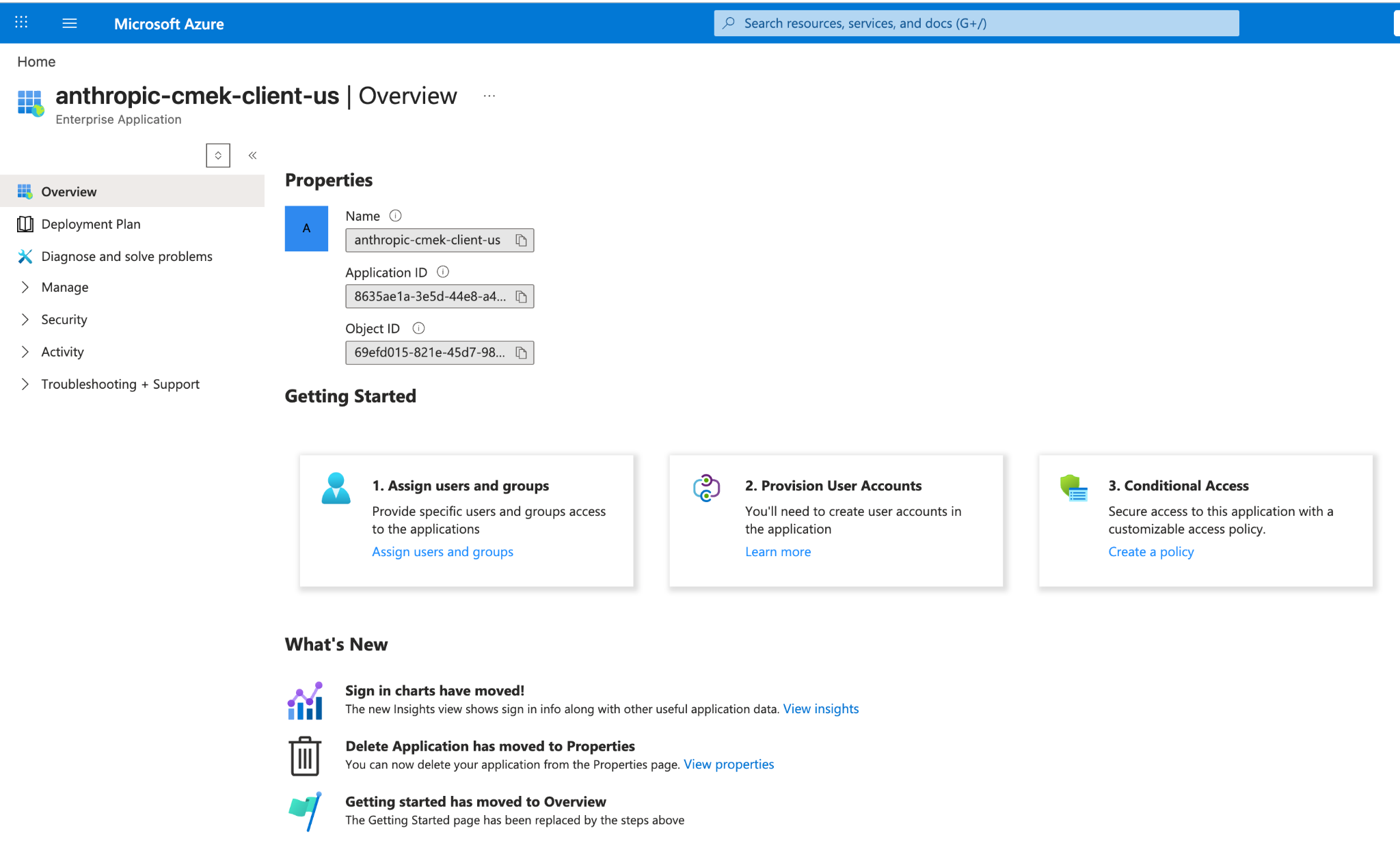
此步骤没有门户等效操作。如果您本地未安装 Azure CLI,请从门户顶部导航栏打开 Cloud Shell。命令成功后,您可以在 **Microsoft Entra ID > 企业应用程序**中,通过清除默认的应用程序类型筛选器并搜索 `anthropic-cmek-client-us` 来找到服务主体的对象 ID。
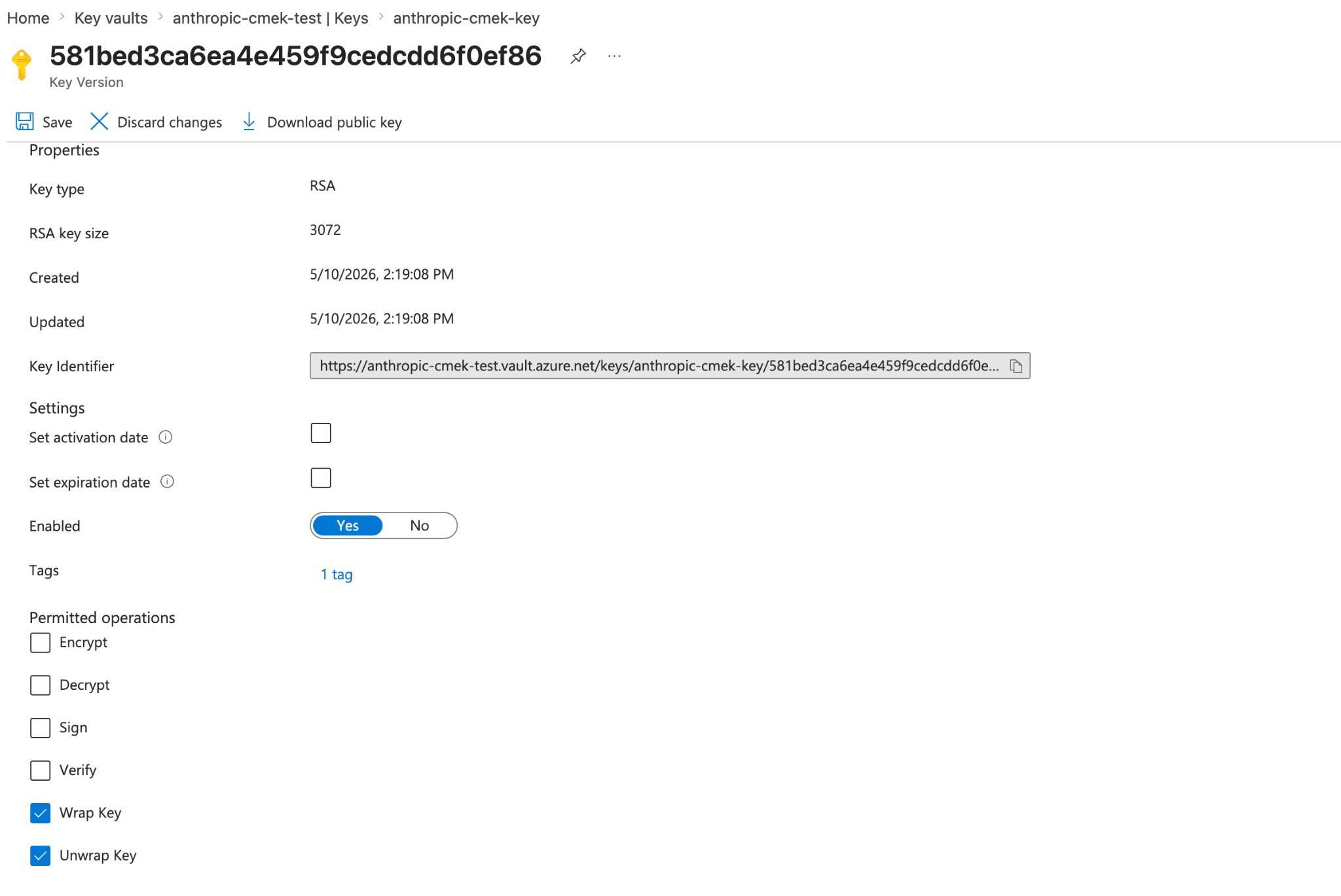
Azure Key Vault 不支持对称密钥包装,因此密钥必须是 RSA(3072 位或更大),并在其允许的操作中包含 `wrapKey` 和 `unwrapKey`。
`--tags` 选项添加组织标签 `anthropic-org-`,其值为 `true`,其中 `` 是您的 Anthropic 组织 ID(小写)。此标签是 Anthropic 验证密钥所必需的。
**查找您的组织 ID:** 在 Claude Console 的 [Organization](https://platform.claude.com/settings/organization) 页面(`platform.claude.com/settings/organization`)上复制 **Organization ID** 字段,或在 claude.ai 的 **Organization settings > Organization** 下复制,或从 [Organization Info](https://platform.claude.com/docs/zh-CN/api/organization/retrieve) 端点读取 `id` 字段。请使用纯 UUID,而不是带 `org_` 前缀的 ID。
```bash
az keyvault key create \
--vault-name \
--name \
--kty RSA --size 3072 \
--ops wrapKey unwrapKey \
--tags anthropic-org-=true
```
对于 HSM 支持的密钥,使用 `--kty RSA-HSM`(需要 Premium-SKU 保管库)。软件保护的 RSA 密钥对于此集成是可接受的。
从门户中,打开您的 Key Vault,选择 **Keys**,然后选择 **Generate/Import**。将密钥类型设置为 RSA,大小设置为 3072 或更大。要将密钥限制为仅包装和解包,请打开密钥版本,滚动到 **Permitted operations**,并取消选中除 **Wrap Key** 和 **Unwrap Key** 之外的所有内容。
在 **Create a key** 页面上,还要在 **Tags** 下添加组织标签。
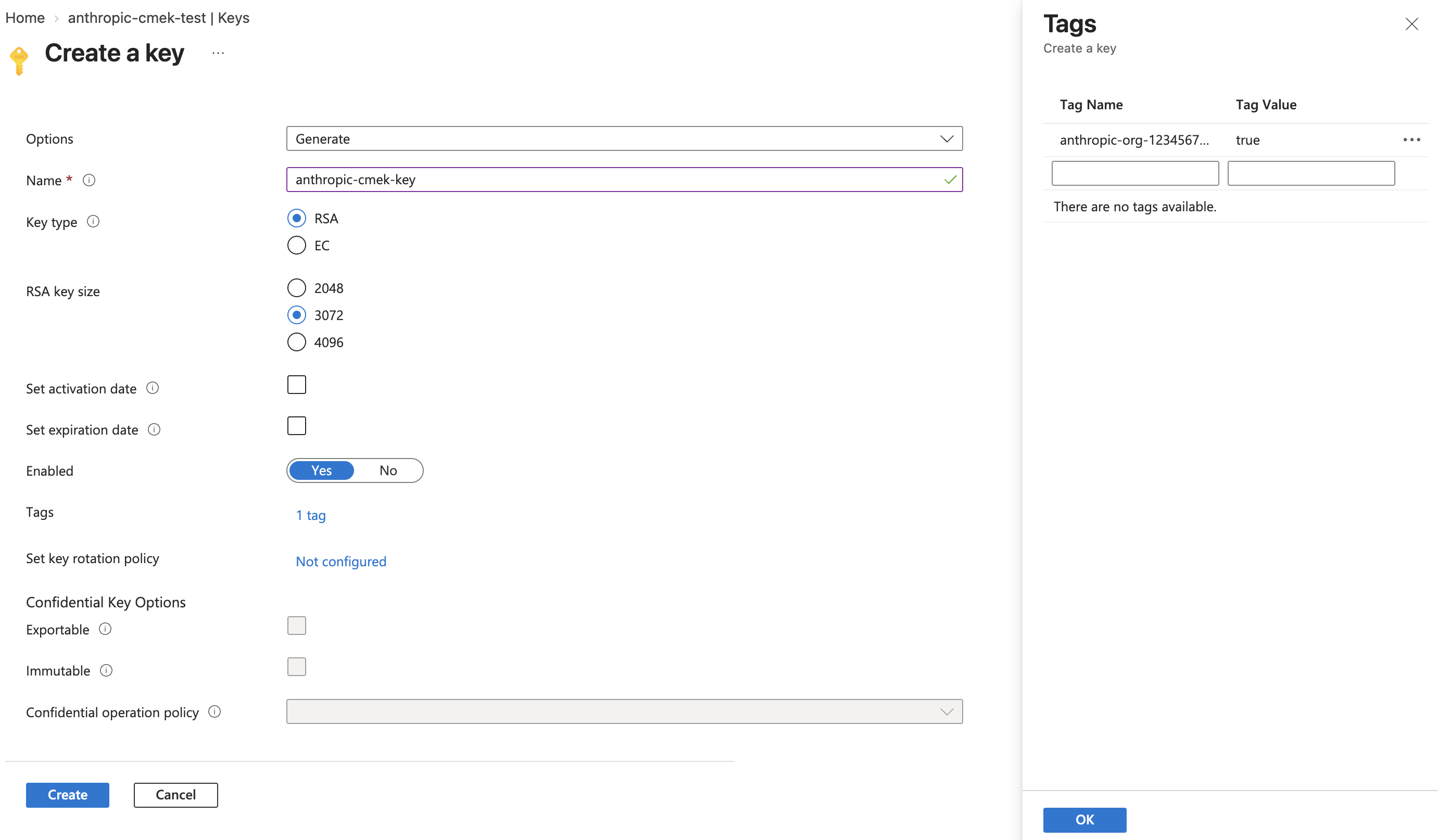
要在多个 Anthropic 组织之间共享一个密钥,请为每个组织添加一个这样的标签。一个密钥版本最多可以携带 15 个标签,包括您自己的标签。
要将标签添加到您已有的密钥,请在门户中打开密钥的当前版本,选择 **Tags** 旁边的链接,添加标签,然后单击 **Save**。使用 Azure CLI,运行 `az keyvault key set-attributes --vault-name --name --tags anthropic-org-=true`。其 `--tags` 选项会替换该版本的标签,因此还要将该版本已有的每个标签以 `name=value` 的形式放入 `--tags` 中。对于 Managed HSM 中的密钥,使用 `--hsm-name ` 而不是 `--vault-name`。
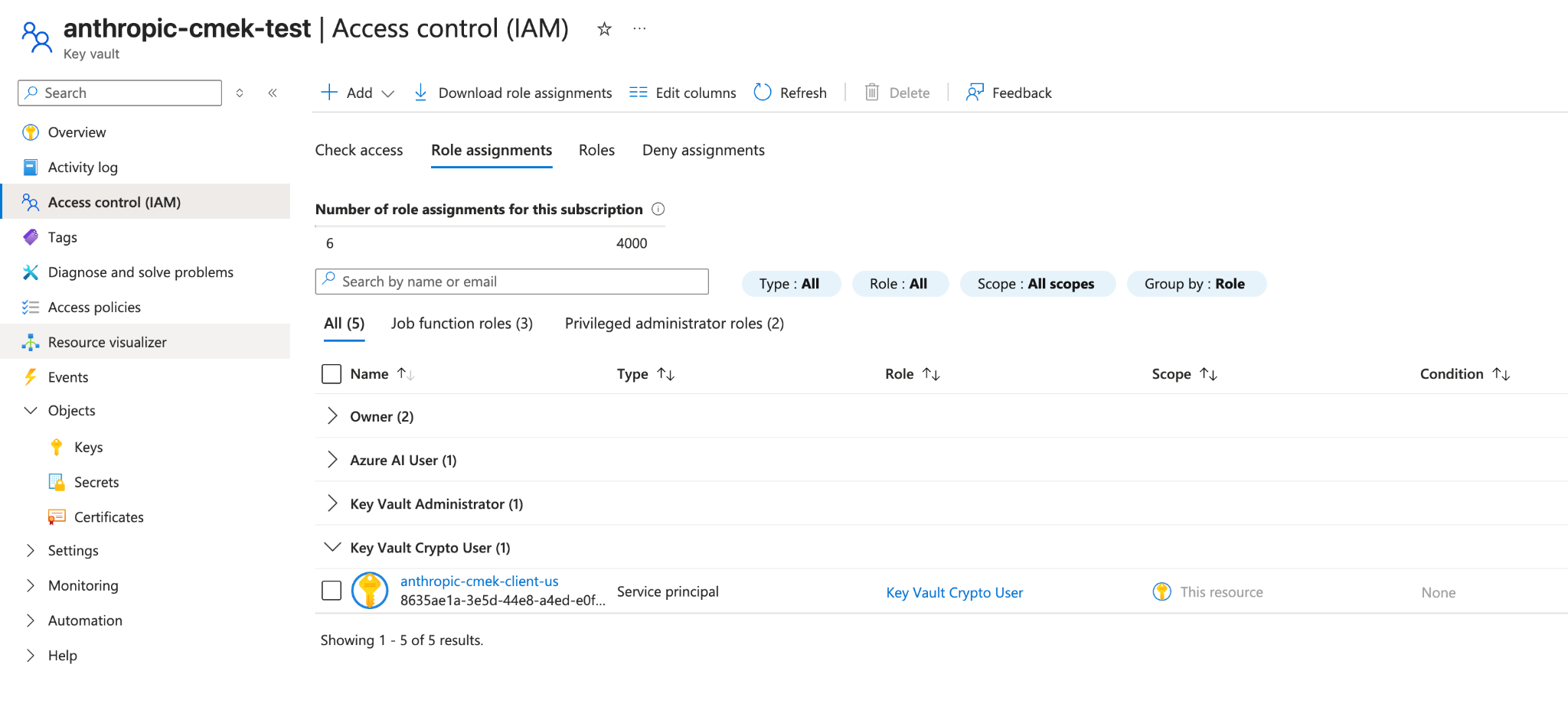
将 `Key Vault Crypto User` 角色分配给第一步中的服务主体,范围限定为**单个密钥**而不是整个保管库。
```bash
VAULT_ID=$(az keyvault show --name --query id -o tsv)
az role assignment create \
--role "Key Vault Crypto User" \
--assignee-object-id \
--assignee-principal-type ServicePrincipal \
--scope "${VAULT_ID}/keys/"
```
内置的 `Key Vault Crypto User` 角色在其分配的范围内授予密钥加密操作(加密、解密、包装、解包、签名、验证)以及密钥读取权限。您在上一步中对密钥设置的 `--ops wrapKey unwrapKey` 限制进一步缩小了针对此密钥可以成功执行的操作,因此实际上 Anthropic 只能包装和解包。
从门户中,打开**密钥**(而不是保管库),选择其 **Access control (IAM)** 选项卡,单击 **Add > Add role assignment**,选择 **Key Vault Crypto User**,并将其分配给 `anthropic-cmek-client-us` 服务主体。
**专用保管库替代方案:** Microsoft 建议每个应用程序使用专用保管库,并在保管库范围分配角色。如果您预配一个仅包含此 Anthropic CMEK 密钥的保管库,您可以改为在保管库范围分配角色,效果是相同的。当密钥位于共享保管库中时,请将范围限定为单个密钥。
```bash
az keyvault show --name \
--query "{rbac:properties.enableRbacAuthorization, purge:properties.enablePurgeProtection, pub:properties.publicNetworkAccess, net:properties.networkAcls.defaultAction, ipRules:properties.networkAcls.ipRules, uri:properties.vaultUri, tenantId:properties.tenantId}"
```
确认:
* `rbac` 为 `true`。
* `purge` 为 `true`。如果它为 `false` 或 `null`,请在继续之前在保管库上启用清除保护。如果没有它,软删除的密钥可能在保留窗口期间被永久清除,使您的 CMEK 保护数据无法恢复。
* `pub` 为 `"Enabled"`。如果它为 `"Disabled"`,Anthropic 无法通过其公共数据平面端点访问保管库,验证将失败。
* `net` 为 `"Allow"`,或者,如果它为 `"Deny"`,则 `ipRules` 包含 Anthropic 的出口范围(请联系 Anthropic 获取当前列表)。
* `uri` 是您注册密钥时使用的保管库 URI。
* `tenantId` 是管理保管库的租户。注册密钥时将此值用作 `tenant_id`,而不是您当前活动订阅的租户(在跨租户设置中两者可能不同)。
## 向 Anthropic 注册密钥
注册密钥的方式取决于您使用的产品。
您可以在 Claude Console 中或通过 Admin API 设置密钥,结果相同。
在 Claude Console 中,前往 [Data retention](https://platform.claude.com/settings/privacy#encryption-keys) 页面(`platform.claude.com/settings/privacy`)。如果您没有看到 **Encryption keys**,请从页面顶部的下拉菜单中选择 **Organization**。在 **Encryption keys** 下,单击 **Add key**。输入显示名称,选择 **Azure Key Vault**,然后单击 **Continue**。填写 **Vault URI**、**Key name** 和 **Tenant ID**,然后单击 **Add**。
密钥详细信息步骤会显示组织标签。在单击 **Add** 之前,按照[创建步骤](https://platform.claude.com/docs/zh-CN/manage-claude/cmek-azure-key-vault#organization-tag)中的描述将其添加到密钥。
在 **Encryption keys** 列表中,单击密钥旁边的 **Verify**。检查通过后会显示 **Connected**。如果失败,会显示一条说明原因的消息。
在 Claude Console 中,前往 [Data retention](https://platform.claude.com/settings/privacy) 页面(`platform.claude.com/settings/privacy`),并从页面顶部的下拉菜单中选择工作区。在 **Encryption key** 下,选择密钥,单击 **Save** 并确认。附加密钥后无法撤销。对于已在接收请求的工作区,密钥可能需要[最多一天才能生效](https://platform.claude.com/docs/zh-CN/manage-claude/cmek#how-it-works)。
通过 Admin API 创建外部密钥配置。
```bash cURL
curl -sS "https://api.anthropic.com/v1/organizations/external_keys" \
-H "x-api-key: $ANTHROPIC_API_KEY" \
-H "anthropic-version: 2023-06-01" \
-H "content-type: application/json" \
-d '{
"display_name": "",
"geo": "us",
"provider_config": {
"type": "azure",
"vault_uri": "https://.vault.azure.net/",
"key_name": "",
"tenant_id": ""
}
}'
```
```bash CLI
ant organization:external-keys create <<'YAML'
display_name: ""
geo: us
provider_config:
type: azure
vault_uri: "https://.vault.azure.net/"
key_name: ""
tenant_id: ""
YAML
```
```python Python
client = anthropic.Anthropic()
external_key = client.organization.external_keys.create(
display_name="",
geo="us",
provider_config={
"type": "azure",
"vault_uri": "https://.vault.azure.net/",
"key_name": "",
"tenant_id": "",
},
)
print(f"id: {external_key.id}")
print(f"display_name: {external_key.display_name}")
```
```typescript TypeScript
const client = new Anthropic();
const externalKey = await client.organization.externalKeys.create({
display_name: "",
geo: "us",
provider_config: {
type: "azure",
vault_uri: "https://.vault.azure.net/",
key_name: "",
tenant_id: ""
}
});
console.log(`id: ${externalKey.id}`);
console.log(`display_name: ${externalKey.display_name}`);
```
```csharp C#
using Anthropic.Models.Organization.ExternalKeys;
AnthropicClient client = new();
var externalKey = await client.Organization.ExternalKeys.Create(new()
{
DisplayName = "",
Geo = Geo.Us,
ProviderConfig = new AzureExternalKeyConfigParam
{
VaultUri = "https://.vault.azure.net/",
KeyName = "",
TenantID = ""
}
});
Console.WriteLine($"id: {externalKey.ID}");
Console.WriteLine($"display_name: {externalKey.DisplayName}");
```
```go Go
client := anthropic.NewClient()
externalKey, err := client.Organization.ExternalKeys.New(context.Background(), anthropic.OrganizationExternalKeyNewParams{
DisplayName: anthropic.String(""),
Geo: anthropic.OrganizationExternalKeyNewParamsGeoUs,
ProviderConfig: anthropic.OrganizationExternalKeyNewParamsProviderConfigUnion{
OfAzure: &anthropic.AzureExternalKeyConfigParam{
VaultURI: "https://.vault.azure.net/",
KeyName: "",
TenantID: "",
},
},
})
if err != nil {
log.Fatal(err)
}
fmt.Printf("id: %s\n", externalKey.ID)
fmt.Printf("display_name: %s\n", externalKey.DisplayName)
```
```java Java
import com.anthropic.models.organization.externalkeys.AzureExternalKeyConfigParam;
import com.anthropic.models.organization.externalkeys.ExternalKeyCreateParams;
void main() {
AnthropicClient client = AnthropicOkHttpClient.fromEnv();
var params = ExternalKeyCreateParams.builder()
.displayName("")
.geo(ExternalKeyCreateParams.Geo.US)
.providerConfig(AzureExternalKeyConfigParam.builder()
.vaultUri("https://.vault.azure.net/")
.keyName("")
.tenantId("")
.build())
.build();
var externalKey = client.organization().externalKeys().create(params);
IO.println("id: " + externalKey.id());
IO.println("display_name: " + externalKey.displayName().orElseThrow());
}
```
```php PHP
use Anthropic\Organization\ExternalKeys\ExternalKeyCreateParams\Geo;
// ...
$client = new Client();
$externalKey = $client->organization->externalKeys->create(
displayName: '',
geo: Geo::US,
providerConfig: [
'type' => 'azure',
'vaultURI' => 'https://.vault.azure.net/',
'keyName' => '',
'tenantID' => '',
],
);
echo "id: {$externalKey->id}\n";
echo "display_name: {$externalKey->displayName}\n";
```
```ruby Ruby
client = Anthropic::Client.new
external_key = client.organization.external_keys.create(
display_name: "",
geo: :us,
provider_config: {
type: :azure,
vault_uri: "https://.vault.azure.net/",
key_name: "",
tenant_id: ""
}
)
puts "id: #{external_key.id}"
puts "display_name: #{external_key.display_name}"
```
响应包含外部密钥 ID:
```json
{
"type": "external_key",
"id": "ekey_",
"display_name": ""
}
```
针对您的密钥触发一次加密和解密往返。这确认 Anthropic 可以向您的租户进行身份验证并执行包装和解包操作。
```bash cURL
curl -sS -X POST "https://api.anthropic.com/v1/organizations/external_keys/ekey_/validate" \
-H "x-api-key: $ANTHROPIC_API_KEY" \
-H "anthropic-version: 2023-06-01"
```
```bash CLI
ant organization:external-keys validate --external-key-id "ekey_"
```
```python Python
client = anthropic.Anthropic()
validation = client.organization.external_keys.validate("ekey_")
print(f"status: {validation.status}")
print(f"error: {validation.error}")
```
```typescript TypeScript
const client = new Anthropic();
const validation = await client.organization.externalKeys.validate("ekey_");
console.log(`status: ${validation.status}`);
console.log(`error: ${validation.error}`);
```
```csharp C#
AnthropicClient client = new();
var validation = await client.Organization.ExternalKeys.Validate("ekey_");
Console.WriteLine($"status: {validation.Status.Raw()}");
Console.WriteLine($"error: {validation.Error}");
```
```go Go
client := anthropic.NewClient()
validation, err := client.Organization.ExternalKeys.Validate(context.Background(), "ekey_")
if err != nil {
log.Fatal(err)
}
fmt.Printf("status: %s\n", validation.Status)
fmt.Printf("error: %s\n", validation.Error)
```
```java Java
AnthropicClient client = AnthropicOkHttpClient.fromEnv();
var validation = client.organization().externalKeys().validate("ekey_");
IO.println("status: " + validation.status().asString());
IO.println("error: " + validation.error().orElse(""));
```
```php PHP
$client = new Client();
$validation = $client->organization->externalKeys->validate(
externalKeyID: 'ekey_',
);
echo "status: {$validation->status}\n";
echo "error: {$validation->error}\n";
```
```ruby Ruby
client = Anthropic::Client.new
validation = client.organization.external_keys.validate("ekey_")
puts "status: #{validation.status}"
puts "error: #{validation.error}"
```
成功的响应如下所示:
```json
{ "type": "external_key_validation", "status": "success", "error": null }
```
如果验证失败,`error` 字段会描述问题。常见原因有:
* **RBAC 传播延迟:** 角色分配可能需要几分钟才能生效。请等待并重试。
* **网络 ACL 阻止 Anthropic:** 按照验证步骤中的描述确认公共网络访问和 `ipRules`。
* **工作负载标识上的条件访问策略:** 如果您的租户有针对服务主体的条件访问策略,请排除 Anthropic 服务主体,或将 Anthropic 的出口范围添加到策略的命名位置。
密钥验证通过后,在向该工作区发送任何请求之前将其附加到新工作区。对于已经接收请求的工作区,密钥可能需要[最多一天才能生效](https://platform.claude.com/docs/zh-CN/manage-claude/cmek#how-it-works)。
```bash cURL
curl -sS -X POST "https://api.anthropic.com/v1/organizations/workspaces/" \
-H "x-api-key: $ANTHROPIC_API_KEY" \
-H "anthropic-version: 2023-06-01" \
-H "content-type: application/json" \
-d '{
"external_key_id": "ekey_"
}'
```
```bash CLI
ant organization:workspaces update \
--workspace-id "" \
--external-key-id "ekey_"
```
```python Python
client = anthropic.Anthropic()
workspace = client.organization.workspaces.update(
"", external_key_id="ekey_"
)
print(f"id: {workspace.id}")
print(f"external_key_id: {workspace.external_key_id}")
```
```typescript TypeScript
const client = new Anthropic();
const workspace = await client.organization.workspaces.update("", {
external_key_id: "ekey_"
});
console.log(`id: ${workspace.id}`);
console.log(`external_key_id: ${workspace.external_key_id}`);
```
```csharp C#
AnthropicClient client = new();
var workspace = await client.Organization.Workspaces.Update("", new()
{
ExternalKeyID = "ekey_"
});
Console.WriteLine($"id: {workspace.ID}");
Console.WriteLine($"external_key_id: {workspace.ExternalKeyID}");
```
```go Go
client := anthropic.NewClient()
workspace, err := client.Organization.Workspaces.Update(
context.Background(),
"",
anthropic.OrganizationWorkspaceUpdateParams{
ExternalKeyID: anthropic.String("ekey_"),
},
)
if err != nil {
log.Fatal(err)
}
fmt.Printf("id: %s\n", workspace.ID)
fmt.Printf("external_key_id: %s\n", workspace.ExternalKeyID)
```
```java Java
import com.anthropic.models.organization.workspaces.WorkspaceUpdateParams;
void main() {
AnthropicClient client = AnthropicOkHttpClient.fromEnv();
var params = WorkspaceUpdateParams.builder()
.externalKeyId("ekey_")
.build();
var workspace = client.organization().workspaces().update("", params);
IO.println("id: " + workspace.id());
IO.println("external_key_id: " + workspace.externalKeyId().orElseThrow());
}
```
```php PHP
$client = new Client();
$workspace = $client->organization->workspaces->update(
workspaceID: '',
externalKeyID: 'ekey_',
);
echo "id: {$workspace->id}\n";
echo "external_key_id: {$workspace->externalKeyID}\n";
```
```ruby Ruby
client = Anthropic::Client.new
workspace = client.organization.workspaces.update(
"",
external_key_id: "ekey_"
)
puts "id: #{workspace.id}"
puts "external_key_id: #{workspace.external_key_id}"
```
在 [claude.ai > Organization settings > Data and privacy](https://claude.ai/admin-settings/data-privacy-controls) 中,打开 **Encryption keys**,然后单击 **Add key**。选择 **Azure**,输入验证步骤中的保管库 URI、密钥名称和租户 ID,然后单击 **Continue**。Anthropic 通过加密和解密往返来验证密钥。一旦显示为已验证,您的组织从那时起就受到 CMEK 保护。
在 Claude Enterprise 上,CMEK 适用于整个组织,因此没有单独的工作区附加步骤,并且一个组织只能有一个密钥。
## Terraform
对于基础设施即代码部署,相同的步骤映射到 `azurerm` 和 `azuread` 提供程序。