---
title: 提示快取
url: https://platform.claude.com/docs/zh-TW/build-with-claude/prompt-caching
description: 使用 `cache_control` 快取提示前綴以降低成本與延遲,可採用自動快取,或搭配 5 分鐘或 1 小時 TTL 的明確斷點。
---
「Prompt caching」(提示快取)可讓您從提示中的特定前綴繼續處理,藉此最佳化您的 API 使用。對於重複性任務或包含固定元素的提示,這能大幅縮短處理時間並降低成本。
若要了解「zero data retention」(零資料保留),即 ZDR 如何適用於此功能,請參閱 [API 與資料保留](https://platform.claude.com/docs/zh-TW/manage-claude/api-and-data-retention)。
啟用提示快取有兩種方式:
* **[自動快取](https://platform.claude.com/docs/zh-TW/build-with-claude/prompt-caching#automatic-caching)**:在請求的最上層加入單一 `cache_control` 欄位。系統會自動將「cache breakpoint」(快取斷點)套用到最後一個可快取的區塊,並隨著對話增長向前移動。最適合需要自動快取不斷增長之訊息歷史的多輪對話。
* **[明確快取斷點](https://platform.claude.com/docs/zh-TW/build-with-claude/prompt-caching#explicit-cache-breakpoints)**:將 `cache_control` 直接放在個別內容區塊上,以精細控制要快取的確切內容。
最簡單的入門方式是使用自動快取:
```bash cURL
curl https://api.anthropic.com/v1/messages \
-H "content-type: application/json" \
-H "x-api-key: $ANTHROPIC_API_KEY" \
-H "anthropic-version: 2023-06-01" \
-d '{
"model": "claude-opus-5-5",
"max_tokens": 1024,
"cache_control": {"type": "ephemeral"},
"system": "You are an AI assistant tasked with analyzing literary works. Your goal is to provide insightful commentary on themes, characters, and writing style.",
"messages": [
{
"role": "user",
"content": "Analyze the major themes in Pride and Prejudice."
}
]
}'
```
```bash CLI
ant messages create --transform usage <<'YAML'
model: claude-opus-5-5
max_tokens: 1024
cache_control:
type: ephemeral
system: >-
You are an AI assistant tasked with analyzing literary works. Your goal is
to provide insightful commentary on themes, characters, and writing style.
messages:
- role: user
content: Analyze the major themes in Pride and Prejudice.
YAML
```
```python Python
client = anthropic.Anthropic()
response = client.messages.create(
model="claude-opus-5-5",
max_tokens=1024,
cache_control={"type": "ephemeral"},
system="You are an AI assistant tasked with analyzing literary works. Your goal is to provide insightful commentary on themes, characters, and writing style.",
messages=[
{
"role": "user",
"content": "Analyze the major themes in 'Pride and Prejudice'.",
}
],
)
print(response.usage.model_dump_json())
```
```typescript TypeScript
const client = new Anthropic();
const response = await client.messages.create({
model: "claude-opus-5-5",
max_tokens: 1024,
cache_control: { type: "ephemeral" },
system:
"You are an AI assistant tasked with analyzing literary works. Your goal is to provide insightful commentary on themes, characters, and writing style.",
messages: [
{
role: "user",
content: "Analyze the major themes in 'Pride and Prejudice'."
}
]
});
console.log(response.usage);
```
```csharp C#
AnthropicClient client = new();
var parameters = new MessageCreateParams
{
Model = Model.ClaudeOpus5_5,
MaxTokens = 1024,
CacheControl = new CacheControlEphemeral(),
System = "You are an AI assistant tasked with analyzing literary works. Your goal is to provide insightful commentary on themes, characters, and writing style.",
Messages =
[
new()
{
Role = Role.User,
Content = "Analyze the major themes in 'Pride and Prejudice'."
}
]
};
var message = await client.Messages.Create(parameters);
Console.WriteLine(message.Usage);
```
```go Go
client := anthropic.NewClient()
response, err := client.Messages.New(context.TODO(), anthropic.MessageNewParams{
Model: anthropic.ModelClaudeOpus5_5,
MaxTokens: 1024,
CacheControl: anthropic.NewCacheControlEphemeralParam(),
System: []anthropic.TextBlockParam{
{Text: "You are an AI assistant tasked with analyzing literary works. Your goal is to provide insightful commentary on themes, characters, and writing style."},
},
Messages: []anthropic.MessageParam{
anthropic.NewUserMessage(anthropic.NewTextBlock("Analyze the major themes in 'Pride and Prejudice'.")),
},
})
if err != nil {
log.Fatal(err)
}
fmt.Println(response.Usage.RawJSON())
```
```java Java
import com.anthropic.models.messages.CacheControlEphemeral;
// ...
public class PromptCachingExample {
public static void main(String[] args) {
AnthropicClient client = AnthropicOkHttpClient.fromEnv();
MessageCreateParams params = MessageCreateParams.builder()
.model(Model.CLAUDE_OPUS_5_5)
.maxTokens(1024)
.cacheControl(CacheControlEphemeral.builder().build())
.system("You are an AI assistant tasked with analyzing literary works. Your goal is to provide insightful commentary on themes, characters, and writing style.")
.addUserMessage("Analyze the major themes in 'Pride and Prejudice'.")
.build();
Message message = client.messages().create(params);
System.out.println(message.usage());
}
}
```
```php PHP
use Anthropic\Messages\CacheControlEphemeral;
// ...
$client = new Client();
$response = $client->messages->create(
maxTokens: 1024,
messages: [
['role' => 'user', 'content' => "Analyze the major themes in 'Pride and Prejudice'."]
],
model: 'claude-opus-5-5',
cacheControl: CacheControlEphemeral::with(),
system: "You are an AI assistant tasked with analyzing literary works. Your goal is to provide insightful commentary on themes, characters, and writing style.",
);
echo json_encode($response->usage);
```
```ruby Ruby
client = Anthropic::Client.new
response = client.messages.create(
model: "claude-opus-5-5",
max_tokens: 1024,
cache_control: {type: "ephemeral"},
system: "You are an AI assistant tasked with analyzing literary works. Your goal is to provide insightful commentary on themes, characters, and writing style.",
messages: [
{
role: "user",
content: "Analyze the major themes in 'Pride and Prejudice'."
}
]
)
puts response.usage
```
使用自動快取時,系統會快取直到最後一個可快取區塊(含該區塊)為止的所有內容。在後續具有相同前綴的請求中,快取內容會自動被重複使用。
***
## 提示快取的運作方式
當您傳送啟用提示快取的請求時:
1. 系統會檢查直到指定快取斷點為止的提示前綴,是否已因近期的查詢而被快取。
2. 若找到,系統會使用快取版本,以縮短處理時間並降低成本。
3. 否則,系統會處理完整提示,並在回應開始時快取該前綴。
這在以下情況特別有用:
* 包含大量範例的提示
* 大量上下文或背景資訊
* 具有一致指示的重複性任務
* 冗長的多輪對話
預設情況下,快取的存留時間為 5 分鐘。每次使用快取內容時,快取都會免費重新整理。
存留時間是從寫入或讀取快取項目的請求開始時起算,而非從其回應結束時起算。生成回應所花費的時間會計入存留時間:如果某個回應需要 4 分鐘才能串流完成,則重複使用相同快取前綴的後續請求,必須在該回應完成後約 1 分鐘內開始。
如果您覺得 5 分鐘太短,Anthropic 也提供 1 小時的快取期限,[需額外付費](https://platform.claude.com/docs/zh-TW/build-with-claude/prompt-caching#pricing)。
如需更多資訊,請參閱 [1 小時快取期限](https://platform.claude.com/docs/zh-TW/build-with-claude/prompt-caching#1-hour-cache-duration)。
**提示快取會快取完整前綴**
提示快取會參照整個提示:`tools`、`system` 和 `messages`(依此順序),直到以 `cache_control` 指定的區塊(含該區塊)為止。
***
## 定價
提示快取引入了新的定價結構。下表顯示每個支援模型每百萬 token 的價格:
| Model | Base input tokens | 5m cache writes | 1h cache writes | Cache hits and refreshes | Output tokens |
| :-------------------------------------------------------------------------------------------------------------------------------------- | :---------------- | :-------------- | :-------------- | :----------------------- | :------------ |
| Claude Fable 5.1 | $10 / MTok | $12.50 / MTok | $20 / MTok | $0.25 / MTok1 | $50 / MTok |
| Claude Mythos 5.1 ([limited availability](https://support.claude.com/en/articles/14604842)) | $10 / MTok | $12.50 / MTok | $20 / MTok | $0.25 / MTok1 | $50 / MTok |
| Claude Fable 5 | $10 / MTok | $12.50 / MTok | $20 / MTok | $1 / MTok | $50 / MTok |
| Claude Mythos 5 ([limited availability](https://support.claude.com/en/articles/14604842)) | $10 / MTok | $12.50 / MTok | $20 / MTok | $1 / MTok | $50 / MTok |
| Claude Opus 5.5 | $4 / MTok | $5 / MTok | $8 / MTok | $0.20 / MTok2 | $20 / MTok |
| Claude Opus 5 | $5 / MTok | $6.25 / MTok | $10 / MTok | $0.50 / MTok | $25 / MTok |
| Claude Opus 4.8 | $5 / MTok | $6.25 / MTok | $10 / MTok | $0.50 / MTok | $25 / MTok |
| Claude Opus 4.7 | $5 / MTok | $6.25 / MTok | $10 / MTok | $0.50 / MTok | $25 / MTok |
| Claude Opus 4.6 | $5 / MTok | $6.25 / MTok | $10 / MTok | $0.50 / MTok | $25 / MTok |
| Claude Opus 4.5 | $5 / MTok | $6.25 / MTok | $10 / MTok | $0.50 / MTok | $25 / MTok |
| Claude Opus 4.1 ([retired, except on Bedrock and Google Cloud](https://platform.claude.com/docs/zh-TW/about-claude/model-deprecations)) | $15 / MTok | $18.75 / MTok | $30 / MTok | $1.50 / MTok | $75 / MTok |
| Claude Opus 4 ([retired, except on Google Cloud](https://platform.claude.com/docs/zh-TW/about-claude/model-deprecations)) | $15 / MTok | $18.75 / MTok | $30 / MTok | $1.50 / MTok | $75 / MTok |
| Claude Sonnet 5.5 | $2 / MTok | $2.50 / MTok | $4 / MTok | $0.10 / MTok2 | $10 / MTok |
| Claude Sonnet 5 | $2 / MTok | $2.50 / MTok | $4 / MTok | $0.20 / MTok | $10 / MTok |
| Claude Sonnet 4.6 | $3 / MTok | $3.75 / MTok | $6 / MTok | $0.30 / MTok | $15 / MTok |
| Claude Sonnet 4.5 | $3 / MTok | $3.75 / MTok | $6 / MTok | $0.30 / MTok | $15 / MTok |
| Claude Sonnet 4 ([retired, except on Bedrock and Google Cloud](https://platform.claude.com/docs/zh-TW/about-claude/model-deprecations)) | $3 / MTok | $3.75 / MTok | $6 / MTok | $0.30 / MTok | $15 / MTok |
| Claude Haiku 5.5 (for prompts up to 100,000 tokens) | $0.10 / MTok | $0.125 / MTok | $0.20 / MTok | $0.01 / MTok | $0.50 / MTok |
| Claude Haiku 5.5 (for prompts over 100,000 tokens) | $0.50 / MTok | $0.625 / MTok | $1 / MTok | $0.05 / MTok | $2.50 / MTok |
| Claude Haiku 4.5 | $1 / MTok | $1.25 / MTok | $2 / MTok | $0.10 / MTok | $5 / MTok |
| Claude Haiku 3.5 ([retired, except on Google Cloud](https://platform.claude.com/docs/zh-TW/about-claude/model-deprecations)) | $0.80 / MTok | $1 / MTok | $1.60 / MTok | $0.08 / MTok | $4 / MTok |
*1 Cache hits and refreshes on Claude Fable 5.1 and Claude Mythos 5.1 are priced at 0.025x the base input price.*
*2 Cache hits and refreshes on Claude Opus 5.5 and Claude Sonnet 5.5 are priced at 0.05x the base input price.*
*All other models use the standard 0.1x multiplier.*
上表反映了提示快取的以下定價倍數:
* 5 分鐘快取寫入 token 為基本輸入 token 價格的 1.25 倍
* 1 小時快取寫入 token 為基本輸入 token 價格的 2 倍
* 快取讀取 token 為基本輸入 token 價格的 0.1 倍(各模型的例外情況請參閱表格註腳)
這些倍數會與其他定價調整因素疊加,例如 Batch API 折扣、[長上下文定價](https://platform.claude.com/docs/zh-TW/about-claude/pricing#long-context-pricing)以及資料駐留。在依提示長度定價的模型上,快取讀取與快取寫入都會計入請求的提示長度。完整詳情請參閱[定價](https://platform.claude.com/docs/zh-TW/about-claude/pricing)。
***
## 支援的模型
所有[現行 Claude 模型](https://platform.claude.com/docs/zh-TW/models/overview)皆支援提示快取(包括自動與明確兩種方式)。
***
## 自動快取
自動快取是啟用提示快取最簡單的方式。您不需要在個別內容區塊上放置 `cache_control`,只需在請求主體的最上層加入單一 `cache_control` 欄位。系統會自動將快取斷點套用到最後一個可快取的區塊。
```bash cURL
curl https://api.anthropic.com/v1/messages \
-H "content-type: application/json" \
-H "x-api-key: $ANTHROPIC_API_KEY" \
-H "anthropic-version: 2023-06-01" \
-d '{
"model": "claude-opus-5-5",
"max_tokens": 1024,
"cache_control": {"type": "ephemeral"},
"system": "You are a helpful assistant that remembers our conversation.",
"messages": [
{"role": "user", "content": "My name is Alex. I work on machine learning."},
{"role": "assistant", "content": "Nice to meet you, Alex! How can I help with your ML work today?"},
{"role": "user", "content": "What did I say I work on?"}
]
}'
```
```bash CLI
ant messages create --transform usage <<'YAML'
model: claude-opus-5-5
max_tokens: 1024
cache_control:
type: ephemeral
system: You are a helpful assistant that remembers our conversation.
messages:
- role: user
content: My name is Alex. I work on machine learning.
- role: assistant
content: Nice to meet you, Alex! How can I help with your ML work today?
- role: user
content: What did I say I work on?
YAML
```
```python Python
client = anthropic.Anthropic()
response = client.messages.create(
model="claude-opus-5-5",
max_tokens=1024,
cache_control={"type": "ephemeral"},
system="You are a helpful assistant that remembers our conversation.",
messages=[
{"role": "user", "content": "My name is Alex. I work on machine learning."},
{
"role": "assistant",
"content": "Nice to meet you, Alex! How can I help with your ML work today?",
},
{"role": "user", "content": "What did I say I work on?"},
],
)
print(response.usage.model_dump_json())
```
```typescript TypeScript
const client = new Anthropic();
const response = await client.messages.create({
model: "claude-opus-5-5",
max_tokens: 1024,
cache_control: { type: "ephemeral" },
system: "You are a helpful assistant that remembers our conversation.",
messages: [
{ role: "user", content: "My name is Alex. I work on machine learning." },
{
role: "assistant",
content: "Nice to meet you, Alex! How can I help with your ML work today?"
},
{ role: "user", content: "What did I say I work on?" }
]
});
console.log(response.usage);
```
```csharp C#
AnthropicClient client = new();
var parameters = new MessageCreateParams
{
Model = Model.ClaudeOpus5_5,
MaxTokens = 1024,
CacheControl = new CacheControlEphemeral(),
System = "You are a helpful assistant that remembers our conversation.",
Messages =
[
new()
{
Role = Role.User,
Content = "My name is Alex. I work on machine learning."
},
new()
{
Role = Role.Assistant,
Content = "Nice to meet you, Alex! How can I help with your ML work today?"
},
new()
{
Role = Role.User,
Content = "What did I say I work on?"
}
]
};
var message = await client.Messages.Create(parameters);
Console.WriteLine(message.Usage);
```
```go Go
client := anthropic.NewClient()
response, err := client.Messages.New(context.TODO(), anthropic.MessageNewParams{
Model: anthropic.ModelClaudeOpus5_5,
MaxTokens: 1024,
CacheControl: anthropic.NewCacheControlEphemeralParam(),
System: []anthropic.TextBlockParam{
{Text: "You are a helpful assistant that remembers our conversation."},
},
Messages: []anthropic.MessageParam{
anthropic.NewUserMessage(anthropic.NewTextBlock("My name is Alex. I work on machine learning.")),
anthropic.NewAssistantMessage(anthropic.NewTextBlock("Nice to meet you, Alex! How can I help with your ML work today?")),
anthropic.NewUserMessage(anthropic.NewTextBlock("What did I say I work on?")),
},
})
if err != nil {
log.Fatal(err)
}
fmt.Println(response.Usage.RawJSON())
```
```java Java
import com.anthropic.models.messages.CacheControlEphemeral;
// ...
public class AutomaticCachingExample {
public static void main(String[] args) {
AnthropicClient client = AnthropicOkHttpClient.fromEnv();
MessageCreateParams params = MessageCreateParams.builder()
.model(Model.CLAUDE_OPUS_5_5)
.maxTokens(1024)
.cacheControl(CacheControlEphemeral.builder().build())
.system("You are a helpful assistant that remembers our conversation.")
.addUserMessage("My name is Alex. I work on machine learning.")
.addAssistantMessage("Nice to meet you, Alex! How can I help with your ML work today?")
.addUserMessage("What did I say I work on?")
.build();
Message message = client.messages().create(params);
System.out.println(message.usage());
}
}
```
```php PHP
use Anthropic\Messages\CacheControlEphemeral;
// ...
$client = new Client();
$response = $client->messages->create(
maxTokens: 1024,
messages: [
['role' => 'user', 'content' => 'My name is Alex. I work on machine learning.'],
['role' => 'assistant', 'content' => 'Nice to meet you, Alex! How can I help with your ML work today?'],
['role' => 'user', 'content' => 'What did I say I work on?'],
],
model: 'claude-opus-5-5',
cacheControl: CacheControlEphemeral::with(),
system: 'You are a helpful assistant that remembers our conversation.',
);
echo json_encode($response->usage);
```
```ruby Ruby
client = Anthropic::Client.new
response = client.messages.create(
model: "claude-opus-5-5",
max_tokens: 1024,
cache_control: {type: "ephemeral"},
system: "You are a helpful assistant that remembers our conversation.",
messages: [
{role: "user", content: "My name is Alex. I work on machine learning."},
{role: "assistant", content: "Nice to meet you, Alex! How can I help with your ML work today?"},
{role: "user", content: "What did I say I work on?"}
]
)
puts response.usage
```
### 自動快取在多輪對話中的運作方式
使用自動快取時,快取點會隨著對話增長自動向前移動。每個新請求都會快取直到最後一個可快取區塊為止的所有內容,而先前的內容則從快取中讀取。
| 請求 | 內容 | 快取行為 |
| ---- | --------------------------------------------------------------------------------------------------------- | --------------------------------------------------- |
| 請求 1 | System
+ User(1) + Asst(1)
+ **User(2)** ◀ 快取 | 所有內容寫入快取 |
| 請求 2 | System
+ User(1) + Asst(1)
+ User(2) + Asst(2)
+ **User(3)** ◀ 快取 | System 至 User(2) 從快取讀取;
Asst(2) + User(3) 寫入快取 |
| 請求 3 | System
+ User(1) + Asst(1)
+ User(2) + Asst(2)
+ User(3) + Asst(3)
+ **User(4)** ◀ 快取 | System 至 User(3) 從快取讀取;
Asst(3) + User(4) 寫入快取 |
快取斷點會自動移動到每個請求中的最後一個可快取區塊,因此隨著對話增長,您不需要更新任何 `cache_control` 標記。
### TTL 支援
預設情況下,自動快取使用 5 分鐘的「time to live」(存留時間),即 TTL。您可以指定 1 小時的 TTL,價格為基本輸入 token 價格的 2 倍:
```json
{ "cache_control": { "type": "ephemeral", "ttl": "1h" } }
```
### 與區塊層級快取結合使用
自動快取與[明確快取斷點](https://platform.claude.com/docs/zh-TW/build-with-claude/prompt-caching#explicit-cache-breakpoints)相容。兩者一起使用時,自動快取斷點會佔用 4 個可用斷點位置中的一個。
這讓您可以結合兩種方法。例如,使用明確斷點來快取您的系統提示,同時由自動快取處理對話:
```json
{
"model": "claude-opus-5-5",
"max_tokens": 1024,
"cache_control": { "type": "ephemeral" },
"system": [
{
"type": "text",
"text": "You are a helpful assistant.",
"cache_control": { "type": "ephemeral" }
}
],
"messages": [{ "role": "user", "content": "What are the key terms?" }]
}
```
### 保持不變的部分
自動快取使用相同的底層快取基礎架構。定價、最低 token 門檻、上下文排序要求,以及 20 個區塊的「lookback window」(回溯視窗),皆與明確斷點的情況相同。
### 邊界情況
* 如果最後一個區塊已有相同 TTL 的明確 `cache_control`,自動快取不會產生任何作用。
* 如果最後一個區塊有不同 TTL 的明確 `cache_control`,API 會傳回 400 錯誤。
* 如果已存在 4 個明確的區塊層級斷點,API 會傳回 400 錯誤(沒有剩餘位置可供自動快取使用)。
* 如果最後一個區塊不符合作為自動快取斷點目標的資格,系統會靜默地向後尋找最近的合格區塊。如果找不到,則會略過快取。
除了舊版 [Amazon Bedrock(Opus 4.6 及更早版本)](https://platform.claude.com/docs/zh-TW/build-with-claude/claude-on-amazon-bedrock-legacy)整合之外,所有平台皆提供自動快取。在該整合上,API 會對最上層的 `cache_control` 欄位傳回 400 錯誤,因此請改用[明確快取斷點](https://platform.claude.com/docs/zh-TW/build-with-claude/prompt-caching#explicit-cache-breakpoints)。
***
## 明確快取斷點
若要更精細地控制快取,您可以將 `cache_control` 直接放在個別內容區塊上。當您需要快取以不同頻率變更的不同區段,或需要精細控制要快取的確切內容時,這會很有用。
### 建構您的提示
將靜態內容(工具定義、系統指示、上下文、範例)放在提示的開頭。使用 `cache_control` 參數標記可重複使用內容的結尾以進行快取。
快取前綴依以下順序建立:`tools`、`system`,然後是 `messages`。此順序形成一個階層結構,每個層級都建立在前面的層級之上。
#### 自動前綴檢查的運作方式
您可以只在靜態內容的結尾使用一個快取斷點,系統會自動找出先前請求已寫入快取的最長前綴。了解其運作方式有助於您最佳化快取策略。
**三個核心原則:**
1. **快取寫入只會發生在您的斷點處。** 以 `cache_control` 標記區塊時,只會寫入一個快取項目:以該區塊結尾之前綴的雜湊值。系統不會為任何更早的位置寫入項目。由於雜湊值是累積的,涵蓋直到斷點(含斷點)為止的所有內容,因此變更斷點處或斷點之前的任何區塊,都會在下一個請求中產生不同的雜湊值。
2. **快取讀取會向後尋找先前請求所寫入的項目。** 在每個請求中,系統會計算您斷點處的前綴雜湊值,並檢查是否有相符的快取項目。如果不存在,系統會一次向後移動一個區塊,檢查每個較早位置的前綴雜湊值是否與快取中已有的內容相符。系統尋找的是先前的寫入,而非穩定的內容。
3. **回溯視窗為 20 個區塊。** 系統每個斷點最多檢查 20 個位置,斷點本身算作第一個。如果系統在該視窗內找不到相符的項目,檢查就會停止(或從下一個明確斷點繼續,如果有的話)。在 Claude API 上,一連串連續的 `tool_use` 區塊算作一個位置,一連串連續的 `tool_result` 區塊也是如此,因此包含許多平行工具呼叫的回合本身不會將先前請求的項目推出視窗之外。
**範例:在不斷增長的對話中回溯**
您每個回合都附加新區塊,並在每個請求的最後一個區塊上設定 `cache_control`:
* **第 1 回合:** 10 個區塊,斷點在區塊 10。不存在任何先前的快取項目。系統在區塊 10 寫入一個項目。
* **第 2 回合:** 15 個區塊,斷點在區塊 15。區塊 15 沒有項目,因此系統向後移動到區塊 10,並找到第 1 回合的項目。在區塊 10 發生「cache hit」(快取命中);系統只需重新處理區塊 11 到 15,並在區塊 15 寫入新項目。
* **第 3 回合:** 35 個區塊,斷點在區塊 35。系統檢查 20 個位置(區塊 35 到 16),但什麼都沒找到。第 2 回合在區塊 15 的項目位於視窗外一個位置,因此沒有快取命中。在區塊 15 加入第二個斷點,會在該處開始第二個回溯視窗,從而找到第 2 回合的項目。
**常見錯誤:將斷點放在每個請求都會變更的內容上**
您的提示有一個大型靜態系統上下文(區塊 1 到 5),後面接著一個包含時間戳記和使用者訊息的每請求區塊(區塊 6)。您在區塊 6 上設定了 `cache_control`:
* **請求 1:** 在區塊 6 進行快取寫入。雜湊值包含時間戳記。
* **請求 2:** 時間戳記不同,因此區塊 6 的前綴雜湊值也不同。回溯會依序檢查區塊 5、4、3、2 和 1,但系統從未在這些位置寫入任何項目。沒有快取命中。您每個請求都要為新的快取寫入付費,卻從未獲得讀取。
回溯不會找出斷點後方的穩定內容並加以快取。它只會找到先前請求已寫入的項目,而寫入只會發生在斷點處。將 `cache_control` 移到區塊 5,也就是在各請求間保持不變的最後一個區塊,之後的每個請求都會讀取快取的前綴。[自動快取](https://platform.claude.com/docs/zh-TW/build-with-claude/prompt-caching#automatic-caching)也會落入相同的陷阱:它會將斷點放在最後一個可快取區塊上,而在此結構中,該區塊正是每個請求都會變更的區塊,因此請改為在區塊 5 上使用明確斷點。
**重點摘要:** 將 `cache_control` 放在您希望共用快取的各請求之間,前綴完全相同的最後一個區塊上。在不斷增長的對話中,只要每個回合新增的區塊少於 20 個,最後一個區塊就能正常運作:較早的內容永遠不會變更,因此下一個請求的回溯會找到先前的寫入。對於具有變動後綴(時間戳記、每請求上下文、傳入訊息)的提示,請將斷點放在靜態前綴的結尾,而非變動的區塊上。
#### 何時使用多個斷點
如果您想要達成以下目的,可以定義最多 4 個快取斷點:
* 快取以不同頻率變更的不同區段(例如,工具很少變更,但上下文每天更新)
* 更精確地控制要快取的內容
* 當不斷增長的對話將您的斷點推到距離上次快取寫入 20 個或更多區塊之外時,確保快取命中
**重要限制:** 回溯只能找到先前請求已寫入的項目。如果不斷增長的對話將您的斷點推到距離上次寫入 20 個或更多區塊之外,回溯視窗就會錯過它。請從一開始就在更接近該位置處加入第二個斷點,讓寫入在您需要之前就已在該處累積。
### 了解快取斷點的成本
**快取斷點本身不會增加任何成本。** 您只需為以下項目付費:
* **快取寫入:** 當新內容寫入快取時(5 分鐘 TTL 比基本輸入 token 多 25%)
* **快取讀取:** 當使用快取內容時(基本輸入 token 價格的 10%,在 Claude Fable 5.1 和 Claude Mythos 5.1 上為 2.5%,在 Claude Opus 5.5 和 Claude Sonnet 5.5 上為 5%)
* **一般輸入 token:** 任何未快取的內容
新增更多 `cache_control` 斷點不會增加您的成本;您仍然根據實際快取和讀取的內容支付相同的金額。斷點讓您能夠控制哪些區段可以獨立快取。
***
## 快取策略與注意事項
### 快取限制
在 Claude API、[Claude Platform on AWS](https://platform.claude.com/docs/zh-TW/build-with-claude/claude-platform-on-aws)、[Google Cloud](https://platform.claude.com/docs/zh-TW/build-with-claude/claude-on-vertex-ai) 和 [Microsoft Foundry](https://platform.claude.com/docs/zh-TW/build-with-claude/claude-in-microsoft-foundry) 上,最小可快取提示長度為:
* Claude Fable 5.1、[Claude Mythos 5.1](https://platform.claude.com/docs/zh-TW/models/mythos-5-1/overview)、Claude Opus 5.5、Claude Opus 5、Claude Sonnet 5.5、Claude Fable 5、[Claude Mythos 5](https://platform.claude.com/docs/zh-TW/models/mythos-5/overview) 和 Claude Haiku 5.5 為 512 個 token
* [Claude Mythos Preview](https://anthropic.com/glasswing) 和 Claude Opus 4.7 為 2,048 個 token
* Claude Opus 4.6 和 Claude Opus 4.5 為 4,096 個 token
* Claude Opus 4.8、Claude Sonnet 5、Claude Sonnet 4.6、Claude Sonnet 4.5([已棄用](https://platform.claude.com/docs/zh-TW/about-claude/model-deprecations))、Claude Opus 4.1([已停用,Bedrock 和 Google Cloud 除外](https://platform.claude.com/docs/zh-TW/about-claude/model-deprecations))、Claude Opus 4([已停用,Google Cloud 除外](https://platform.claude.com/docs/zh-TW/about-claude/model-deprecations))和 Claude Sonnet 4([已停用,Bedrock 和 Google Cloud 除外](https://platform.claude.com/docs/zh-TW/about-claude/model-deprecations))為 1,024 個 token
* Claude Haiku 4.5 為 4,096 個 token
* Claude Haiku 3.5([已停用,Google Cloud 除外](https://platform.claude.com/docs/zh-TW/about-claude/model-deprecations))為 2,048 個 token
這些最低要求適用於提供各模型的每個平台。
較短的提示無法被快取,即使已標記 `cache_control` 也一樣。任何快取少於此 token 數量的請求都會在不使用快取的情況下處理,且不會傳回錯誤。若要確認提示是否已被快取,請檢查[回應的 usage 欄位](https://platform.claude.com/docs/zh-TW/build-with-claude/prompt-caching#tracking-cache-performance):如果 `cache_creation_input_tokens` 和 `cache_read_input_tokens` 都是 0,表示提示未被快取(可能是因為未達到最低長度要求)。
如果您的提示只差一點就達到您的模型和平台的最低要求,擴充快取內容以達到門檻通常是值得的。快取讀取的成本遠低於未快取的輸入 token,因此對於經常重複使用的提示,達到最低要求可以降低成本。
[Bedrock](https://platform.claude.com/docs/zh-TW/build-with-claude/claude-in-amazon-bedrock) 是由 AWS 營運的平台。在 Bedrock 上,請參閱 [Bedrock 提示快取文件](https://docs.aws.amazon.com/bedrock/latest/userguide/prompt-caching.html),以了解適用的各模型最低要求、失敗行為和 usage 欄位名稱。
對於並行請求,請注意快取項目只有在第一個回應開始後才會可用。如果您需要平行請求的快取命中,請等待第一個回應後再傳送後續請求。
目前,「ephemeral」是唯一支援的快取類型,預設存留時間為 5 分鐘。
### 可以快取的內容
請求中的大多數區塊都可以被快取。這包括:
* 工具:`tools` 陣列中的工具定義
* 系統訊息:`system` 陣列中的內容區塊
* 文字訊息:`messages.content` 陣列中的內容區塊,適用於使用者和助理回合
* 圖片與文件:`messages.content` 陣列中的內容區塊,位於使用者回合中
* 工具使用與工具結果:`messages.content` 陣列中的內容區塊,適用於使用者和助理回合
這些元素都可以被快取,無論是自動快取,還是透過以 `cache_control` 標記。
### 無法快取的內容
雖然大多數請求區塊都可以被快取,但仍有一些例外:
* 思考區塊無法直接以 `cache_control` 快取。不過,當思考區塊出現在先前的助理回合中時,它們「可以」與其他內容一起被快取。以這種方式快取時,從快取讀取時它們「確實」會計為輸入 token。
* 子內容區塊(例如[引用](https://platform.claude.com/docs/zh-TW/build-with-claude/citations))本身無法直接快取。請改為快取最上層區塊。
以引用為例,作為引用來源資料的最上層文件內容區塊可以被快取。這讓您可以透過快取引用將參照的文件,有效地將提示快取與引用搭配使用。
* 空白文字區塊無法被快取。
### 導致快取失效的因素
修改快取內容可能會使部分或全部快取失效。
如[建構您的提示](https://platform.claude.com/docs/zh-TW/build-with-claude/prompt-caching#structuring-your-prompt)中所述,快取遵循以下階層結構:`tools` → `system` → `messages`。每個層級的變更都會使該層級及所有後續層級失效。
下表顯示不同類型的變更會使快取的哪些部分失效。✘ 表示快取失效,而 ✓ 表示快取仍然有效。
| 變更內容 | 工具快取 | 系統快取 | 訊息快取 | 影響 |
| ------------------- | ----- | ----- | ----- | ------------------------------------------------------------------------------------------------------------------------------------------------------------------------------------------------------------------------------------------------------------------------------------------------------------------------------------------------------------ |
| **工具定義** | ✘ | ✘ | ✘ | 修改工具定義(名稱、描述、參數)會使整個快取失效 |
| **網頁搜尋切換** | ✓ | ✘ | ✘ | 啟用/停用網頁搜尋會修改系統提示 |
| **引用切換** | ✓ | ✘ | ✘ | 啟用/停用引用會修改系統提示 |
| **速度設定** | ✓ | ✘ | ✘ | 在 [`speed: "fast"` 與標準速度](https://platform.claude.com/docs/zh-TW/build-with-claude/fast-mode)之間切換會使系統和訊息快取失效 |
| **工具選擇** | ✓ | ✓ | ✘ | 變更 `tool_choice` 參數只會影響訊息區塊 |
| **圖片** | ✓ | ✓ | ✘ | 在提示中任何位置新增/移除圖片都會影響訊息區塊 |
| **思考參數** | 依模型而定 | 依模型而定 | ✘ | 思考設定(模式,以及擴展模式中的 `budget_tokens`)會被呈現到提示中,因此變更它一定會使訊息區塊失效;在將設定呈現於工具和系統之前的模型上,工具和系統快取也會失效。請參閱[思考與提示快取](https://platform.claude.com/docs/zh-TW/build-with-claude/thinking#thinking-and-prompt-caching)。 |
| **Effort 設定** | 依模型而定 | 依模型而定 | ✘ | 變更 [`output_config.effort`](https://platform.claude.com/docs/zh-TW/build-with-claude/effort) 值一定會使訊息區塊失效,對工具和系統快取的影響則與思考參數相同,依模型而定。將 effort 明確設定為模型的預設值等同於省略它,不會造成失效。在支援[每則訊息 effort](https://platform.claude.com/docs/zh-TW/build-with-claude/effort#change-effort-mid-conversation-beta) 的模型上,透過 `messages` 內的 `role: "system"` 訊息傳遞的 effort 變更會讓快取前綴保持完整。 |
| **傳遞給含思考之請求的非工具結果** | ✓ | ✓ | 依模型而定 | 在 Opus 4.5+、Sonnet 4.6+ 和 Haiku 5.5 上,思考區塊預設會被保留,因此快取仍然有效(✓)。在較早的 Opus/Sonnet 模型和 Claude Haiku 4.5 及更早的 Haiku 模型上,所有先前快取的思考區塊都會從上下文中移除,且這些思考區塊之後的任何訊息都會從快取中移除(✘)。如需更多詳情,請參閱[使用思考區塊進行快取](https://platform.claude.com/docs/zh-TW/build-with-claude/prompt-caching#caching-with-thinking-blocks)。 |
| **被捨棄的思考區塊** | ✓ | ✓ | ✘ | 當 API 捨棄 Claude Fable 5.1、Claude Mythos 5.1、Claude Opus 5.5、Claude Sonnet 5.5 或 Claude Haiku 5.5 的思考區塊,且該區塊在該請求中未被[保留](https://platform.claude.com/docs/zh-TW/build-with-claude/thinking#preserved-thinking)時(例如,您將其重播給無法讀取它的模型),該請求的快取前綴會從該區塊的位置開始變更。接收模型可以讀取且未經變更傳回的區塊,會讓快取保持完整。 |
在支援[對話中途工具變更](https://platform.claude.com/docs/zh-TW/build-with-claude/mid-conversation-system-messages#mid-conversation-tool-changes)的模型上,`inline-tools-2026-09-15` beta 標頭可讓您在對話進行中新增工具或變更工具定義,而無需編輯 `tools`。請在對話中途系統訊息的 `tool_addition` 區塊中傳送定義,並讓 `tools` 保持與您最初傳送時完全相同。快取前綴仍然相符,因此只有附加的訊息會被當作新輸入處理。唯一的例外是沒有任何非延遲工具的 `tools` 陣列,在這種情況下,以此方式定義的第一個工具會在該請求中造成一次完整的快取未命中。請參閱[在訊息中定義工具](https://platform.claude.com/docs/zh-TW/build-with-claude/mid-conversation-system-messages#define-tools-in-a-message-beta)。
在 Claude Fable 5.1、[Claude Mythos 5.1](https://platform.claude.com/docs/zh-TW/models/mythos-5-1/overview)、Claude Fable 5、[Claude Mythos 5](https://platform.claude.com/docs/zh-TW/models/mythos-5/overview)、Claude Opus 5.5、Claude Opus 4.8、Claude Opus 5、Claude Sonnet 5.5 和 Claude Haiku 5.5 上,您可以在對話進行中新增系統指示,而不會使系統或訊息快取失效。請將 `{"role": "system"}` 訊息附加到 `messages`,而不是編輯頂層 `system` 欄位,如此快取前綴就會保持不變。此功能在 Claude Sonnet 5 上無法使用。請改用頂層 `system` 欄位。請參閱[對話中途系統訊息](https://platform.claude.com/docs/zh-TW/build-with-claude/mid-conversation-system-messages)。
### 追蹤快取效能
使用回應中 `usage` 內的以下 API 回應欄位(若使用[串流](https://platform.claude.com/docs/zh-TW/build-with-claude/streaming),則為 `message_start` 事件)來監控快取效能:
* `cache_creation_input_tokens`:建立新項目時寫入快取的 token 數量。
* `cache_read_input_tokens`:此請求從快取中擷取的 token 數量。
* `input_tokens`:未從快取讀取、也未用於建立快取的輸入 token 數量(即最後一個快取斷點之後的 token)。
**了解 token 明細**
`input_tokens` 欄位僅代表請求中**最後一個快取斷點之後**的 token,而非您傳送的所有輸入 token。
計算總輸入 token:
```text wrap
total_input_tokens = cache_read_input_tokens + cache_creation_input_tokens + input_tokens
```
**空間說明:**
* `cache_read_input_tokens` = 斷點之前已快取的 token(讀取)
* `cache_creation_input_tokens` = 斷點之前正在快取的 token(寫入)
* `input_tokens` = 最後一個斷點之後的 token(不符合快取資格)
**範例:** 如果您的請求有 100,000 個 token 的快取內容(從快取讀取)、0 個 token 的新快取內容,以及使用者訊息中的 50 個 token(位於快取斷點之後):
* `cache_read_input_tokens`:100,000
* `cache_creation_input_tokens`:0
* `input_tokens`:50
* **處理的總輸入 token:** 100,050 個 token
這對於了解成本和速率限制都很重要,因為在有效使用快取時,`input_tokens` 通常會遠小於您的總輸入量。
### 使用思考區塊進行快取
將[思考](https://platform.claude.com/docs/zh-TW/build-with-claude/thinking)與提示快取搭配使用時,思考區塊具有特殊行為:
**與其他內容一起自動快取:** 雖然思考區塊無法明確以 `cache_control` 標記,但當您使用工具結果進行後續 API 呼叫時,它們會作為請求內容的一部分被快取。這通常發生在工具使用期間,當您將思考區塊傳回以繼續對話時。
**輸入 token 計算:** 當思考區塊從快取讀取時,它們會在您的使用量指標中計為輸入 token。這對於成本計算和 token 預算規劃很重要。
**快取失效模式:**
* 當只提供工具結果作為使用者訊息時,快取仍然有效
* 在 Opus 4.5+、Sonnet 4.6+ 和 Haiku 5.5 上,即使新增了非工具結果的使用者內容,思考區塊預設也會被保留,因此快取仍然有效
* 在較早的 Opus/Sonnet 模型和 Claude Haiku 4.5 及更早的 Haiku 模型上,新增非工具結果的使用者內容時快取會失效,導致所有先前的思考區塊從上下文中移除
* 即使沒有明確的 `cache_control` 標記,也會發生此快取行為
如需更多關於快取失效的詳情,請參閱[導致快取失效的因素](https://platform.claude.com/docs/zh-TW/build-with-claude/prompt-caching#what-invalidates-the-cache)。
**工具使用範例:**
```text wrap
Request 1: User: "What's the weather in Paris?"
Response: [thinking_block_1] + [tool_use block 1]
Request 2:
User: ["What's the weather in Paris?"],
Assistant: [thinking_block_1] + [tool_use block 1],
User: [tool_result_1, cache=True]
Response: [thinking_block_2] + [text block 2]
# Request 2 caches its request content (not the response)
# The cache includes: user message, thinking_block_1, tool_use block 1, and tool_result_1
Request 3:
User: ["What's the weather in Paris?"],
Assistant: [thinking_block_1] + [tool_use block 1],
User: [tool_result_1, cache=True],
Assistant: [thinking_block_2] + [text block 2],
User: [Text response, cache=True]
# Depending on the model, this non-tool-result user block either keeps prior thinking blocks or strips them (see the next paragraph)
```
在較早的 Opus/Sonnet 模型和 Claude Haiku 4.5 及更早的 Haiku 模型上,所有先前的思考區塊會在此時從上下文中移除。在 Opus 4.5+、Sonnet 4.6+ 和 Haiku 5.5 上,先前的思考區塊預設會被保留,並仍是快取前綴的一部分。
如需更詳細的資訊,請參閱[思考與提示快取](https://platform.claude.com/docs/zh-TW/build-with-claude/thinking#thinking-and-prompt-caching)。
### 快取儲存與共用
提示快取使用[工作區](https://platform.claude.com/docs/zh-TW/manage-claude/workspaces)層級的隔離。快取依工作區隔離,確保同一組織內各工作區之間的資料分離。這適用於 Claude API、Claude Platform on AWS 和 Microsoft Foundry;Bedrock 和 Google Cloud 則維持組織層級的快取隔離。如果您使用多個工作區,請檢視您的快取策略以因應此差異。
* **組織與工作區隔離:** 快取在組織之間是隔離的。不同組織永遠不會共用快取,即使它們使用相同的提示也一樣。在 Claude API、Claude Platform on AWS 和 Microsoft Foundry 上,快取也會在組織內依工作區隔離;Bedrock 和 Google Cloud 僅使用組織層級的隔離。
* **完全比對:** 快取命中需要 100% 相同的提示區段,包括直到以 cache control 標記的區塊(含該區塊)為止的所有文字和圖片。
* **輸出 token 生成:** 提示快取對輸出 token 生成沒有影響。您收到的回應與未使用提示快取時所得到的回應完全相同。
### 有效快取的最佳實務
若要最佳化提示快取效能:
* 對於多輪對話,請從[自動快取](https://platform.claude.com/docs/zh-TW/build-with-claude/prompt-caching#automatic-caching)開始。它會自動處理斷點管理。
* 當您需要快取具有不同變更頻率的不同區段時,請使用[明確的區塊層級斷點](https://platform.claude.com/docs/zh-TW/build-with-claude/prompt-caching#explicit-cache-breakpoints)。
* 快取穩定、可重複使用的內容,例如系統指示、背景資訊、大型上下文或常用的工具定義。
* 將快取內容放在提示的開頭以獲得最佳效能。
* 策略性地使用快取斷點來分隔不同的可快取前綴區段。
* 將斷點放在各請求間保持相同的最後一個區塊上。對於具有靜態前綴和變動後綴(時間戳記、每請求上下文、傳入訊息)的提示,斷點應位於前綴的結尾,而非變動的區塊上。
* 定期分析快取命中率,並視需要調整您的策略。
### 針對不同使用案例進行最佳化
根據您的情境調整提示快取策略:
* 對話代理:降低長時間對話的成本和「latency」(延遲),特別是包含冗長指示或上傳文件的對話。
* 程式設計助理:透過在提示中保留相關區段或程式碼庫的摘要版本,改善自動完成和程式碼庫問答。
* 大型文件處理:在提示中納入包含圖片的完整長篇資料,而不會增加回應延遲。
* 詳細指示集:分享大量的指示、程序和範例清單,以微調 Claude 的回應。開發人員通常會在提示中包含一兩個範例,但透過提示快取,您可以納入 20 個以上多樣化的高品質答案範例,以獲得更好的效能。
* 代理式工具使用:提升涉及多次工具呼叫和反覆程式碼變更之情境的效能,在這類情境中,每個步驟通常都需要新的 API 呼叫。
* 與書籍、論文、文件、Podcast 逐字稿及其他長篇內容對話:將整份(或多份)文件嵌入提示中,讓使用者向其提問,使任何知識庫都變得生動。
### 常見問題疑難排解
如果遇到非預期的行為:
[快取診斷](https://platform.claude.com/docs/zh-TW/build-with-claude/cache-diagnostics)會讓 API 比較連續的請求,並回報提示前綴在何處出現分歧,可自動處理此清單中的許多步驟。
* 確保快取區段在各次呼叫間完全相同。對於明確斷點,請確認 `cache_control` 標記位於相同位置
* 檢查呼叫是否在快取存留時間內進行(預設為 5 分鐘)
* 確認 `tool_choice`、圖片使用、思考設定和 `output_config.effort` 在各次呼叫間保持一致
* 確認您快取的 token 數量至少達到您的模型和平台的最低限制(請參閱[快取限制](https://platform.claude.com/docs/zh-TW/build-with-claude/prompt-caching#cache-limitations))
* 確認您的斷點位於各請求間保持相同的區塊上。快取寫入只會發生在斷點處,如果該區塊會變更(時間戳記、每請求上下文、傳入訊息),前綴雜湊值就永遠不會相符。回溯不會找出斷點後方的穩定內容;它只會找到先前請求在其各自斷點處寫入的項目
* 確認您的 `tool_use` 內容區塊中的鍵具有穩定的順序,因為某些語言(例如 Swift、Go)會在 JSON 轉換期間隨機排列鍵的順序,導致快取失效
* 使用[快取診斷](https://platform.claude.com/docs/zh-TW/build-with-claude/cache-diagnostics)讓 API 比較連續的請求,並回報提示的哪個部分出現分歧
變更 `tool_choice` 或提示中任何位置圖片的有無,都會使快取失效,需要建立新的快取項目。如需快取失效的更多詳情,請參閱[導致快取失效的因素](https://platform.claude.com/docs/zh-TW/build-with-claude/prompt-caching#what-invalidates-the-cache)。
***
## 1 小時快取期限
如果您覺得 5 分鐘太短,Anthropic 也提供 1 小時的快取期限,[需額外付費](https://platform.claude.com/docs/zh-TW/build-with-claude/prompt-caching#pricing)。
1 小時快取期限可在 Claude API、[Amazon Bedrock](https://platform.claude.com/docs/zh-TW/build-with-claude/claude-in-amazon-bedrock)、[Amazon Bedrock(Opus 4.6 及更早版本)](https://platform.claude.com/docs/zh-TW/build-with-claude/claude-on-amazon-bedrock-legacy)、[Claude Platform on AWS](https://platform.claude.com/docs/zh-TW/build-with-claude/claude-platform-on-aws)、[Google Cloud](https://platform.claude.com/docs/zh-TW/build-with-claude/claude-on-vertex-ai) 和 [Microsoft Foundry](https://platform.claude.com/docs/zh-TW/build-with-claude/claude-in-microsoft-foundry) 上使用。
若要使用延長快取,請在 `cache_control` 定義中包含 `ttl`,如下所示:
```json
"cache_control": {
"type": "ephemeral",
"ttl": "1h"
}
```
回應會包含如下的詳細快取資訊:
```json Output
{
"usage": {
"input_tokens": 2048,
"cache_read_input_tokens": 1800,
"cache_creation_input_tokens": 248,
"output_tokens": 503,
"cache_creation": {
"ephemeral_5m_input_tokens": 148,
"ephemeral_1h_input_tokens": 100
}
}
}
```
請注意,目前的 `cache_creation_input_tokens` 欄位等於 `cache_creation` 物件中各值的總和。
如果您在使用網頁搜尋等伺服器工具時,看到並非您所要求的 `ephemeral_5m_input_tokens` 寫入,請參閱[搭配提示快取的工具使用](https://platform.claude.com/docs/zh-TW/agents-and-tools/tool-use/tool-use-with-prompt-caching#server-tool-results-are-cached-automatically)。
### 何時使用 1 小時快取
如果您的提示是以固定頻率使用(即使用頻率高於每 5 分鐘一次的系統提示),請繼續使用 5 分鐘快取,因為它會持續免費重新整理。
1 小時快取最適合用於以下情境:
* 當您的提示使用頻率可能低於每 5 分鐘一次,但高於每小時一次時。例如,當代理式輔助代理需要超過 5 分鐘的時間,或是儲存與使用者的長篇聊天對話,而您通常預期該使用者可能不會在接下來 5 分鐘內回應時。
* 當延遲很重要,且您的後續提示可能在 5 分鐘之後才傳送時。
* 當您想要改善速率限制的使用率時,因為快取命中不會計入您的速率限制。
5 分鐘和 1 小時快取在延遲方面的表現相同。對於長篇文件,您通常會看到首個 token 回應時間有所改善。
### 混合不同的 TTL
您可以在同一個請求中同時使用 1 小時和 5 分鐘的快取控制,但有一個重要的限制:TTL 較長的快取項目必須出現在 TTL 較短的項目之前(也就是說,1 小時快取項目必須出現在任何 5 分鐘快取項目之前)。
混合使用 TTL 時,API 會在您的提示中決定三個計費位置:
1. 位置 `A`:最高快取命中處的 token 數(若無命中則為 0)。
2. 位置 `B`:`A` 之後最高的 1 小時 `cache_control` 區塊處的 token 數(若不存在則等於 `A`)。
3. 位置 `C`:最後一個 `cache_control` 區塊處的 token 數。
如果 `B` 或 `C` 大於 `A`,則必然是快取未命中,因為 `A` 是最高的快取命中處。
您將被收取以下費用:
1. `A` 的快取讀取 token。
2. `(B - A)` 的 1 小時快取寫入 token。
3. `(C - B)` 的 5 分鐘快取寫入 token。
以下是三個範例。此圖描繪了 3 個請求的輸入 token,每個請求都有不同的快取命中與快取未命中。因此,每個請求都有不同的計算價格,顯示在彩色方框中。
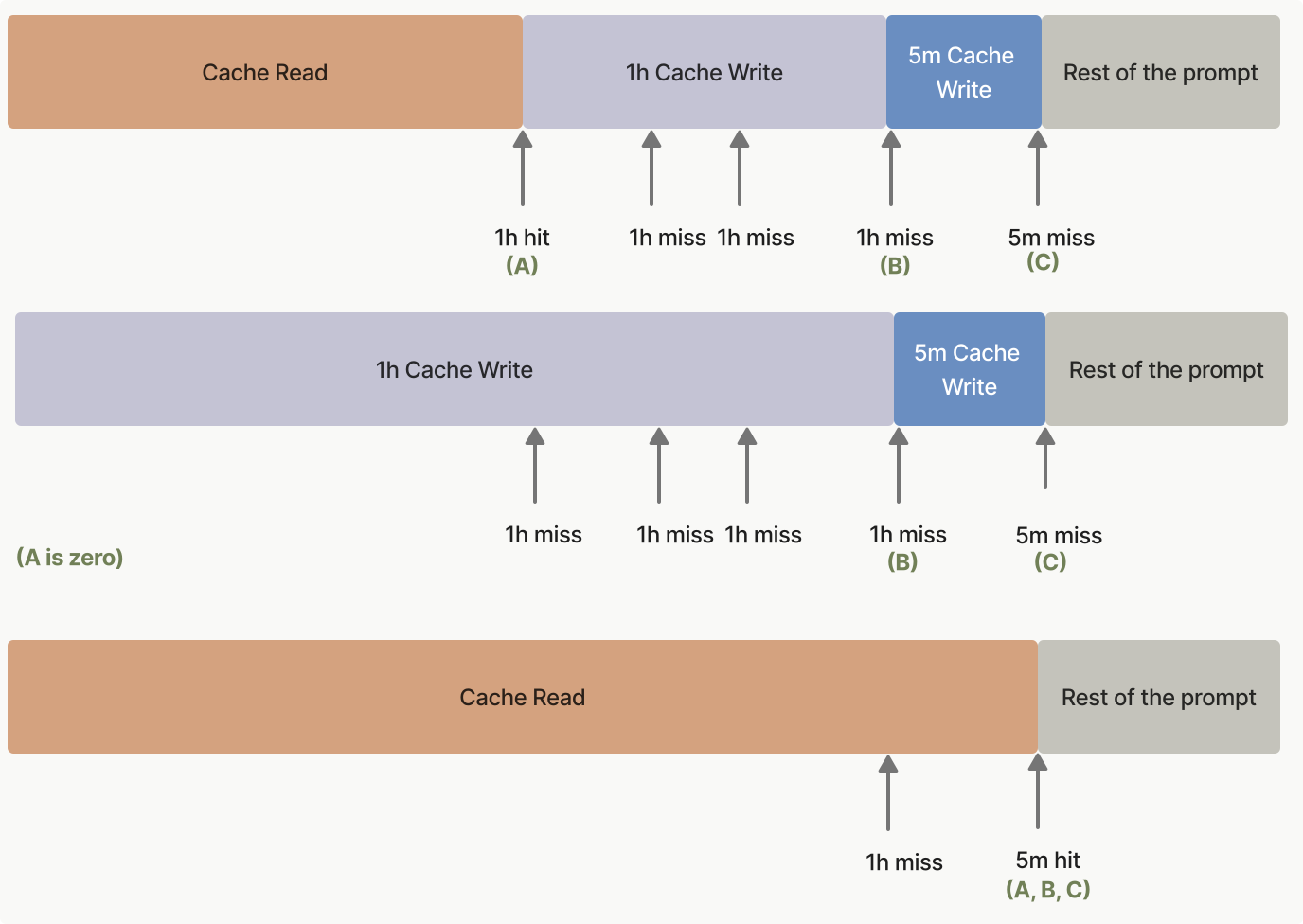
***
## 預熱快取
「Cache pre-warming」(快取預熱)讓您可以在使用者觸發實際請求之前,將系統提示或工具定義載入提示快取中。這消除了第一次使用者互動時因快取未命中而產生的延遲損失,為對延遲敏感的應用程式縮短「time-to-first-token」(首個 token 時間),即 TTFT。
### 運作方式
在您的請求中設定 `max_tokens: 0`。API 會將您的提示讀入模型,並在任何 `cache_control` 中斷點寫入快取,然後立即返回,不產生任何輸出。回應會包含一個空的 `content` 陣列、`stop_reason: "max_tokens"`,以及一個完整填入的 `usage` 區塊。
請將 `cache_control` 中斷點放在與後續請求共用的最後一個區塊上(通常是您的系統提示或工具定義),而不是放在佔位用的使用者訊息上。否則,快取項目會以該佔位訊息為鍵,後續請求將無法命中它。同時也請使用與後續請求相同的思考設定和 `output_config.effort`:這些值會被渲染到提示中(請參閱[什麼會使快取失效](https://platform.claude.com/docs/zh-TW/build-with-claude/prompt-caching#what-invalidates-the-cache)),因此使用不同設定進行的預熱可能會寫入一個您的實際流量永遠不會命中的項目。這表示您應使用[明確快取中斷點](https://platform.claude.com/docs/zh-TW/build-with-claude/prompt-caching#explicit-cache-breakpoints),而非[自動快取](https://platform.claude.com/docs/zh-TW/build-with-claude/prompt-caching#automatic-caching),因為自動快取會將中斷點放在最後一個區塊上,而在此情況下最後一個區塊就是佔位訊息。佔位用的使用者訊息可以是任何包含非空白內容的字串(此處的範例使用 `"warmup"`);其內容會被讀入模型,但永遠不會得到回答。
如果前綴尚未被快取,預熱請求會產生**快取寫入**費用,與任何其他請求相同。請檢查回應中的 `usage.cache_creation_input_tokens` 以確認是否發生了寫入。輸出 token 的計費為零。
```bash cURL
curl https://api.anthropic.com/v1/messages \
-H "content-type: application/json" \
-H "x-api-key: $ANTHROPIC_API_KEY" \
-H "anthropic-version: 2023-06-01" \
-d '{
"model": "claude-opus-5-5",
"max_tokens": 0,
"system": [
{
"type": "text",
"text": "You are an expert software engineer with deep knowledge of distributed systems...",
"cache_control": {"type": "ephemeral"}
}
],
"messages": [{"role": "user", "content": "warmup"}]
}'
```
```bash CLI
ant messages create \
--transform '{stop_reason,content,usage}' --format yaml <<'YAML'
model: claude-opus-5-5
max_tokens: 0
system:
- type: text
text: >-
You are an expert software engineer with deep knowledge of
distributed systems...
cache_control:
type: ephemeral
messages:
- role: user
content: warmup
YAML
```
```python Python
client = anthropic.Anthropic()
# 請在使用者到來前先執行此請求,以預熱共用的系統提示快取。
prewarm = client.messages.create(
model="claude-opus-5-5",
max_tokens=0,
system=[
{
"type": "text",
"text": "You are an expert software engineer with deep knowledge of distributed systems...",
"cache_control": {"type": "ephemeral"},
}
],
messages=[{"role": "user", "content": "warmup"}],
)
print(prewarm.stop_reason) # "max_tokens"
print(prewarm.content) # []
print(prewarm.usage)
```
```typescript TypeScript
const client = new Anthropic();
// 請在使用者到來前先發送此請求,以預熱共用的系統提示快取。
const prewarm = await client.messages.create({
model: "claude-opus-5-5",
max_tokens: 0,
system: [
{
type: "text",
text: "You are an expert software engineer with deep knowledge of distributed systems...",
cache_control: { type: "ephemeral" }
}
],
messages: [{ role: "user", content: "warmup" }]
});
console.log(prewarm.stop_reason); // "max_tokens"
console.log(prewarm.content); // []
console.log(prewarm.usage);
```
```csharp C#
AnthropicClient client = new();
var prewarm = await client.Messages.Create(
new()
{
Model = Model.ClaudeOpus5_5,
MaxTokens = 0,
System = new(
[
new TextBlockParam
{
Text = "You are an expert software engineer with deep knowledge of distributed systems...",
CacheControl = new(),
},
]
),
Messages = [new() { Role = Role.User, Content = "warmup" }],
}
);
Console.WriteLine(prewarm.StopReason?.Raw()); // "max_tokens"
Console.WriteLine(prewarm.Content.Count); // 0
Console.WriteLine(prewarm.Usage);
```
```go Go
client := anthropic.NewClient()
prewarm, err := client.Messages.New(context.TODO(), anthropic.MessageNewParams{
Model: anthropic.ModelClaudeOpus5_5,
MaxTokens: 0,
System: []anthropic.TextBlockParam{
{
Text: "You are an expert software engineer with deep knowledge of distributed systems...",
CacheControl: anthropic.NewCacheControlEphemeralParam(),
},
},
Messages: []anthropic.MessageParam{
anthropic.NewUserMessage(anthropic.NewTextBlock("warmup")),
},
})
if err != nil {
panic(err)
}
fmt.Println(prewarm.StopReason) // "max_tokens"
fmt.Println(prewarm.Content) // []
fmt.Println(prewarm.Usage.RawJSON())
```
```java Java
AnthropicClient client = AnthropicOkHttpClient.fromEnv();
Message prewarm = client.messages().create(MessageCreateParams.builder()
.model(Model.CLAUDE_OPUS_5_5)
.maxTokens(0)
.systemOfTextBlockParams(List.of(TextBlockParam.builder()
.text("You are an expert software engineer with deep knowledge of distributed systems...")
.cacheControl(CacheControlEphemeral.builder().build())
.build()))
.addUserMessage("warmup")
.build());
IO.println(prewarm.stopReason()); // Optional[max_tokens]
IO.println(prewarm.content()); // []
IO.println(prewarm.usage());
```
```php PHP
$client = new Client();
$prewarm = $client->messages->create(
model: Model::CLAUDE_OPUS_5_5,
maxTokens: 0,
system: [
[
'type' => 'text',
'text' => 'You are an expert software engineer with deep knowledge of distributed systems...',
'cache_control' => ['type' => 'ephemeral'],
],
],
messages: [['role' => 'user', 'content' => 'warmup']],
);
echo $prewarm->stopReason, PHP_EOL; // "max_tokens"
echo json_encode($prewarm->content), PHP_EOL; // []
echo json_encode($prewarm->usage), PHP_EOL;
```
```ruby Ruby
client = Anthropic::Client.new
prewarm = client.messages.create(
model: Anthropic::Model::CLAUDE_OPUS_5_5,
max_tokens: 0,
system_: [
{
type: "text",
text: "You are an expert software engineer with deep knowledge of distributed systems...",
cache_control: {type: "ephemeral"}
}
],
messages: [{role: "user", content: "warmup"}]
)
puts prewarm.stop_reason # :max_tokens
puts prewarm.content # []
puts prewarm.usage
```
API 會返回一個空的 `content` 陣列:
```json Output
{
"id": "msg_01XFDUDYJgAACzvnptvVoYEL",
"type": "message",
"role": "assistant",
"content": [],
"model": "claude-opus-5-5",
"stop_reason": "max_tokens",
"stop_sequence": null,
"usage": {
"input_tokens": 8,
"cache_creation_input_tokens": 5120,
"cache_read_input_tokens": 0,
"cache_creation": {
"ephemeral_5m_input_tokens": 5120,
"ephemeral_1h_input_tokens": 0
},
"iterations": [
{
"input_tokens": 8,
"output_tokens": 0,
"cache_read_input_tokens": 0,
"cache_creation_input_tokens": 5120,
"cache_creation": {
"ephemeral_5m_input_tokens": 5120,
"ephemeral_1h_input_tokens": 0
},
"type": "message"
}
],
"output_tokens": 0,
"service_tier": "standard",
"inference_geo": "global"
}
}
```
### 典型使用模式
在您的應用程式啟動時(或按排定的間隔)發送預熱請求,然後在預熱完成後再發送實際的使用者請求:
```bash cURL
# 在應用程式啟動時或依排程間隔預熱快取。
curl https://api.anthropic.com/v1/messages \
-H "content-type: application/json" \
-H "x-api-key: $ANTHROPIC_API_KEY" \
-H "anthropic-version: 2023-06-01" \
-d '{
"model": "claude-opus-5-5",
"max_tokens": 0,
"system": [
{
"type": "text",
"text": "You are an expert software engineer with deep knowledge of distributed systems...",
"cache_control": {"type": "ephemeral"}
}
],
"messages": [{"role": "user", "content": "warmup"}]
}'
# 之後當使用者送出訊息時,系統提示前綴已經被快取。
curl https://api.anthropic.com/v1/messages \
-H "content-type: application/json" \
-H "x-api-key: $ANTHROPIC_API_KEY" \
-H "anthropic-version: 2023-06-01" \
-d '{
"model": "claude-opus-5-5",
"max_tokens": 1024,
"system": [
{
"type": "text",
"text": "You are an expert software engineer with deep knowledge of distributed systems...",
"cache_control": {"type": "ephemeral"}
}
],
"messages": [{"role": "user", "content": "How do I implement a binary search tree?"}]
}'
```
```bash CLI
# 在應用程式啟動時或依排定的間隔預熱快取。
ant messages create --transform usage <<'YAML'
model: claude-opus-5-5
max_tokens: 0
system:
- type: text
text: >-
You are an expert software engineer with deep knowledge of
distributed systems...
cache_control:
type: ephemeral
messages:
- role: user
content: warmup
YAML
# 之後當使用者送出訊息時,系統提示前綴已經被快取。
ant messages create --transform 'content.#(type=="text").text' --raw-output <<'YAML'
model: claude-opus-5-5
max_tokens: 1024
system:
- type: text
text: >-
You are an expert software engineer with deep knowledge of
distributed systems...
cache_control:
type: ephemeral
messages:
- role: user
content: How do I implement a binary search tree?
YAML
```
```python Python
client = anthropic.Anthropic()
SYSTEM_PROMPT = [
{
"type": "text",
"text": "You are an expert software engineer with deep knowledge of distributed systems...",
"cache_control": {"type": "ephemeral"},
}
]
def prewarm_cache() -> None:
"""Call this at application startup or on a scheduled interval."""
client.messages.create(
model="claude-opus-5-5",
max_tokens=0,
system=SYSTEM_PROMPT,
messages=[{"role": "user", "content": "warmup"}],
)
def respond(user_message: str) -> anthropic.types.Message:
"""The real user request; benefits from a warm cache."""
return client.messages.create(
model="claude-opus-5-5",
max_tokens=1024,
system=SYSTEM_PROMPT,
messages=[{"role": "user", "content": user_message}],
)
# 在任何使用者流量抵達之前先預熱快取。
prewarm_cache()
# 之後當使用者送出訊息時,系統提示前綴已經被快取。
response = respond("How do I implement a binary search tree?")
for block in response.content:
if block.type == "text":
print(block.text)
```
```typescript TypeScript
const client = new Anthropic();
const SYSTEM_PROMPT: Anthropic.TextBlockParam[] = [
{
type: "text",
text: "You are an expert software engineer with deep knowledge of distributed systems...",
cache_control: { type: "ephemeral" }
}
];
// 請在應用程式啟動時或依排程定期呼叫此函式。
async function prewarmCache(): Promise {
await client.messages.create({
model: "claude-opus-5-5",
max_tokens: 0,
system: SYSTEM_PROMPT,
messages: [{ role: "user", content: "warmup" }]
});
}
// 實際的使用者請求;可受益於已預熱的快取。
async function respond(userMessage: string): Promise {
return client.messages.create({
model: "claude-opus-5-5",
max_tokens: 1024,
system: SYSTEM_PROMPT,
messages: [{ role: "user", content: userMessage }]
});
}
// 在任何使用者流量抵達前先預熱快取。
await prewarmCache();
// 之後當使用者送出訊息時,系統提示前綴已被快取。
const response = await respond("How do I implement a binary search tree?");
const textBlock = response.content.find(
(block): block is Anthropic.TextBlock => block.type === "text"
);
console.log(textBlock?.text);
```
```csharp C#
AnthropicClient client = new();
List systemPrompt =
[
new TextBlockParam
{
Text = "You are an expert software engineer with deep knowledge of distributed systems...",
CacheControl = new(),
},
];
// 請在應用程式啟動時或依排程定期呼叫此函式。
async Task PrewarmCache() =>
await client.Messages.Create(
new()
{
Model = Model.ClaudeOpus5_5,
MaxTokens = 0,
System = new(systemPrompt),
Messages = [new() { Role = Role.User, Content = "warmup" }],
}
);
// 實際的使用者請求;可受益於已預熱的快取。
async Task Respond(string userMessage) =>
await client.Messages.Create(
new()
{
Model = Model.ClaudeOpus5_5,
MaxTokens = 1024,
System = new(systemPrompt),
Messages = [new() { Role = Role.User, Content = userMessage }],
}
);
// 在任何使用者流量抵達前先預熱快取。
await PrewarmCache();
// 之後當使用者送出訊息時,系統提示前綴已經被快取。
var response = await Respond("How do I implement a binary search tree?");
foreach (var block in response.Content)
{
if (block.TryPickText(out var textBlock))
{
Console.WriteLine(textBlock.Text);
}
}
```
```go Go
var client = anthropic.NewClient()
var systemPrompt = []anthropic.TextBlockParam{
{
Text: "You are an expert software engineer with deep knowledge of distributed systems...",
CacheControl: anthropic.NewCacheControlEphemeralParam(),
},
}
// 請在應用程式啟動時或依排程定期呼叫此函式。
func prewarmCache() error {
_, err := client.Messages.New(context.TODO(), anthropic.MessageNewParams{
Model: anthropic.ModelClaudeOpus5_5,
MaxTokens: 0,
System: systemPrompt,
Messages: []anthropic.MessageParam{
anthropic.NewUserMessage(anthropic.NewTextBlock("warmup")),
},
})
return err
}
// 實際的使用者請求;可受益於已預熱的快取。
func respond(userMessage string) (*anthropic.Message, error) {
return client.Messages.New(context.TODO(), anthropic.MessageNewParams{
Model: anthropic.ModelClaudeOpus5_5,
MaxTokens: 1024,
System: systemPrompt,
Messages: []anthropic.MessageParam{
anthropic.NewUserMessage(anthropic.NewTextBlock(userMessage)),
},
})
}
func main() {
// 在任何使用者流量抵達前先預熱快取。
if err := prewarmCache(); err != nil {
log.Fatal(err)
}
// 之後當使用者送出訊息時,系統提示前綴已經被快取。
response, err := respond("How do I implement a binary search tree?")
if err != nil {
log.Fatal(err)
}
for _, block := range response.Content {
if textBlock, ok := block.AsAny().(anthropic.TextBlock); ok {
fmt.Println(textBlock.Text)
}
}
}
```
```java Java
AnthropicClient client = AnthropicOkHttpClient.fromEnv();
List systemPrompt = List.of(TextBlockParam.builder()
.text("You are an expert software engineer with deep knowledge of distributed systems...")
.cacheControl(CacheControlEphemeral.builder().build())
.build());
// 請在應用程式啟動時或依排程定期呼叫此函式。
void prewarmCache() {
client.messages().create(MessageCreateParams.builder()
.model(Model.CLAUDE_OPUS_5_5)
.maxTokens(0)
.systemOfTextBlockParams(systemPrompt)
.addUserMessage("warmup")
.build());
}
// 實際的使用者請求;可受益於已預熱的快取。
Message respond(String userMessage) {
return client.messages().create(MessageCreateParams.builder()
.model(Model.CLAUDE_OPUS_5_5)
.maxTokens(1024)
.systemOfTextBlockParams(systemPrompt)
.addUserMessage(userMessage)
.build());
}
void main() {
// 在任何使用者流量抵達前先預熱快取。
prewarmCache();
// 之後當使用者送出訊息時,系統提示前綴已被快取。
Message response = respond("How do I implement a binary search tree?");
response.content().stream()
.flatMap(block -> block.text().stream())
.forEach(textBlock -> IO.println(textBlock.text()));
}
```
```php PHP
$client = new Client();
$systemPrompt = [
[
'type' => 'text',
'text' => 'You are an expert software engineer with deep knowledge of distributed systems...',
'cache_control' => ['type' => 'ephemeral'],
],
];
// 請在應用程式啟動時或依排程定期呼叫此函式。
$prewarmCache = fn () => $client->messages->create(
model: Model::CLAUDE_OPUS_5_5,
maxTokens: 0,
system: $systemPrompt,
messages: [['role' => 'user', 'content' => 'warmup']],
);
// 實際的使用者請求;可受益於已預熱的快取。
$respond = fn (string $userMessage) => $client->messages->create(
model: Model::CLAUDE_OPUS_5_5,
maxTokens: 1024,
system: $systemPrompt,
messages: [['role' => 'user', 'content' => $userMessage]],
);
// 在任何使用者流量到達之前預熱快取。
$prewarmCache();
// 之後當使用者送出訊息時,系統提示前綴已被快取。
$response = $respond('How do I implement a binary search tree?');
foreach ($response->content as $block) {
if ($block->type === 'text') {
echo $block->text, PHP_EOL;
}
}
```
```ruby Ruby
client = Anthropic::Client.new
SYSTEM_PROMPT = [
{
type: "text",
text: "You are an expert software engineer with deep knowledge of distributed systems...",
cache_control: {type: "ephemeral"}
}
]
# 請在應用程式啟動時或依排程定期呼叫此函式。
def prewarm_cache(client)
client.messages.create(
model: Anthropic::Model::CLAUDE_OPUS_5_5,
max_tokens: 0,
system_: SYSTEM_PROMPT,
messages: [{role: "user", content: "warmup"}]
)
end
# 實際的使用者請求;可受益於已預熱的快取。
def respond(client, user_message)
client.messages.create(
model: Anthropic::Model::CLAUDE_OPUS_5_5,
max_tokens: 1024,
system_: SYSTEM_PROMPT,
messages: [{role: "user", content: user_message}]
)
end
# 在任何使用者流量抵達前先預熱快取。
prewarm_cache(client)
# 之後當使用者送出訊息時,系統提示前綴已經被快取。
response = respond(client, "How do I implement a binary search tree?")
response.content.each do |block|
puts block.text if block.type == :text
end
```
請記住,快取 TTL 仍然適用。對於預設的 5 分鐘快取,請至少每 5 分鐘發送一次新的預熱請求,以保持快取處於預熱狀態。如果使用者請求之間的間隔較長,請改用 [1 小時快取持續時間](https://platform.claude.com/docs/zh-TW/build-with-claude/prompt-caching#1-hour-cache-duration)。
### 限制
如果設定了以下任何一項,`max_tokens: 0` 請求將以 `invalid_request_error` 被拒絕,因為每一項都意味著需要產生零 token 預算無法產生的輸出:
* `stream: true`
* [擴展思考](https://platform.claude.com/docs/zh-TW/build-with-claude/extended-thinking)(`thinking.type: "enabled"`)
* [結構化輸出](https://platform.claude.com/docs/zh-TW/build-with-claude/structured-outputs)(`output_config.format`)
* `{"type": "tool", ...}` 或 `{"type": "any"}` 的 `tool_choice`
在 [Message Batches](https://platform.claude.com/docs/zh-TW/build-with-claude/batch-processing) 請求中,`max_tokens: 0` 也會被拒絕。預熱的目標是首個 token 時間,這不適用於批次處理,而且在批次處理期間寫入的快取項目很可能在後續請求執行之前就已過期。
### 取代 max\_tokens=1 的變通做法
在 `max_tokens: 0` 推出之前,有些應用程式使用 `max_tokens: 1` 的預熱呼叫來達到相同的效果。建議使用 `max_tokens: 0` 的方式:它不會產生任何輸出,因此沒有需要捨棄的單一 token 回覆,不會對輸出 token 計費,而且請求的意圖也很明確。
***
## 提示快取範例
為了幫助您開始使用提示快取,[提示快取 cookbook](https://platform.claude.com/cookbook/misc-prompt-caching) 提供了詳細的範例和最佳實踐。
以下程式碼片段展示了各種提示快取模式。這些範例示範了如何在不同情境中實作快取,幫助您了解此功能的實際應用:
```bash cURL
curl https://api.anthropic.com/v1/messages \
-H "x-api-key: $ANTHROPIC_API_KEY" \
-H "anthropic-version: 2023-06-01" \
-H "content-type: application/json" \
-d '{
"model": "claude-opus-5-5",
"max_tokens": 1024,
"system": [
{
"type": "text",
"text": "You are an AI assistant tasked with analyzing legal documents."
},
{
"type": "text",
"text": "Here is the full text of a complex legal agreement: [Insert full text of a 50-page legal agreement here]",
"cache_control": {"type": "ephemeral"}
}
],
"messages": [
{
"role": "user",
"content": "What are the key terms and conditions in this agreement?"
}
]
}'
```
```bash CLI
ant messages create --transform usage <<'YAML'
model: claude-opus-5-5
max_tokens: 1024
system:
- type: text
text: You are an AI assistant tasked with analyzing legal documents.
- type: text
text: >-
Here is the full text of a complex legal agreement:
[Insert full text of a 50-page legal agreement here]
cache_control:
type: ephemeral
messages:
- role: user
content: What are the key terms and conditions in this agreement?
YAML
```
```python Python
client = anthropic.Anthropic()
response = client.messages.create(
model="claude-opus-5-5",
max_tokens=1024,
system=[
{
"type": "text",
"text": "You are an AI assistant tasked with analyzing legal documents.",
},
{
"type": "text",
"text": "Here is the full text of a complex legal agreement: [Insert full text of a 50-page legal agreement here]",
"cache_control": {"type": "ephemeral"},
},
],
messages=[
{
"role": "user",
"content": "What are the key terms and conditions in this agreement?",
}
],
)
print(response.usage.model_dump_json())
```
```typescript TypeScript
const client = new Anthropic();
const response = await client.messages.create({
model: "claude-opus-5-5",
max_tokens: 1024,
system: [
{
type: "text",
text: "You are an AI assistant tasked with analyzing legal documents."
},
{
type: "text",
text: "Here is the full text of a complex legal agreement: [Insert full text of a 50-page legal agreement here]",
cache_control: { type: "ephemeral" }
}
],
messages: [
{
role: "user",
content: "What are the key terms and conditions in this agreement?"
}
]
});
console.log(response.usage);
```
```csharp C#
AnthropicClient client = new()
{
ApiKey = Environment.GetEnvironmentVariable("ANTHROPIC_API_KEY")
};
var parameters = new MessageCreateParams
{
Model = Model.ClaudeOpus5_5,
MaxTokens = 1024,
System = new MessageCreateParamsSystem(new List
{
new TextBlockParam()
{
Text = "You are an AI assistant tasked with analyzing legal documents.",
},
new TextBlockParam()
{
Text = "Here is the full text of a complex legal agreement: [Insert full text of a 50-page legal agreement here]",
CacheControl = new CacheControlEphemeral(),
},
}),
Messages =
[
new()
{
Role = Role.User,
Content = "What are the key terms and conditions in this agreement?"
}
]
};
var message = await client.Messages.Create(parameters);
Console.WriteLine(message.Usage);
```
```go Go
client := anthropic.NewClient()
response, err := client.Messages.New(context.TODO(), anthropic.MessageNewParams{
Model: anthropic.ModelClaudeOpus5_5,
MaxTokens: 1024,
System: []anthropic.TextBlockParam{
{
Text: "You are an AI assistant tasked with analyzing legal documents.",
},
{
Text: "Here is the full text of a complex legal agreement: [Insert full text of a 50-page legal agreement here]",
CacheControl: anthropic.NewCacheControlEphemeralParam(),
},
},
Messages: []anthropic.MessageParam{
anthropic.NewUserMessage(anthropic.NewTextBlock("What are the key terms and conditions in this agreement?")),
},
})
if err != nil {
log.Fatal(err)
}
fmt.Println(response.Usage.RawJSON())
```
```java Java
import com.anthropic.models.messages.CacheControlEphemeral;
// ...
public class LegalDocumentAnalysisExample {
public static void main(String[] args) {
AnthropicClient client = AnthropicOkHttpClient.fromEnv();
MessageCreateParams params = MessageCreateParams.builder()
.model(Model.CLAUDE_OPUS_5_5)
.maxTokens(1024)
.systemOfTextBlockParams(
List.of(
TextBlockParam.builder()
.text("You are an AI assistant tasked with analyzing legal documents.")
.build(),
TextBlockParam.builder()
.text(
"Here is the full text of a complex legal agreement: [Insert full text of a 50-page legal agreement here]"
)
.cacheControl(CacheControlEphemeral.builder().build())
.build()
)
)
.addUserMessage("What are the key terms and conditions in this agreement?")
.build();
Message message = client.messages().create(params);
System.out.println(message.usage());
}
}
```
```php PHP
$client = new Client();
$message = $client->messages->create(
maxTokens: 1024,
messages: [
[
'role' => 'user',
'content' => 'What are the key terms and conditions in this agreement?'
]
],
model: 'claude-opus-5-5',
system: [
[
'type' => 'text',
'text' => 'You are an AI assistant tasked with analyzing legal documents.'
],
[
'type' => 'text',
'text' => 'Here is the full text of a complex legal agreement: [Insert full text of a 50-page legal agreement here]',
'cache_control' => ['type' => 'ephemeral']
]
],
);
echo json_encode($message->usage), PHP_EOL;
```
```ruby Ruby
client = Anthropic::Client.new
message = client.messages.create(
model: "claude-opus-5-5",
max_tokens: 1024,
system: [
{
type: "text",
text: "You are an AI assistant tasked with analyzing legal documents."
},
{
type: "text",
text: "Here is the full text of a complex legal agreement: [Insert full text of a 50-page legal agreement here]",
cache_control: { type: "ephemeral" }
}
],
messages: [
{
role: "user",
content: "What are the key terms and conditions in this agreement?"
}
]
)
puts message.usage
```
此範例示範了提示快取的基本用法,將法律協議的全文作為前綴進行快取,同時讓使用者指示保持未快取狀態。
對於第一個請求:
* `input_tokens`:僅使用者訊息中的 token 數量
* `cache_creation_input_tokens`:整個系統訊息(包括法律文件)中的 token 數量
* `cache_read_input_tokens`:0(第一個請求沒有快取命中)
對於快取存續期間內的後續請求:
* `input_tokens`:僅使用者訊息中的 token 數量
* `cache_creation_input_tokens`:0(沒有建立新的快取)
* `cache_read_input_tokens`:整個已快取系統訊息中的 token 數量
您可以透過在 `tools` 陣列中的最後一個工具上放置 `cache_control` 來快取工具定義。在該工具之前定義的所有工具(包括該工具本身)都會作為單一前綴被快取。
```json
{
"model": "claude-opus-5-5",
"max_tokens": 1024,
"tools": [
{
"name": "get_weather",
"description": "Get the current weather in a given location",
"input_schema": {
"type": "object",
"properties": { "location": { "type": "string" } },
"required": ["location"]
}
},
{
"name": "get_time",
"description": "Get the current time in a given time zone",
"input_schema": {
"type": "object",
"properties": { "timezone": { "type": "string" } },
"required": ["timezone"]
},
"cache_control": { "type": "ephemeral" }
}
],
"messages": [{ "role": "user", "content": "What is the weather and time in New York?" }]
}
```
在第一個請求中,`cache_creation_input_tokens` 反映所有工具定義的 token 數量。在快取存續期間內的後續請求中,這些 token 會改為出現在 `cache_read_input_tokens` 之下。
關於工具定義、`defer_loading` 與快取失效之間的詳細互動,請參閱[搭配提示快取的工具使用](https://platform.claude.com/docs/zh-TW/agents-and-tools/tool-use/tool-use-with-prompt-caching)。
```bash cURL
curl https://api.anthropic.com/v1/messages \
-H "x-api-key: $ANTHROPIC_API_KEY" \
-H "anthropic-version: 2023-06-01" \
-H "content-type: application/json" \
-d '{
"model": "claude-opus-5-5",
"max_tokens": 1024,
"system": [
{
"type": "text",
"text": "...long system prompt",
"cache_control": {"type": "ephemeral"}
}
],
"messages": [
{
"role": "user",
"content": [
{
"type": "text",
"text": "Hello, can you tell me more about the solar system?"
}
]
},
{
"role": "assistant",
"content": "Certainly! The solar system is the collection of celestial bodies that orbit our Sun. It consists of eight planets, numerous moons, asteroids, comets, and other objects. The planets, in order from closest to farthest from the Sun, are: Mercury, Venus, Earth, Mars, Jupiter, Saturn, Uranus, and Neptune. Each planet has its own unique characteristics and features. Is there a specific aspect of the solar system you would like to know more about?"
},
{
"role": "user",
"content": [
{
"type": "text",
"text": "Good to know."
},
{
"type": "text",
"text": "Tell me more about Mars.",
"cache_control": {"type": "ephemeral"}
}
]
}
]
}'
```
```bash CLI
ant messages create --transform usage <<'YAML'
model: claude-opus-5-5
max_tokens: 1024
system:
- type: text
text: "...long system prompt"
cache_control:
type: ephemeral
messages:
- role: user
content:
- type: text
text: Hello, can you tell me more about the solar system?
- role: assistant
content: >-
Certainly! The solar system is the collection of celestial bodies that
orbit our Sun. It consists of eight planets, numerous moons, asteroids,
comets, and other objects. The planets, in order from closest to farthest
from the Sun, are: Mercury, Venus, Earth, Mars, Jupiter, Saturn, Uranus,
and Neptune. Each planet has its own unique characteristics and features.
Is there a specific aspect of the solar system you would like to know
more about?
- role: user
content:
- type: text
text: Good to know.
- type: text
text: Tell me more about Mars.
cache_control:
type: ephemeral
YAML
```
```python Python
client = anthropic.Anthropic()
response = client.messages.create(
model="claude-opus-5-5",
max_tokens=1024,
system=[
{
"type": "text",
"text": "...long system prompt",
"cache_control": {"type": "ephemeral"},
}
],
messages=[
# ……目前為止的冗長對話
{
"role": "user",
"content": [
{
"type": "text",
"text": "Hello, can you tell me more about the solar system?",
}
],
},
{
"role": "assistant",
"content": "Certainly! The solar system is the collection of celestial bodies that orbit our Sun. It consists of eight planets, numerous moons, asteroids, comets, and other objects. The planets, in order from closest to farthest from the Sun, are: Mercury, Venus, Earth, Mars, Jupiter, Saturn, Uranus, and Neptune. Each planet has its own unique characteristics and features. Is there a specific aspect of the solar system you'd like to know more about?",
},
{
"role": "user",
"content": [
{"type": "text", "text": "Good to know."},
{
"type": "text",
"text": "Tell me more about Mars.",
"cache_control": {"type": "ephemeral"},
},
],
},
],
)
print(response.usage.model_dump_json())
```
```typescript TypeScript
const client = new Anthropic();
const response = await client.messages.create({
model: "claude-opus-5-5",
max_tokens: 1024,
system: [
{
type: "text",
text: "...long system prompt",
cache_control: { type: "ephemeral" }
}
],
messages: [
// ……目前為止的冗長對話
{
role: "user",
content: [
{
type: "text",
text: "Hello, can you tell me more about the solar system?"
}
]
},
{
role: "assistant",
content:
"Certainly! The solar system is the collection of celestial bodies that orbit our Sun. It consists of eight planets, numerous moons, asteroids, comets, and other objects. The planets, in order from closest to farthest from the Sun, are: Mercury, Venus, Earth, Mars, Jupiter, Saturn, Uranus, and Neptune. Each planet has its own unique characteristics and features. Is there a specific aspect of the solar system you'd like to know more about?"
},
{
role: "user",
content: [
{
type: "text",
text: "Good to know."
},
{
type: "text",
text: "Tell me more about Mars.",
cache_control: { type: "ephemeral" }
}
]
}
]
});
console.log(response.usage);
```
```csharp C#
AnthropicClient client = new();
var parameters = new MessageCreateParams
{
Model = Model.ClaudeOpus5_5,
MaxTokens = 1024,
System = new MessageCreateParamsSystem(new List
{
new TextBlockParam()
{
Text = "...long system prompt",
CacheControl = new CacheControlEphemeral(),
},
}),
Messages =
[
new()
{
Role = Role.User,
Content = new MessageParamContent(new List
{
new ContentBlockParam(new TextBlockParam("Hello, can you tell me more about the solar system?")),
}),
},
new()
{
Role = Role.Assistant,
Content = "Certainly! The solar system is the collection of celestial bodies that orbit our Sun. It consists of eight planets, numerous moons, asteroids, comets, and other objects. The planets, in order from closest to farthest from the Sun, are: Mercury, Venus, Earth, Mars, Jupiter, Saturn, Uranus, and Neptune. Each planet has its own unique characteristics and features. Is there a specific aspect of the solar system you would like to know more about?"
},
new()
{
Role = Role.User,
Content = new MessageParamContent(new List
{
new ContentBlockParam(new TextBlockParam("Good to know.")),
new ContentBlockParam(new TextBlockParam()
{
Text = "Tell me more about Mars.",
CacheControl = new CacheControlEphemeral(),
}),
})
}
]
};
var message = await client.Messages.Create(parameters);
Console.WriteLine(message.Usage);
```
```go Go
client := anthropic.NewClient()
response, err := client.Messages.New(context.TODO(), anthropic.MessageNewParams{
Model: anthropic.ModelClaudeOpus5_5,
MaxTokens: 1024,
System: []anthropic.TextBlockParam{
{
Text: "...long system prompt",
CacheControl: anthropic.NewCacheControlEphemeralParam(),
},
},
Messages: []anthropic.MessageParam{
anthropic.NewUserMessage(anthropic.NewTextBlock("Hello, can you tell me more about the solar system?")),
anthropic.NewAssistantMessage(anthropic.NewTextBlock("Certainly! The solar system is the collection of celestial bodies that orbit our Sun. It consists of eight planets, numerous moons, asteroids, comets, and other objects. The planets, in order from closest to farthest from the Sun, are: Mercury, Venus, Earth, Mars, Jupiter, Saturn, Uranus, and Neptune. Each planet has its own unique characteristics and features. Is there a specific aspect of the solar system you would like to know more about?")),
{
Role: anthropic.MessageParamRoleUser,
Content: []anthropic.ContentBlockParamUnion{
anthropic.NewTextBlock("Good to know."),
{OfText: &anthropic.TextBlockParam{
Text: "Tell me more about Mars.",
CacheControl: anthropic.NewCacheControlEphemeralParam(),
}},
},
},
},
})
if err != nil {
log.Fatal(err)
}
fmt.Println(response.Usage.RawJSON())
```
```java Java
import com.anthropic.models.messages.CacheControlEphemeral;
// ...
public class ConversationWithCacheControlExample {
public static void main(String[] args) {
AnthropicClient client = AnthropicOkHttpClient.fromEnv();
// 建立暫時性系統提示
TextBlockParam systemPrompt = TextBlockParam.builder()
.text("...long system prompt")
.cacheControl(CacheControlEphemeral.builder().build())
.build();
// 建立訊息參數
MessageCreateParams params = MessageCreateParams.builder()
.model(Model.CLAUDE_OPUS_5_5)
.maxTokens(1024)
.systemOfTextBlockParams(List.of(systemPrompt))
// 第一則使用者訊息(不含快取控制)
.addUserMessage("Hello, can you tell me more about the solar system?")
// 助理回應
.addAssistantMessage(
"Certainly! The solar system is the collection of celestial bodies that orbit our Sun. It consists of eight planets, numerous moons, asteroids, comets, and other objects. The planets, in order from closest to farthest from the Sun, are: Mercury, Venus, Earth, Mars, Jupiter, Saturn, Uranus, and Neptune. Each planet has its own unique characteristics and features. Is there a specific aspect of the solar system you would like to know more about?"
)
// 第二則使用者訊息(含快取控制)
.addUserMessageOfBlockParams(
List.of(
ContentBlockParam.ofText(TextBlockParam.builder().text("Good to know.").build()),
ContentBlockParam.ofText(
TextBlockParam.builder()
.text("Tell me more about Mars.")
.cacheControl(CacheControlEphemeral.builder().build())
.build()
)
)
)
.build();
Message message = client.messages().create(params);
System.out.println(message.usage());
}
}
```
```php PHP
$client = new Client();
$message = $client->messages->create(
maxTokens: 1024,
messages: [
[
'role' => 'user',
'content' => [
[
'type' => 'text',
'text' => 'Hello, can you tell me more about the solar system?'
]
]
],
[
'role' => 'assistant',
'content' => "Certainly! The solar system is the collection of celestial bodies that orbit our Sun. It consists of eight planets, numerous moons, asteroids, comets, and other objects. The planets, in order from closest to farthest from the Sun, are: Mercury, Venus, Earth, Mars, Jupiter, Saturn, Uranus, and Neptune. Each planet has its own unique characteristics and features. Is there a specific aspect of the solar system you would like to know more about?"
],
[
'role' => 'user',
'content' => [
['type' => 'text', 'text' => 'Good to know.'],
[
'type' => 'text',
'text' => 'Tell me more about Mars.',
'cache_control' => ['type' => 'ephemeral']
]
]
]
],
model: 'claude-opus-5-5',
system: [
[
'type' => 'text',
'text' => '...long system prompt',
'cache_control' => ['type' => 'ephemeral']
]
],
);
echo json_encode($message->usage), PHP_EOL;
```
```ruby Ruby
client = Anthropic::Client.new
message = client.messages.create(
model: "claude-opus-5-5",
max_tokens: 1024,
system: [
{
type: "text",
text: "...long system prompt",
cache_control: { type: "ephemeral" }
}
],
messages: [
{
role: "user",
content: [
{
type: "text",
text: "Hello, can you tell me more about the solar system?"
}
]
},
{
role: "assistant",
content: "Certainly! The solar system is the collection of celestial bodies that orbit our Sun. It consists of eight planets, numerous moons, asteroids, comets, and other objects. The planets, in order from closest to farthest from the Sun, are: Mercury, Venus, Earth, Mars, Jupiter, Saturn, Uranus, and Neptune. Each planet has its own unique characteristics and features. Is there a specific aspect of the solar system you would like to know more about?"
},
{
role: "user",
content: [
{ type: "text", text: "Good to know." },
{
type: "text",
text: "Tell me more about Mars.",
cache_control: { type: "ephemeral" }
}
]
}
]
)
puts message.usage
```
此範例示範了如何在多輪對話中使用提示快取。
在每一輪中,最後一則訊息的最後一個區塊都會標記 `cache_control`,以便對話可以被增量快取。系統會自動查找並使用先前快取的最長區塊序列來處理後續訊息。也就是說,先前標記了 `cache_control` 的區塊之後不再標記,但如果它們在 5 分鐘內被命中,仍會被視為快取命中(同時也是快取刷新!)。
此外,請注意 `cache_control` 參數被放置在系統訊息上。這是為了確保如果它從快取中被逐出(在超過 5 分鐘未被使用之後),它會在下一個請求時被重新加入快取。
這種方法對於在持續進行的對話中維持上下文非常有用,無需重複處理相同的資訊。
正確設定後,您應該會在每個請求的 usage 回應中看到以下內容:
* `input_tokens`:新使用者訊息中的 token 數量(會很少)
* `cache_creation_input_tokens`:新的助手輪次和使用者輪次中的 token 數量
* `cache_read_input_tokens`:截至上一輪為止的對話中的 token 數量
```bash cURL
curl https://api.anthropic.com/v1/messages \
-H "x-api-key: $ANTHROPIC_API_KEY" \
-H "anthropic-version: 2023-06-01" \
-H "content-type: application/json" \
-d '{
"model": "claude-opus-5-5",
"max_tokens": 1024,
"tools": [
{
"name": "search_documents",
"description": "Search through the knowledge base",
"input_schema": {
"type": "object",
"properties": {
"query": {
"type": "string",
"description": "Search query"
}
},
"required": ["query"]
}
},
{
"name": "get_document",
"description": "Retrieve a specific document by ID",
"input_schema": {
"type": "object",
"properties": {
"doc_id": {
"type": "string",
"description": "Document ID"
}
},
"required": ["doc_id"]
},
"cache_control": {"type": "ephemeral"}
}
],
"system": [
{
"type": "text",
"text": "You are a helpful research assistant with access to a document knowledge base.\n\n# Instructions\n- Always search for relevant documents before answering\n- Provide citations for your sources\n- Be objective and accurate in your responses\n- If multiple documents contain relevant information, synthesize them\n- Acknowledge when information is not available in the knowledge base",
"cache_control": {"type": "ephemeral"}
},
{
"type": "text",
"text": "# Knowledge Base Context\n\nHere are the relevant documents for this conversation:\n\n## Document 1: Solar System Overview\nThe solar system consists of the Sun and all objects that orbit it...\n\n## Document 2: Planetary Characteristics\nEach planet has unique features. Mercury is the smallest planet...\n\n## Document 3: Mars Exploration\nMars has been a target of exploration for decades...\n\n[Additional documents...]",
"cache_control": {"type": "ephemeral"}
}
],
"messages": [
{
"role": "user",
"content": "Can you search for information about Mars rovers?"
},
{
"role": "assistant",
"content": [
{
"type": "tool_use",
"id": "tool_1",
"name": "search_documents",
"input": {"query": "Mars rovers"}
}
]
},
{
"role": "user",
"content": [
{
"type": "tool_result",
"tool_use_id": "tool_1",
"content": "Found 3 relevant documents: Document 3 (Mars Exploration), Document 7 (Rover Technology), Document 9 (Mission History)"
}
]
},
{
"role": "assistant",
"content": [
{
"type": "text",
"text": "I found 3 relevant documents about Mars rovers. Let me get more details from the Mars Exploration document."
}
]
},
{
"role": "user",
"content": [
{
"type": "text",
"text": "Yes, please tell me about the Perseverance rover specifically.",
"cache_control": {"type": "ephemeral"}
}
]
}
]
}'
```
```bash CLI
ant messages create --transform usage <<'YAML'
model: claude-opus-5-5
max_tokens: 1024
tools:
- name: search_documents
description: Search through the knowledge base
input_schema:
type: object
properties:
query:
type: string
description: Search query
required: [query]
- name: get_document
description: Retrieve a specific document by ID
input_schema:
type: object
properties:
doc_id:
type: string
description: Document ID
required: [doc_id]
cache_control:
type: ephemeral
system:
- type: text
text: |-
You are a helpful research assistant with access to a document knowledge base.
# Instructions
- Always search for relevant documents before answering
- Provide citations for your sources
- Be objective and accurate in your responses
- If multiple documents contain relevant information, synthesize them
- Acknowledge when information is not available in the knowledge base
cache_control:
type: ephemeral
- type: text
text: |-
# Knowledge Base Context
Here are the relevant documents for this conversation:
## Document 1: Solar System Overview
The solar system consists of the Sun and all objects that orbit it...
## Document 2: Planetary Characteristics
Each planet has unique features. Mercury is the smallest planet...
## Document 3: Mars Exploration
Mars has been a target of exploration for decades...
[Additional documents...]
cache_control:
type: ephemeral
messages:
- role: user
content: Can you search for information about Mars rovers?
- role: assistant
content:
- type: tool_use
id: tool_1
name: search_documents
input:
query: Mars rovers
- role: user
content:
- type: tool_result
tool_use_id: tool_1
content: >-
Found 3 relevant documents: Document 3 (Mars Exploration),
Document 7 (Rover Technology), Document 9 (Mission History)
- role: assistant
content:
- type: text
text: >-
I found 3 relevant documents about Mars rovers. Let me get more
details from the Mars Exploration document.
- role: user
content:
- type: text
text: Yes, please tell me about the Perseverance rover specifically.
cache_control:
type: ephemeral
YAML
```
```python Python
client = anthropic.Anthropic()
response = client.messages.create(
model="claude-opus-5-5",
max_tokens=1024,
tools=[
{
"name": "search_documents",
"description": "Search through the knowledge base",
"input_schema": {
"type": "object",
"properties": {
"query": {"type": "string", "description": "Search query"}
},
"required": ["query"],
},
},
{
"name": "get_document",
"description": "Retrieve a specific document by ID",
"input_schema": {
"type": "object",
"properties": {
"doc_id": {"type": "string", "description": "Document ID"}
},
"required": ["doc_id"],
},
"cache_control": {"type": "ephemeral"},
},
],
system=[
{
"type": "text",
"text": "You are a helpful research assistant with access to a document knowledge base.\n\n# Instructions\n- Always search for relevant documents before answering\n- Provide citations for your sources\n- Be objective and accurate in your responses\n- If multiple documents contain relevant information, synthesize them\n- Acknowledge when information is not available in the knowledge base",
"cache_control": {"type": "ephemeral"},
},
{
"type": "text",
"text": "# Knowledge Base Context\n\nHere are the relevant documents for this conversation:\n\n## Document 1: Solar System Overview\nThe solar system consists of the Sun and all objects that orbit it...\n\n## Document 2: Planetary Characteristics\nEach planet has unique features. Mercury is the smallest planet...\n\n## Document 3: Mars Exploration\nMars has been a target of exploration for decades...\n\n[Additional documents...]",
"cache_control": {"type": "ephemeral"},
},
],
messages=[
{
"role": "user",
"content": "Can you search for information about Mars rovers?",
},
{
"role": "assistant",
"content": [
{
"type": "tool_use",
"id": "tool_1",
"name": "search_documents",
"input": {"query": "Mars rovers"},
}
],
},
{
"role": "user",
"content": [
{
"type": "tool_result",
"tool_use_id": "tool_1",
"content": "Found 3 relevant documents: Document 3 (Mars Exploration), Document 7 (Rover Technology), Document 9 (Mission History)",
}
],
},
{
"role": "assistant",
"content": [
{
"type": "text",
"text": "I found 3 relevant documents about Mars rovers. Let me get more details from the Mars Exploration document.",
}
],
},
{
"role": "user",
"content": [
{
"type": "text",
"text": "Yes, please tell me about the Perseverance rover specifically.",
"cache_control": {"type": "ephemeral"},
}
],
},
],
)
print(response.usage.model_dump_json())
```
```typescript TypeScript
const client = new Anthropic();
const response = await client.messages.create({
model: "claude-opus-5-5",
max_tokens: 1024,
tools: [
{
name: "search_documents",
description: "Search through the knowledge base",
input_schema: {
type: "object",
properties: {
query: {
type: "string",
description: "Search query"
}
},
required: ["query"]
}
},
{
name: "get_document",
description: "Retrieve a specific document by ID",
input_schema: {
type: "object",
properties: {
doc_id: {
type: "string",
description: "Document ID"
}
},
required: ["doc_id"]
},
cache_control: { type: "ephemeral" }
}
],
system: [
{
type: "text",
text: "You are a helpful research assistant with access to a document knowledge base.\n\n# Instructions\n- Always search for relevant documents before answering\n- Provide citations for your sources\n- Be objective and accurate in your responses\n- If multiple documents contain relevant information, synthesize them\n- Acknowledge when information is not available in the knowledge base",
cache_control: { type: "ephemeral" }
},
{
type: "text",
text: "# Knowledge Base Context\n\nHere are the relevant documents for this conversation:\n\n## Document 1: Solar System Overview\nThe solar system consists of the Sun and all objects that orbit it...\n\n## Document 2: Planetary Characteristics\nEach planet has unique features. Mercury is the smallest planet...\n\n## Document 3: Mars Exploration\nMars has been a target of exploration for decades...\n\n[Additional documents...]",
cache_control: { type: "ephemeral" }
}
],
messages: [
{
role: "user",
content: "Can you search for information about Mars rovers?"
},
{
role: "assistant",
content: [
{
type: "tool_use",
id: "tool_1",
name: "search_documents",
input: { query: "Mars rovers" }
}
]
},
{
role: "user",
content: [
{
type: "tool_result",
tool_use_id: "tool_1",
content:
"Found 3 relevant documents: Document 3 (Mars Exploration), Document 7 (Rover Technology), Document 9 (Mission History)"
}
]
},
{
role: "assistant",
content: [
{
type: "text",
text: "I found 3 relevant documents about Mars rovers. Let me get more details from the Mars Exploration document."
}
]
},
{
role: "user",
content: [
{
type: "text",
text: "Yes, please tell me about the Perseverance rover specifically.",
cache_control: { type: "ephemeral" }
}
]
}
]
});
console.log(response.usage);
```
```csharp C#
AnthropicClient client = new()
{
ApiKey = Environment.GetEnvironmentVariable("ANTHROPIC_API_KEY")
};
var parameters = new MessageCreateParams
{
Model = Model.ClaudeOpus5_5,
MaxTokens = 1024,
Tools =
[
new ToolUnion(new Tool()
{
Name = "search_documents",
Description = "Search through the knowledge base",
InputSchema = new InputSchema()
{
Properties = new Dictionary
{
["query"] = JsonSerializer.SerializeToElement(new { type = "string", description = "Search query" }),
},
Required = ["query"],
},
}),
new ToolUnion(new Tool()
{
Name = "get_document",
Description = "Retrieve a specific document by ID",
InputSchema = new InputSchema()
{
Properties = new Dictionary
{
["doc_id"] = JsonSerializer.SerializeToElement(new { type = "string", description = "Document ID" }),
},
Required = ["doc_id"],
},
CacheControl = new CacheControlEphemeral(),
}),
],
System = new MessageCreateParamsSystem(new List
{
new TextBlockParam()
{
Text = "You are a helpful research assistant with access to a document knowledge base.\n\n# Instructions\n- Always search for relevant documents before answering\n- Provide citations for your sources\n- Be objective and accurate in your responses\n- If multiple documents contain relevant information, synthesize them\n- Acknowledge when information is not available in the knowledge base",
CacheControl = new CacheControlEphemeral(),
},
new TextBlockParam()
{
Text = "# Knowledge Base Context\n\nHere are the relevant documents for this conversation:\n\n## Document 1: Solar System Overview\nThe solar system consists of the Sun and all objects that orbit it...\n\n## Document 2: Planetary Characteristics\nEach planet has unique features. Mercury is the smallest planet...\n\n## Document 3: Mars Exploration\nMars has been a target of exploration for decades...\n\n[Additional documents...]",
CacheControl = new CacheControlEphemeral(),
},
}),
Messages =
[
new() { Role = Role.User, Content = "Can you search for information about Mars rovers?" },
new()
{
Role = Role.Assistant,
Content = new MessageParamContent(new List
{
new ContentBlockParam(new ToolUseBlockParam()
{
ID = "tool_1",
Name = "search_documents",
Input = new Dictionary
{
["query"] = JsonSerializer.SerializeToElement("Mars rovers"),
},
}),
}),
},
new()
{
Role = Role.User,
Content = new MessageParamContent(new List
{
new ContentBlockParam(new ToolResultBlockParam()
{
ToolUseID = "tool_1",
Content = "Found 3 relevant documents: Document 3 (Mars Exploration), Document 7 (Rover Technology), Document 9 (Mission History)",
}),
}),
},
new()
{
Role = Role.Assistant,
Content = "I found 3 relevant documents about Mars rovers. Let me get more details from the Mars Exploration document.",
},
new()
{
Role = Role.User,
Content = new MessageParamContent(new List
{
new ContentBlockParam(new TextBlockParam()
{
Text = "Yes, please tell me about the Perseverance rover specifically.",
CacheControl = new CacheControlEphemeral(),
}),
}),
},
]
};
var message = await client.Messages.Create(parameters);
Console.WriteLine(message.Usage);
```
```go Go
client := anthropic.NewClient()
response, err := client.Messages.New(context.TODO(), anthropic.MessageNewParams{
Model: anthropic.ModelClaudeOpus5_5,
MaxTokens: 1024,
Tools: []anthropic.ToolUnionParam{
{OfTool: &anthropic.ToolParam{
Name: "search_documents",
Description: anthropic.String("Search through the knowledge base"),
InputSchema: anthropic.ToolInputSchemaParam{
Properties: map[string]any{
"query": map[string]any{
"type": "string",
"description": "Search query",
},
},
Required: []string{"query"},
},
}},
{OfTool: &anthropic.ToolParam{
Name: "get_document",
Description: anthropic.String("Retrieve a specific document by ID"),
InputSchema: anthropic.ToolInputSchemaParam{
Properties: map[string]any{
"doc_id": map[string]any{
"type": "string",
"description": "Document ID",
},
},
Required: []string{"doc_id"},
},
CacheControl: anthropic.NewCacheControlEphemeralParam(),
}},
},
System: []anthropic.TextBlockParam{
{
Text: "You are a helpful research assistant with access to a document knowledge base.\n\n# Instructions\n- Always search for relevant documents before answering\n- Provide citations for your sources\n- Be objective and accurate in your responses\n- If multiple documents contain relevant information, synthesize them\n- Acknowledge when information is not available in the knowledge base",
CacheControl: anthropic.NewCacheControlEphemeralParam(),
},
{
Text: "# Knowledge Base Context\n\nHere are the relevant documents for this conversation:\n\n## Document 1: Solar System Overview\nThe solar system consists of the Sun and all objects that orbit it...\n\n## Document 2: Planetary Characteristics\nEach planet has unique features. Mercury is the smallest planet...\n\n## Document 3: Mars Exploration\nMars has been a target of exploration for decades...\n\n[Additional documents...]",
CacheControl: anthropic.NewCacheControlEphemeralParam(),
},
},
Messages: []anthropic.MessageParam{
anthropic.NewUserMessage(anthropic.NewTextBlock("Can you search for information about Mars rovers?")),
anthropic.NewAssistantMessage(anthropic.NewToolUseBlock(
"tool_1",
map[string]any{"query": "Mars rovers"},
"search_documents",
)),
anthropic.NewUserMessage(anthropic.NewToolResultBlock(
"tool_1",
"Found 3 relevant documents: Document 3 (Mars Exploration), Document 7 (Rover Technology), Document 9 (Mission History)",
false,
)),
anthropic.NewAssistantMessage(anthropic.NewTextBlock("I found 3 relevant documents about Mars rovers. Let me get more details from the Mars Exploration document.")),
{
Role: anthropic.MessageParamRoleUser,
Content: []anthropic.ContentBlockParamUnion{
{OfText: &anthropic.TextBlockParam{
Text: "Yes, please tell me about the Perseverance rover specifically.",
CacheControl: anthropic.NewCacheControlEphemeralParam(),
}},
},
},
},
})
if err != nil {
log.Fatal(err)
}
fmt.Println(response.Usage.RawJSON())
```
```java Java
import com.anthropic.models.messages.CacheControlEphemeral;
// ...
public class MultipleCacheBreakpointsExample {
public static void main(String[] args) {
AnthropicClient client = AnthropicOkHttpClient.fromEnv();
// 搜尋工具的 schema
InputSchema searchSchema = InputSchema.builder()
.properties(
JsonValue.from(
Map.of("query", Map.of("type", "string", "description", "Search query"))
)
)
.putAdditionalProperty("required", JsonValue.from(List.of("query")))
.build();
// 取得文件工具的 schema
InputSchema getDocSchema = InputSchema.builder()
.properties(
JsonValue.from(
Map.of("doc_id", Map.of("type", "string", "description", "Document ID"))
)
)
.putAdditionalProperty("required", JsonValue.from(List.of("doc_id")))
.build();
MessageCreateParams params = MessageCreateParams.builder()
.model(Model.CLAUDE_OPUS_5_5)
.maxTokens(1024)
// 工具清單,並在最後一個工具上設定 cache control
.addTool(
Tool.builder()
.name("search_documents")
.description("Search through the knowledge base")
.inputSchema(searchSchema)
.build()
)
.addTool(
Tool.builder()
.name("get_document")
.description("Retrieve a specific document by ID")
.inputSchema(getDocSchema)
.cacheControl(CacheControlEphemeral.builder().build())
.build()
)
// 系統提示,分別在指示與上下文上設定 cache control
.systemOfTextBlockParams(
List.of(
TextBlockParam.builder()
.text(
"You are a helpful research assistant with access to a document knowledge base.\n\n# Instructions\n- Always search for relevant documents before answering\n- Provide citations for your sources\n- Be objective and accurate in your responses\n- If multiple documents contain relevant information, synthesize them\n- Acknowledge when information is not available in the knowledge base"
)
.cacheControl(CacheControlEphemeral.builder().build())
.build(),
TextBlockParam.builder()
.text(
"# Knowledge Base Context\n\nHere are the relevant documents for this conversation:\n\n## Document 1: Solar System Overview\nThe solar system consists of the Sun and all objects that orbit it...\n\n## Document 2: Planetary Characteristics\nEach planet has unique features. Mercury is the smallest planet...\n\n## Document 3: Mars Exploration\nMars has been a target of exploration for decades...\n\n[Additional documents...]"
)
.cacheControl(CacheControlEphemeral.builder().build())
.build()
)
)
// 對話歷史
.addUserMessage("Can you search for information about Mars rovers?")
.addAssistantMessageOfBlockParams(
List.of(
ContentBlockParam.ofToolUse(
ToolUseBlockParam.builder()
.id("tool_1")
.name("search_documents")
.input(JsonValue.from(Map.of("query", "Mars rovers")))
.build()
)
)
)
.addUserMessageOfBlockParams(
List.of(
ContentBlockParam.ofToolResult(
ToolResultBlockParam.builder()
.toolUseId("tool_1")
.content(
"Found 3 relevant documents: Document 3 (Mars Exploration), Document 7 (Rover Technology), Document 9 (Mission History)"
)
.build()
)
)
)
.addAssistantMessageOfBlockParams(
List.of(
ContentBlockParam.ofText(
TextBlockParam.builder()
.text(
"I found 3 relevant documents about Mars rovers. Let me get more details from the Mars Exploration document."
)
.build()
)
)
)
.addUserMessageOfBlockParams(
List.of(
ContentBlockParam.ofText(
TextBlockParam.builder()
.text("Yes, please tell me about the Perseverance rover specifically.")
.cacheControl(CacheControlEphemeral.builder().build())
.build()
)
)
)
.build();
Message message = client.messages().create(params);
System.out.println(message.usage());
}
}
```
```php PHP
$client = new Client();
$message = $client->messages->create(
maxTokens: 1024,
messages: [
[
'role' => 'user',
'content' => 'Can you search for information about Mars rovers?'
],
[
'role' => 'assistant',
'content' => [
[
'type' => 'tool_use',
'id' => 'tool_1',
'name' => 'search_documents',
'input' => ['query' => 'Mars rovers']
]
]
],
[
'role' => 'user',
'content' => [
[
'type' => 'tool_result',
'tool_use_id' => 'tool_1',
'content' => 'Found 3 relevant documents: Document 3 (Mars Exploration), Document 7 (Rover Technology), Document 9 (Mission History)'
]
]
],
[
'role' => 'assistant',
'content' => [
[
'type' => 'text',
'text' => 'I found 3 relevant documents about Mars rovers. Let me get more details from the Mars Exploration document.'
]
]
],
[
'role' => 'user',
'content' => [
[
'type' => 'text',
'text' => 'Yes, please tell me about the Perseverance rover specifically.',
'cache_control' => ['type' => 'ephemeral']
]
]
]
],
model: 'claude-opus-5-5',
system: [
[
'type' => 'text',
'text' => "You are a helpful research assistant with access to a document knowledge base.\n\n# Instructions\n- Always search for relevant documents before answering\n- Provide citations for your sources\n- Be objective and accurate in your responses\n- If multiple documents contain relevant information, synthesize them\n- Acknowledge when information is not available in the knowledge base",
'cache_control' => ['type' => 'ephemeral']
],
[
'type' => 'text',
'text' => "# Knowledge Base Context\n\nHere are the relevant documents for this conversation:\n\n## Document 1: Solar System Overview\nThe solar system consists of the Sun and all objects that orbit it...\n\n## Document 2: Planetary Characteristics\nEach planet has unique features. Mercury is the smallest planet...\n\n## Document 3: Mars Exploration\nMars has been a target of exploration for decades...\n\n[Additional documents...]",
'cache_control' => ['type' => 'ephemeral']
]
],
tools: [
[
'name' => 'search_documents',
'description' => 'Search through the knowledge base',
'input_schema' => [
'type' => 'object',
'properties' => [
'query' => [
'type' => 'string',
'description' => 'Search query'
]
],
'required' => ['query']
]
],
[
'name' => 'get_document',
'description' => 'Retrieve a specific document by ID',
'input_schema' => [
'type' => 'object',
'properties' => [
'doc_id' => [
'type' => 'string',
'description' => 'Document ID'
]
],
'required' => ['doc_id']
],
'cache_control' => ['type' => 'ephemeral']
]
],
);
echo json_encode($message->usage), PHP_EOL;
```
```ruby Ruby
client = Anthropic::Client.new
message = client.messages.create(
model: "claude-opus-5-5",
max_tokens: 1024,
tools: [
{
name: "search_documents",
description: "Search through the knowledge base",
input_schema: {
type: "object",
properties: {
query: {
type: "string",
description: "Search query"
}
},
required: ["query"]
}
},
{
name: "get_document",
description: "Retrieve a specific document by ID",
input_schema: {
type: "object",
properties: {
doc_id: {
type: "string",
description: "Document ID"
}
},
required: ["doc_id"]
},
cache_control: { type: "ephemeral" }
}
],
system: [
{
type: "text",
text: "You are a helpful research assistant with access to a document knowledge base.\n\n# Instructions\n- Always search for relevant documents before answering\n- Provide citations for your sources\n- Be objective and accurate in your responses\n- If multiple documents contain relevant information, synthesize them\n- Acknowledge when information is not available in the knowledge base",
cache_control: { type: "ephemeral" }
},
{
type: "text",
text: "# Knowledge Base Context\n\nHere are the relevant documents for this conversation:\n\n## Document 1: Solar System Overview\nThe solar system consists of the Sun and all objects that orbit it...\n\n## Document 2: Planetary Characteristics\nEach planet has unique features. Mercury is the smallest planet...\n\n## Document 3: Mars Exploration\nMars has been a target of exploration for decades...\n\n[Additional documents...]",
cache_control: { type: "ephemeral" }
}
],
messages: [
{
role: "user",
content: "Can you search for information about Mars rovers?"
},
{
role: "assistant",
content: [
{
type: "tool_use",
id: "tool_1",
name: "search_documents",
input: { query: "Mars rovers" }
}
]
},
{
role: "user",
content: [
{
type: "tool_result",
tool_use_id: "tool_1",
content: "Found 3 relevant documents: Document 3 (Mars Exploration), Document 7 (Rover Technology), Document 9 (Mission History)"
}
]
},
{
role: "assistant",
content: [
{
type: "text",
text: "I found 3 relevant documents about Mars rovers. Let me get more details from the Mars Exploration document."
}
]
},
{
role: "user",
content: [
{
type: "text",
text: "Yes, please tell me about the Perseverance rover specifically.",
cache_control: { type: "ephemeral" }
}
]
}
]
)
puts message.usage
```
這個完整的範例示範了如何使用全部 4 個可用的快取中斷點來最佳化提示的不同部分:
1. **工具快取**(快取中斷點 1):最後一個工具定義上的 `cache_control` 參數會快取所有工具定義。
2. **可重複使用的指示快取**(快取中斷點 2):系統提示中的靜態指示會被單獨快取。這些指示在請求之間很少變更。
3. **RAG 上下文快取**(快取中斷點 3):知識庫文件會被獨立快取,讓您可以更新 RAG 文件,而不會使工具或指示的快取失效。
4. **對話歷史快取**(快取中斷點 4):最後一則使用者訊息標記了 `cache_control`,以便在對話進行時對其進行增量快取。
這種方法提供了最大的彈性:
* 如果您在對話中附加新的一輪而不變更先前的內容,則全部四個快取區段都會被重複使用
* 如果您更新了 RAG 文件但保持相同的工具和指示,則前兩個快取區段會被重複使用
* 如果您變更了對話但保持相同的工具、指示和文件,則前三個區段會被重複使用
* 任何中斷點的變更都會使該區段及其之後的所有內容失效,而較早的已快取區段仍然有效
對於第一個請求:
* `input_tokens`:極少(最後一個快取中斷點之後的 token,在此範例中接近 0)
* `cache_creation_input_tokens`:所有已快取區段中的 token(工具 + 指示 + RAG 文件 + 對話歷史)
* `cache_read_input_tokens`:0(沒有快取命中)
對於僅包含新使用者訊息的後續請求(且第四個中斷點已移至該新的最後一則訊息,如範例所示):
* `input_tokens`:極少(最後一個快取中斷點之後的 token,在此範例中接近 0)
* `cache_creation_input_tokens`:新使用者訊息和上一個助手輪次中的 token(正在被快取的新對話區段)
* `cache_read_input_tokens`:所有先前已快取的 token(工具 + 指示 + RAG 文件 + 先前的對話)
此模式特別適用於:
* 具有大型文件上下文的 RAG 應用程式
* 使用多個工具的代理系統
* 需要維持上下文的長時間對話
* 需要獨立最佳化提示不同部分的應用程式
## 資料保留
提示快取(包括自動和明確快取)符合「zero data retention」(零資料保留),即 ZDR 的資格。Anthropic 不會儲存您提示或 Claude 回應的原始文字。
快取內容的 KV(key-value,鍵值)快取表示和加密雜湊僅保存在記憶體中,不會以靜態方式儲存。快取項目的最短存續時間為 5 分鐘(標準)或 1 小時(延長),之後會被迅速(但非立即)刪除。快取項目在組織之間是隔離的,而在 Claude API、Claude Platform on AWS 和 Microsoft Foundry 上,也會在組織內的工作區之間隔離。
關於所有功能的 ZDR 資格,請參閱 [API 與資料保留](https://platform.claude.com/docs/zh-TW/manage-claude/api-and-data-retention)。
***
## 常見問題
**在大多數情況下,在靜態內容結尾放置單一快取中斷點就足夠了。** 快取寫入只會發生在您標記的區塊上。請將它放在跨請求保持相同的最後一個區塊上,之後的每個請求都會讀取同一個項目。如果後面的區塊會隨每個請求而變化(例如時間戳記、傳入的訊息),請將中斷點保持在它之前,放在最後一個穩定的區塊上。
只有在以下情況下,您才需要多個中斷點:
* 不斷增長的對話使您的中斷點超出上次快取寫入 20 個或更多區塊,導致先前的項目落在「lookback window」(回溯視窗)之外
* 您想要獨立快取以不同頻率更新的區段
* 您需要明確控制要快取的內容以最佳化成本
範例:如果您有系統指示(很少變更)和 RAG 上下文(每天變更),您可以使用兩個中斷點來分別快取它們。
不會,快取中斷點本身是免費的。您只需支付:
* 將內容寫入快取的費用(5 分鐘 TTL 比基本輸入 token 高 25%)
* 從快取讀取的費用(基本輸入 token 價格的一小部分,請參閱[定價](https://platform.claude.com/docs/zh-TW/build-with-claude/prompt-caching#pricing))
* 未快取內容的一般輸入 token 費用
中斷點的數量不會影響定價;只有快取和讀取的內容量才有影響。
usage 回應包含三個獨立的輸入 token 欄位,它們共同代表您的總輸入:
```text wrap
total_input_tokens = cache_read_input_tokens + cache_creation_input_tokens + input_tokens
```
* `cache_read_input_tokens`:從快取中擷取的 token(快取中斷點之前所有已被快取的內容)
* `cache_creation_input_tokens`:正在寫入快取的新 token(在快取中斷點處)
* `input_tokens`:**最後一個快取中斷點之後**未被快取的 token
**重要:** `input_tokens` 並不代表所有輸入 token,僅代表最後一個快取中斷點之後的部分。如果您有已快取的內容,`input_tokens` 通常會遠小於您的總輸入。
**範例:** 快取了一份 200k token 的文件,並有一個 50 token 的使用者問題:
* `cache_read_input_tokens`:200,000
* `cache_creation_input_tokens`:0
* `input_tokens`:50
* **總計:** 200,050 個 token
這個細分對於了解您的成本和速率限制使用量都至關重要。詳情請參閱[追蹤快取效能](https://platform.claude.com/docs/zh-TW/build-with-claude/prompt-caching#tracking-cache-performance)。
快取的預設最短存續時間(TTL)為 5 分鐘。每次使用已快取的內容時,此存續時間都會被刷新。
如果您覺得 5 分鐘太短,Anthropic 也提供 [1 小時快取 TTL](https://platform.claude.com/docs/zh-TW/build-with-claude/prompt-caching#1-hour-cache-duration)。
存續時間是從寫入或讀取快取項目的請求開始時計算,而不是從其回應結束時計算。產生回應所花費的時間會計入存續時間,因此後續請求可重複使用快取的時間窗口為存續時間減去產生時間。
如果您的請求會產生很長的回應,且下一個請求可能要到存續時間結束後才會開始,請使用 [1 小時快取 TTL](https://platform.claude.com/docs/zh-TW/build-with-claude/prompt-caching#1-hour-cache-duration)。
您可以在提示中定義最多 4 個快取中斷點(使用 `cache_control` 參數)。
所有[現行的 Claude 模型](https://platform.claude.com/docs/zh-TW/models/overview)都支援提示快取。
變更思考參數(切換模式,或在擴展模式中變更預算)會使已快取的訊息前綴失效,也可能使已快取的系統提示和工具失效,因為思考設定會被渲染到提示中。[`output_config.effort`](https://platform.claude.com/docs/zh-TW/build-with-claude/effort) 值的行為也相同。
關於快取失效的更多詳情,請參閱[什麼會使快取失效](https://platform.claude.com/docs/zh-TW/build-with-claude/prompt-caching#what-invalidates-the-cache)。
關於思考功能的更多資訊,包括其與工具使用和提示快取的互動,請參閱[思考與提示快取](https://platform.claude.com/docs/zh-TW/build-with-claude/thinking#thinking-and-prompt-caching)。
最簡單的方式是在請求主體的頂層加入 `"cache_control": {"type": "ephemeral"}`([自動快取](https://platform.claude.com/docs/zh-TW/build-with-claude/prompt-caching#automatic-caching))。或者,在個別內容區塊上加入至少一個 `cache_control` 中斷點([明確快取中斷點](https://platform.claude.com/docs/zh-TW/build-with-claude/prompt-caching#explicit-cache-breakpoints))。
可以,提示快取可以與其他 API 功能(例如工具使用和視覺功能)一起使用。但是,變更提示中是否包含圖片或修改工具使用設定會破壞快取。
關於快取失效的更多詳情,請參閱[什麼會使快取失效](https://platform.claude.com/docs/zh-TW/build-with-claude/prompt-caching#what-invalidates-the-cache)。
提示快取引入了新的定價結構:5 分鐘快取寫入的費用比基本輸入 token 高 25%,1 小時快取寫入的費用為基本輸入 token 的 2 倍,而快取命中的費用為基本輸入 token 價格的一小部分(各模型的倍數請參閱[定價](https://platform.claude.com/docs/zh-TW/build-with-claude/prompt-caching#pricing))。
目前無法手動清除快取。已快取的前綴會在至少 5 分鐘未活動後自動過期。
您可以使用 API 回應中的 `cache_creation_input_tokens` 和 `cache_read_input_tokens` 欄位來監控快取效能。
關於快取失效的更多詳情,包括需要建立新快取項目的變更清單,請參閱[什麼會使快取失效](https://platform.claude.com/docs/zh-TW/build-with-claude/prompt-caching#what-invalidates-the-cache)。
提示快取在設計上採用了嚴格的隱私和資料隔離措施:
1. 快取鍵是使用截至快取控制點為止的提示的加密雜湊所產生的。這表示只有具有相同提示的請求才能存取特定的快取。
2. 在 Claude API、Claude Platform on AWS 和 Microsoft Foundry 上,快取會依組織內的工作區進行隔離。在 Bedrock 和 Google Cloud 上,快取會依組織進行隔離。在所有情況下,快取都絕不會在組織之間共用,即使提示完全相同也是如此。詳情請參閱[快取儲存與共用](https://platform.claude.com/docs/zh-TW/build-with-claude/prompt-caching#cache-storage-and-sharing)。
3. 快取機制的設計旨在維護每個獨特對話或上下文的完整性和隱私。
4. 在提示中的任何位置使用 `cache_control` 都是安全的。若要讓快取產生讀取,請將中斷點放在穩定前綴的結尾:將它放在每個請求都會變更的區塊上(例如時間戳記或使用者的任意輸入),每次都會寫入新的項目,且永遠不會命中。
這些措施確保提示快取在提供效能優勢的同時,也能維護資料隱私和安全性。
可以,您可以在 [Batches API](https://platform.claude.com/docs/zh-TW/build-with-claude/batch-processing) 請求中使用提示快取。但是,由於非同步批次請求可能會以任意順序並行處理,因此快取命中是以盡力而為的方式提供的。
[1 小時快取](https://platform.claude.com/docs/zh-TW/build-with-claude/prompt-caching#1-hour-cache-duration)可以幫助提高您的快取命中率。最具成本效益的使用方式如下:
* 收集一組具有共用前綴的訊息請求。
* 發送一個批次請求,其中只包含一個具有此共用前綴和 1 小時快取區塊的請求。這會將前綴寫入 1 小時快取。
* 一旦完成,立即提交其餘的請求。您必須監控該工作以得知其何時完成。
這通常比使用 5 分鐘快取更好,因為批次請求需要 5 分鐘到 1 小時才能完成是很常見的。
此錯誤通常出現在您升級了 SDK 或使用了過時的程式碼範例時。提示快取不再需要 beta 前綴。請不要使用:
```python Python
client.beta.prompt_caching.messages.create(**params)
```
請改用:
```python Python
client.messages.create(**params)
```
此錯誤通常出現在您升級了 SDK 或使用了過時的程式碼範例時。提示快取不再需要 beta 前綴。請不要使用:
```typescript TypeScript
client.beta.promptCaching.messages.create(/* ... */);
```
請改用:
```typescript
client.messages.create(/* ... */);
```